Your Cart

No products in the cart.

Our Top Picks

RARHost : High-performance servers with NVMe SSD storage and LiteSpeed Web Server
RARHost
$59.00 Starter
Add to Cart
1forAll : Your All-in-One Tool For Voice, Image & Video AI
1forAll
$29.00 Tier 1
Add to Cart
We.Inc: Build Chatbots, Websites & More with AI
We.Inc
$349.00 LTD Tier 1
Add to Cart
Brand2Social : Social Media Management tool for generating automated messages
Brand2Social
$29.00 Brand
Add to Cart

Shop Premium Tools Starting at $9 😍 Save on Lifetime Access

Explore Now
00 : 00 : 00 : 00
Day Hour Min Sec
Home » Store » Taskeniya: Manage Projects, Tasks, and Team Work in One Place

Taskeniya: Manage Projects, Tasks, and Team Work in One Place

Taskeniya project and task management dashboard

TL;DR

Taskeniya Lifetime Deal

Keeping projects on track isn’t always easy. Tasks get scattered across different tools, deadlines slip, and team members can lose sight of what needs attention next.

When planning, communication, and time tracking happen in separate places, even straightforward projects can become harder to manage.

Taskeniya brings project and task management into one workspace, helping teams organize their work, assign responsibilities, and track progress without constantly switching between applications.

With five built-in views, agile sprint planning, time tracking, custom workflows, and team collaboration tools, Taskeniya adapts to the way your team works.

Taskeniya gives each project its own tasks, statuses, priorities, and team members.

You can break larger assignments into smaller subtasks, connect dependent tasks, set due dates, and organize work using labels and reusable templates.

As work moves forward, update task statuses and follow progress through the view that makes the most sense for your team.

Instead of trying to piece together updates from multiple sources, you can manage day-to-day work from a shared workspace.

Whether you’re managing client projects, coordinating a product launch, or organizing everyday business tasks, it gives you a clearer picture of what’s happening and what needs to happen next.

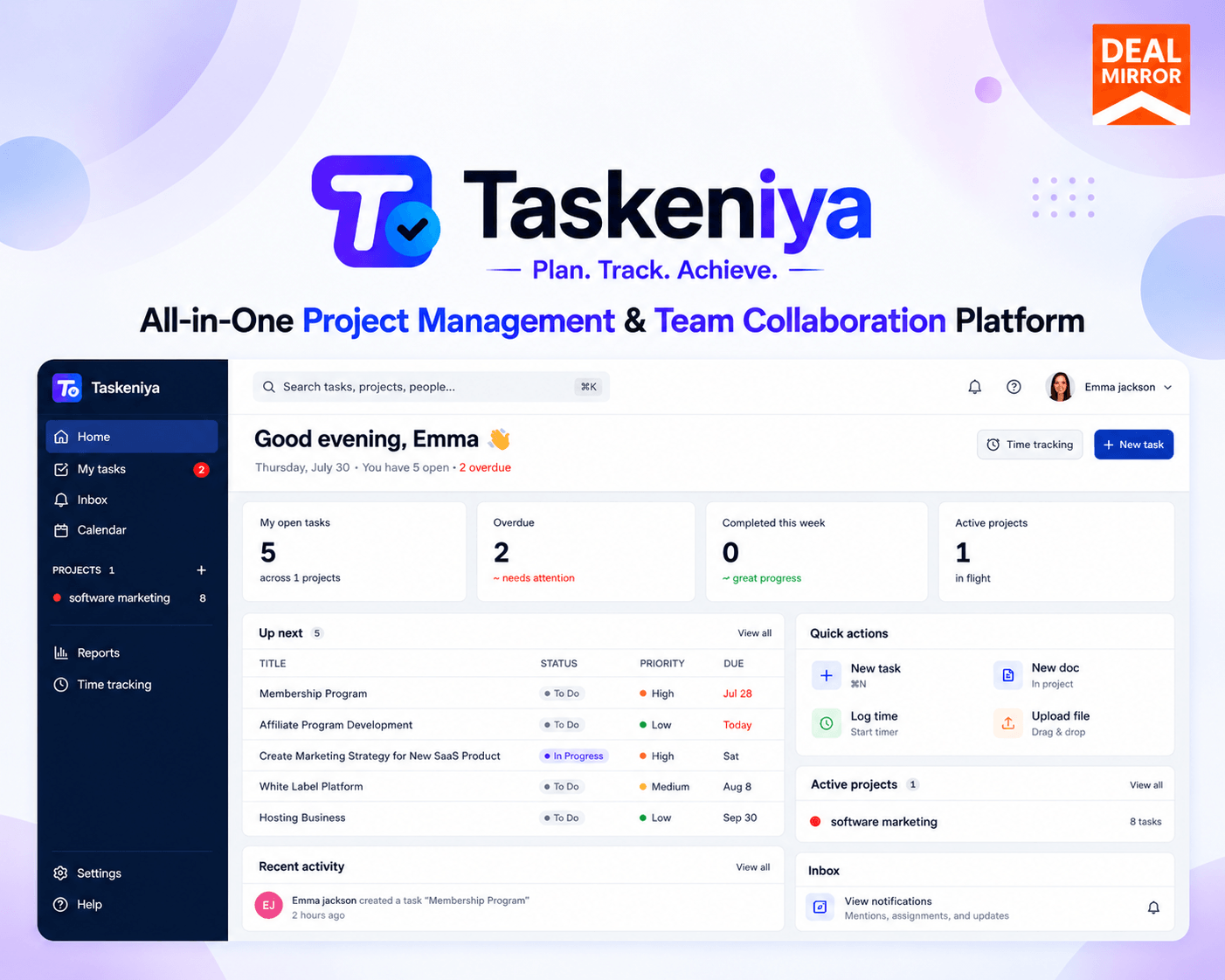
Overview Image
Taskeniya task management tool with Kanban boards and project views

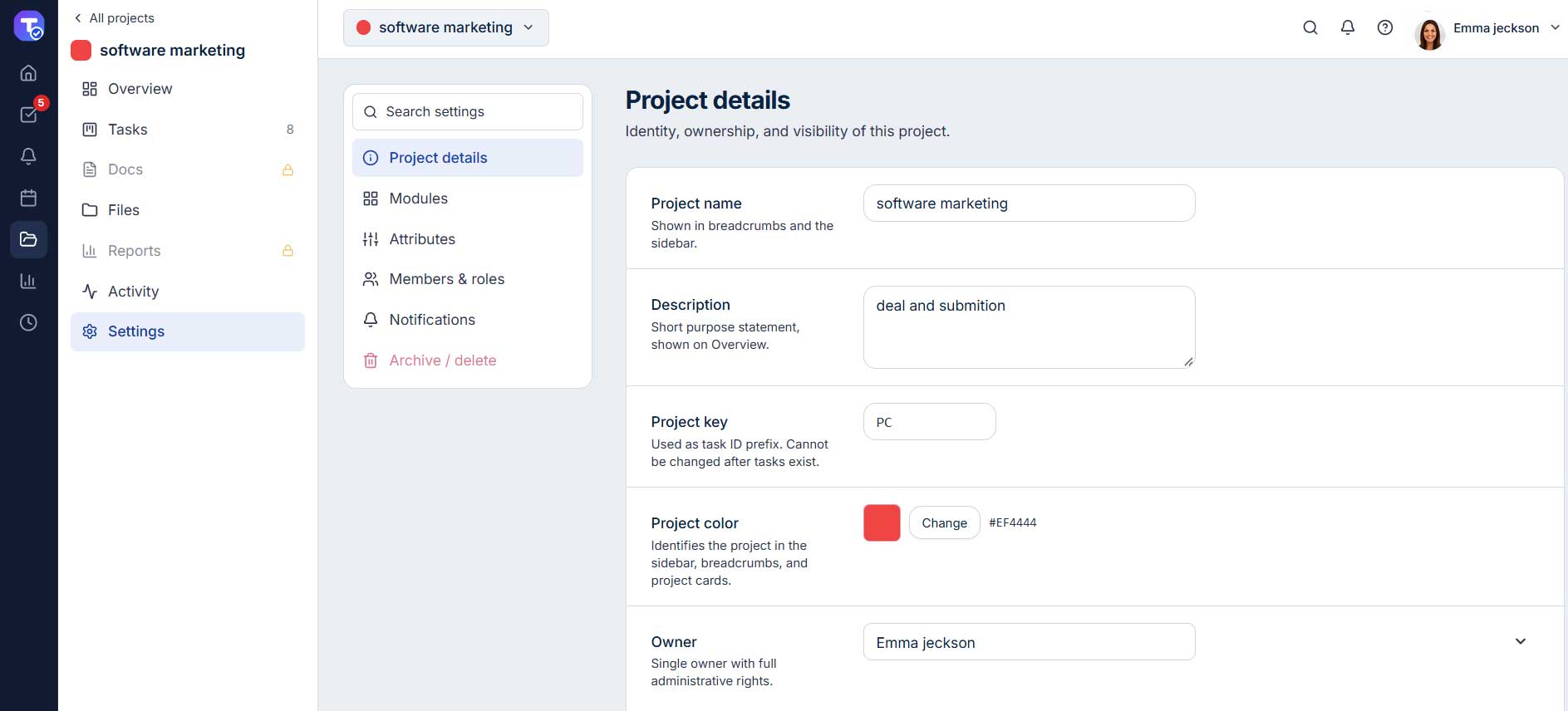
Project Details

Taskeniya project management software dashboard

How Taskeniya Works

Step 1: Create your workspace

Set up your workspace and invite team members who need access.

Step 2: Create a project

Give your project a name, configure its settings, and choose the statuses and priorities that fit your workflow.

Step 3: Add and organize tasks

Create tasks, assign owners, set deadlines, add subtasks, and connect dependencies where needed.

Step 4: Choose your preferred view

Use a Kanban board, table, calendar, timeline, or workload view to understand your team’s work.

Step 5: Collaborate and track time

Share updates, discuss tasks, attach relevant files, and log the time spent on assignments.

Step 6: Review progress

Use project reports, sprint charts, and workload information to identify delays and plan the next steps.

Key Features

  • Five Built-In Project Views: Manage tasks with Kanban, Table, Calendar, Timeline/Gantt, and Workload views.
  • Agile Sprint Planning: Organize backlogs, plan sprints, estimate story points, and group tasks into epics.
  • Built-In Time Tracking: Track work hours, compare estimated and actual time, and review timesheets and reports.
  • Custom Workflows: Configure task statuses, status transitions, and permissions to match your team’s processes.
  • Task Dependencies and Subtasks: Break projects into smaller tasks, assign responsibilities, and track dependencies and blockers.
  • Reusable Task Templates: Save templates with subtasks, labels, and custom fields, and automate recurring tasks.
  • Team Collaboration and Discussions: Collaborate through threaded comments, @mentions, project discussions, file attachments, and notifications.
  • Reports and Project Analytics: Monitor task progress, overdue work, completion trends, team workloads, time tracking, and sprint performance.
  • Smart Search and Keyboard Shortcuts: Find information quickly using global search, a command palette, and 30+ keyboard shortcuts.
  • Project Documents and File Attachments: Keep project documents, supporting files, and task discussions organized in one place.
  • Custom Permissions and Project Controls: Manage workspace roles, project access, workflow permissions, statuses, priorities, and task types.
  • Export and Data Management: Export task data to CSV for spreadsheet analysis and further use.

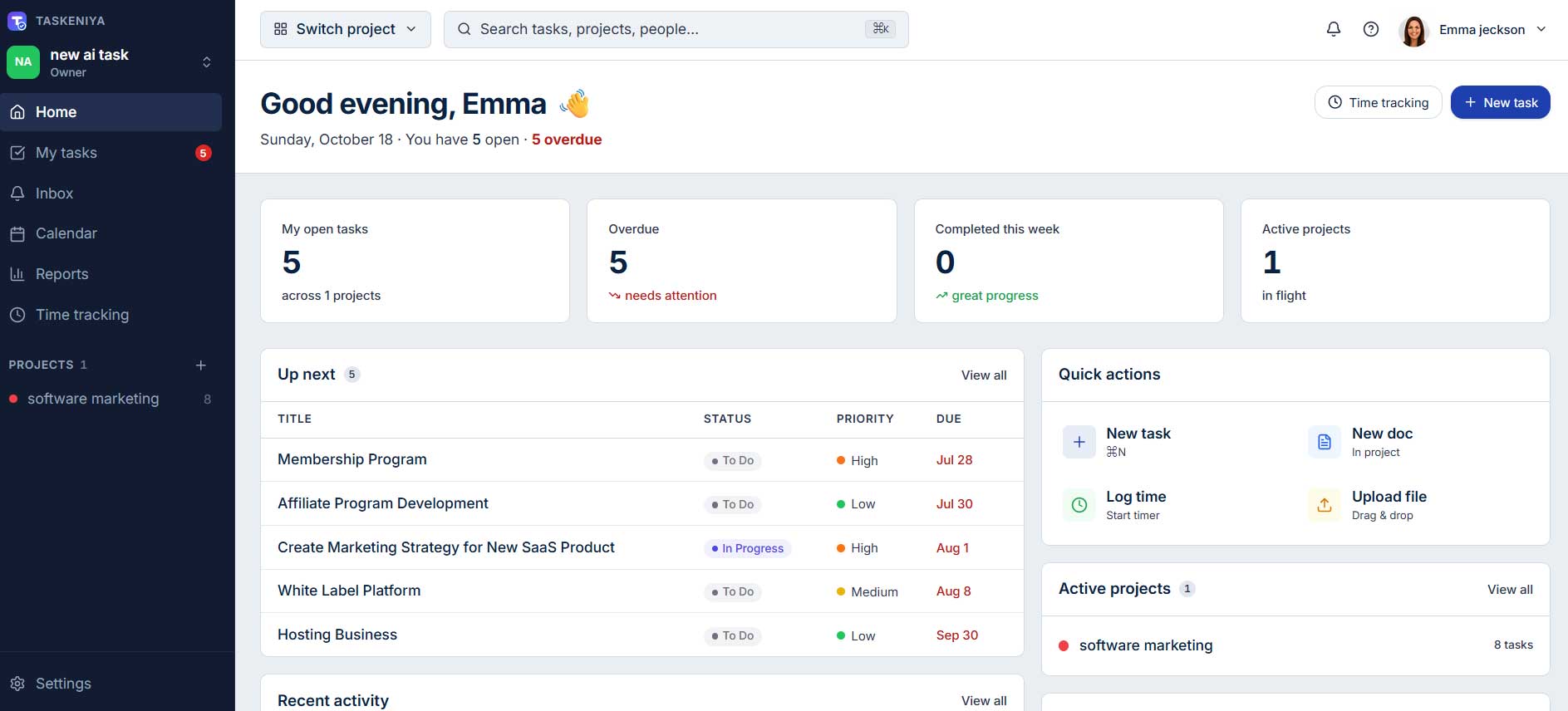
My Tasks
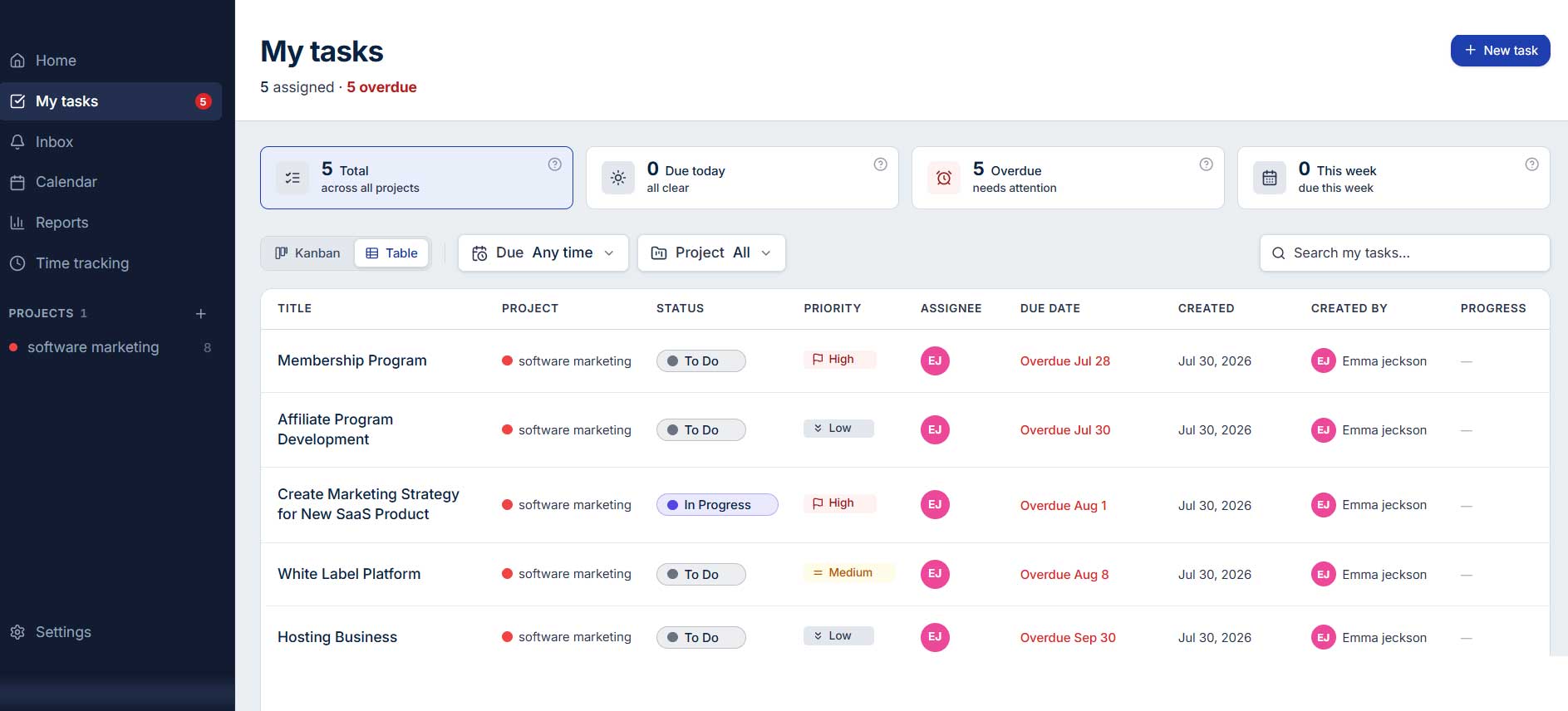
Taskeniya project planning software with calendar and timeline views

Taskeniya task dependencies and recurring task management features

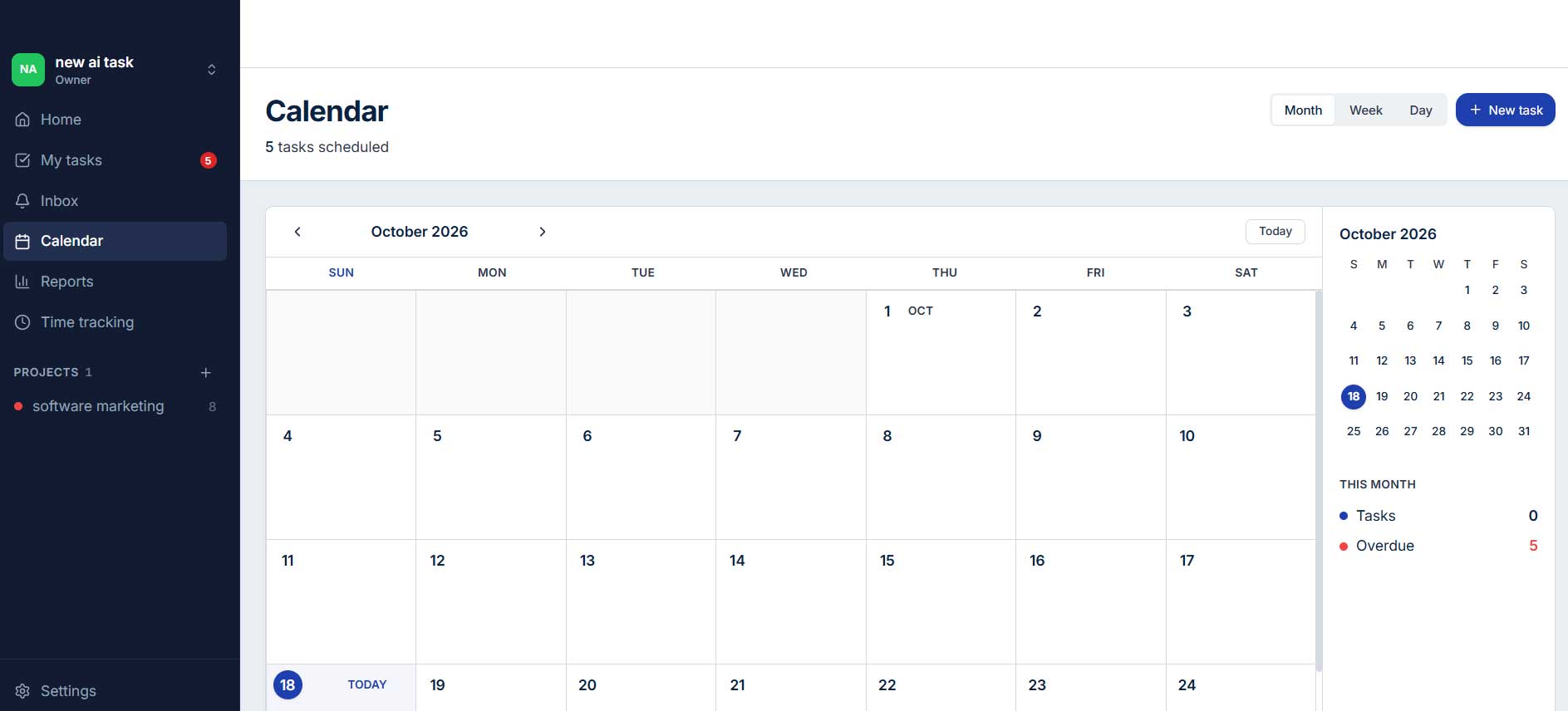
Calendar

Taskeniya workflow management tool with custom statuses and permissions

Use Cases

  • Software Development and Agile Teams: Manage product backlogs, plan sprints, assign development tasks, and track progress with story points, epics, and sprint reports.
  • Marketing and Content Planning: Organize marketing campaigns, schedule content tasks, manage review stages, and keep deadlines visible across your team.
  • Agency and Client Project Management: Coordinate client projects, assign deliverables, track working hours, and monitor project progress from one workspace.
  • Startup and Product Management: Manage product launches, prioritize feature requests, track dependencies, and keep team members aligned on upcoming milestones.
  • Freelancers and Consultants: Organize client assignments, set deadlines, record time spent on tasks, and review completed work to keep projects on track.
  • Team Workload Management: Review task assignments through the workload view to understand how work is distributed and identify potential capacity issues.
  • Recurring Business Operations: Create reusable task templates and recurring tasks for routine activities such as weekly reviews, monthly reporting, and regular maintenance.
  • Project Planning and Deadline Tracking: Use calendar and timeline views to plan schedules, understand task dependencies, and identify work that may affect project deadlines.
  • Internal Team Collaboration: Keep task discussions, comments, file attachments, and project updates organized so team members can find relevant information more easily.
  • Time Tracking and Project Reporting: Record working hours, compare estimated and actual time, and use project reports to understand progress and review how effort is spent.

Deal Terms

  • Length of access: Lifetime
  • Redemption deadline: 60 days from purchase
  • 30-Day Money-Back Guarantee (For Non-Prime Members/Regular Users).
  • 60-Day Money-Back Guarantee (For DealMirror Prime Members Only).

Intro Video

Roadmap & Use Cases:

Discount code auto-applied at checkout.

Taskeniya: Manage Projects, Tasks, and Team Work in One Place

One-time payment. Lifetime access.

What you get in this deal

50 Members
50 Projects
500 MB Storage
Calendar View

$57.00/$147.00 61% Saving

Select Plan Check Plan Details


30 Days Money-back Guarantee

Day
Hrs
Min
Sec

TL;DR

Taskeniya Lifetime Deal

Keeping projects on track isn’t always easy. Tasks get scattered across different tools, deadlines slip, and team members can lose sight of what needs attention next.

When planning, communication, and time tracking happen in separate places, even straightforward projects can become harder to manage.

Taskeniya brings project and task management into one workspace, helping teams organize their work, assign responsibilities, and track progress without constantly switching between applications.

With five built-in views, agile sprint planning, time tracking, custom workflows, and team collaboration tools, Taskeniya adapts to the way your team works.

Taskeniya gives each project its own tasks, statuses, priorities, and team members.

You can break larger assignments into smaller subtasks, connect dependent tasks, set due dates, and organize work using labels and reusable templates.

As work moves forward, update task statuses and follow progress through the view that makes the most sense for your team.

Instead of trying to piece together updates from multiple sources, you can manage day-to-day work from a shared workspace.

Whether you’re managing client projects, coordinating a product launch, or organizing everyday business tasks, it gives you a clearer picture of what’s happening and what needs to happen next.

Overview Image

Taskeniya task management tool with Kanban boards and project views

Project Details

Taskeniya project management software dashboard

How Taskeniya Works

Step 1: Create your workspace

Set up your workspace and invite team members who need access.

Step 2: Create a project

Give your project a name, configure its settings, and choose the statuses and priorities that fit your workflow.

Step 3: Add and organize tasks

Create tasks, assign owners, set deadlines, add subtasks, and connect dependencies where needed.

Step 4: Choose your preferred view

Use a Kanban board, table, calendar, timeline, or workload view to understand your team’s work.

Step 5: Collaborate and track time

Share updates, discuss tasks, attach relevant files, and log the time spent on assignments.

Step 6: Review progress

Use project reports, sprint charts, and workload information to identify delays and plan the next steps.

Key Features

  • Five Built-In Project Views: Manage tasks with Kanban, Table, Calendar, Timeline/Gantt, and Workload views.
  • Agile Sprint Planning: Organize backlogs, plan sprints, estimate story points, and group tasks into epics.
  • Built-In Time Tracking: Track work hours, compare estimated and actual time, and review timesheets and reports.
  • Custom Workflows: Configure task statuses, status transitions, and permissions to match your team’s processes.
  • Task Dependencies and Subtasks: Break projects into smaller tasks, assign responsibilities, and track dependencies and blockers.
  • Reusable Task Templates: Save templates with subtasks, labels, and custom fields, and automate recurring tasks.
  • Team Collaboration and Discussions: Collaborate through threaded comments, @mentions, project discussions, file attachments, and notifications.
  • Reports and Project Analytics: Monitor task progress, overdue work, completion trends, team workloads, time tracking, and sprint performance.
  • Smart Search and Keyboard Shortcuts: Find information quickly using global search, a command palette, and 30+ keyboard shortcuts.
  • Project Documents and File Attachments: Keep project documents, supporting files, and task discussions organized in one place.
  • Custom Permissions and Project Controls: Manage workspace roles, project access, workflow permissions, statuses, priorities, and task types.
  • Export and Data Management: Export task data to CSV for spreadsheet analysis and further use.

My Tasks
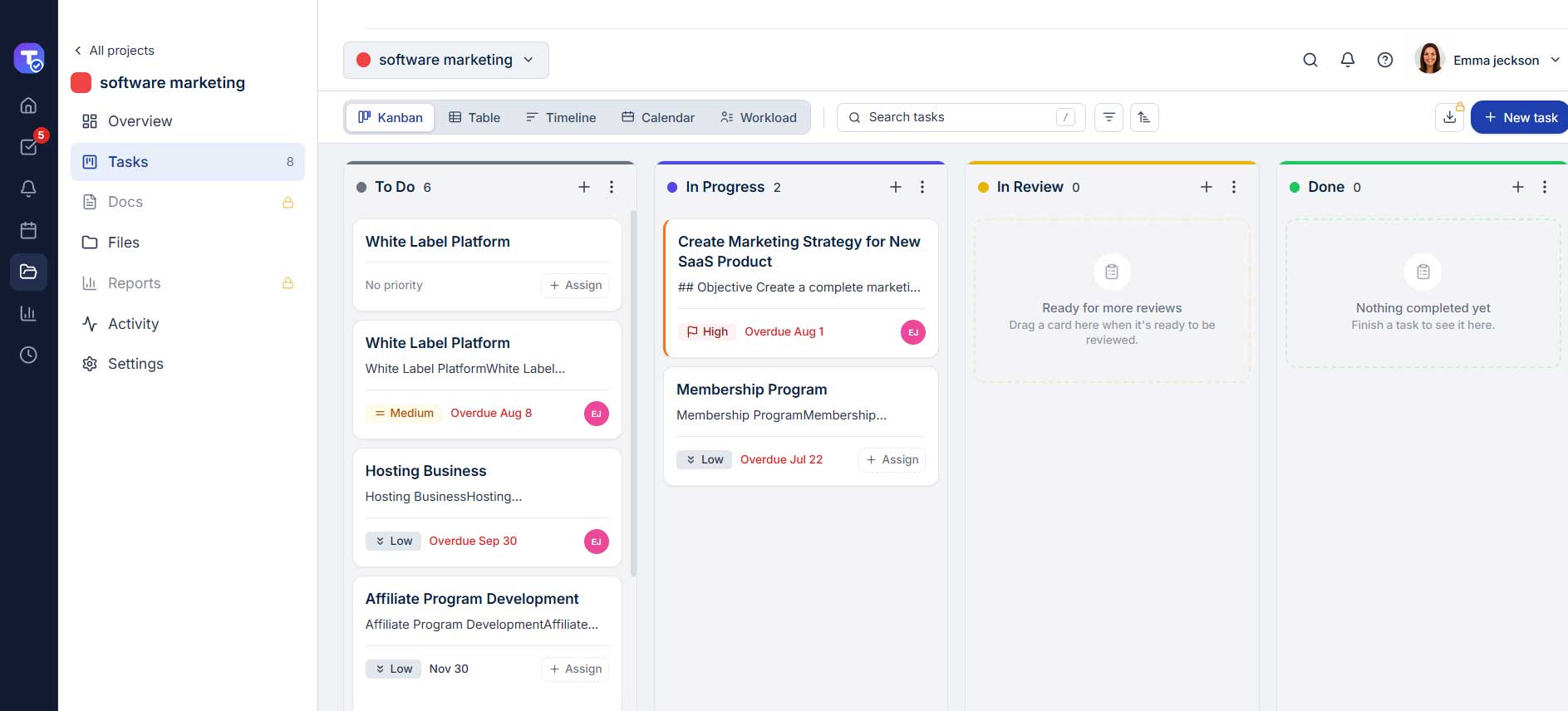
Taskeniya project planning software with calendar and timeline views

Taskeniya task dependencies and recurring task management features

Calendar

Taskeniya workflow management tool with custom statuses and permissions

Use Cases

  • Software Development and Agile Teams: Manage product backlogs, plan sprints, assign development tasks, and track progress with story points, epics, and sprint reports.
  • Marketing and Content Planning: Organize marketing campaigns, schedule content tasks, manage review stages, and keep deadlines visible across your team.
  • Agency and Client Project Management: Coordinate client projects, assign deliverables, track working hours, and monitor project progress from one workspace.
  • Startup and Product Management: Manage product launches, prioritize feature requests, track dependencies, and keep team members aligned on upcoming milestones.
  • Freelancers and Consultants: Organize client assignments, set deadlines, record time spent on tasks, and review completed work to keep projects on track.
  • Team Workload Management: Review task assignments through the workload view to understand how work is distributed and identify potential capacity issues.
  • Recurring Business Operations: Create reusable task templates and recurring tasks for routine activities such as weekly reviews, monthly reporting, and regular maintenance.
  • Project Planning and Deadline Tracking: Use calendar and timeline views to plan schedules, understand task dependencies, and identify work that may affect project deadlines.
  • Internal Team Collaboration: Keep task discussions, comments, file attachments, and project updates organized so team members can find relevant information more easily.
  • Time Tracking and Project Reporting: Record working hours, compare estimated and actual time, and use project reports to understand progress and review how effort is spent.

Deal Terms

  • Length of access: Lifetime
  • Redemption deadline: 60 days from purchase
  • 30-Day Money-Back Guarantee (For Non-Prime Members/Regular Users).
  • 60-Day Money-Back Guarantee (For DealMirror Prime Members Only).
Pricing

Tier 1

One-time payment. Lifetime access.

$57.00$147.00


50 Members
50 Projects
500 MB Storage
Calendar View
Timeline / Gantt View
Workload View
Sprints & Backlog
Epics
WIP Limits
Time Tracking
Task Dependencies
Recurring Tasks
Task Templates
Project Docs
Discussions
Project Activity Log
Advanced Permissions
Custom Statuses & Attributes
Custom Workflow Transitions
Saved Filters
Reports & Analytics
Data Export (CSV)

FAQ's

Q: 1. How do I contact support?

A: You can contact support at [email protected] 

Q: 2. What is Taskeniya?

A: Taskeniya is a project and task management platform that helps teams plan work, organize tasks, collaborate, track time, and monitor progress.

Q: 3. What views does Taskeniya offer?

A: Taskeniya includes Kanban, table, calendar, timeline/Gantt, and workload views. It also provides a backlog for work that has not yet been scheduled.

Q: 4. Does Taskeniya support agile project management?

A: Yes. It supports sprints, backlogs, epics, story points, burndown charts, and sprint velocity reporting.

Q: 5. Can I track time with Taskeniya?

A: Yes. You can run a timer on a task or enter time manually. You can also compare estimates with actual time and review timesheets and project reports.

Q: 6. Can I customize task statuses and workflows?

A: Yes. You can define custom statuses and configure allowed workflow transitions to match your team’s process.

Q: 7. Does Taskeniya support recurring tasks?

A: Yes. You can configure tasks to repeat on daily, weekly, or monthly schedules.

Q: 8. Can my team collaborate inside Taskeniya?

A: Yes. Taskeniya includes task comments, @mentions, project discussions, file attachments, notifications, and an activity log.

Q: 9. Is Taskeniya suitable for small teams?

A: Yes. Its free plan provides a starting point for small teams, while paid plans offer higher limits for projects, team members, and storage.

Q: 10. Can I import projects from Jira, Trello, or Asana?

A: According to Taskeniya’s official FAQ, one-click importing from Jira, Trello, or Asana is not currently available. You can create tasks in bulk within the app and export data to CSV.

Q: 11. Can I export task data?

A: Yes. Taskeniya supports CSV exports so you can use your task data in compatible spreadsheet and reporting workflows.

Reviews

Reviews

There are no reviews yet.

Be the first to review “Taskeniya: Manage Projects, Tasks, and Team Work in One Place”

Questions & Answers

You need to log in to ask a question.

  • Loading questions...