ProofBeer Lifetime Deal
Customers often hesitate before buying because they want reassurance that a product or service delivers on its promises. Without visible reviews and genuine customer feedback, even a well-designed website can struggle to build trust and encourage conversions.
ProofBeer helps businesses collect, manage, and showcase customer feedback in one place. Create feedback forms with AI assistance, bring reviews from supported platforms into a central dashboard, analyze responses, and display testimonials through customizable website widgets.
Instead of manually copying reviews between different tools, you can build a more connected workflow for collecting feedback and publishing social proof across landing pages, product pages, and other important website sections.
ProofBeer is an all-in-one social proof platform designed to help businesses turn customer experiences into website-ready testimonials and review displays.
It combines an AI-assisted form builder, external review synchronization, feedback analytics, and embeddable widgets. You can collect new responses, manage existing reviews, and display selected feedback using layouts such as grids, carousels, and avatar rows.
The platform also supports integrations for routing feedback into tools such as Slack, Google Sheets, and Zapier, helping teams keep their review workflows connected.
Funnel Drop-off
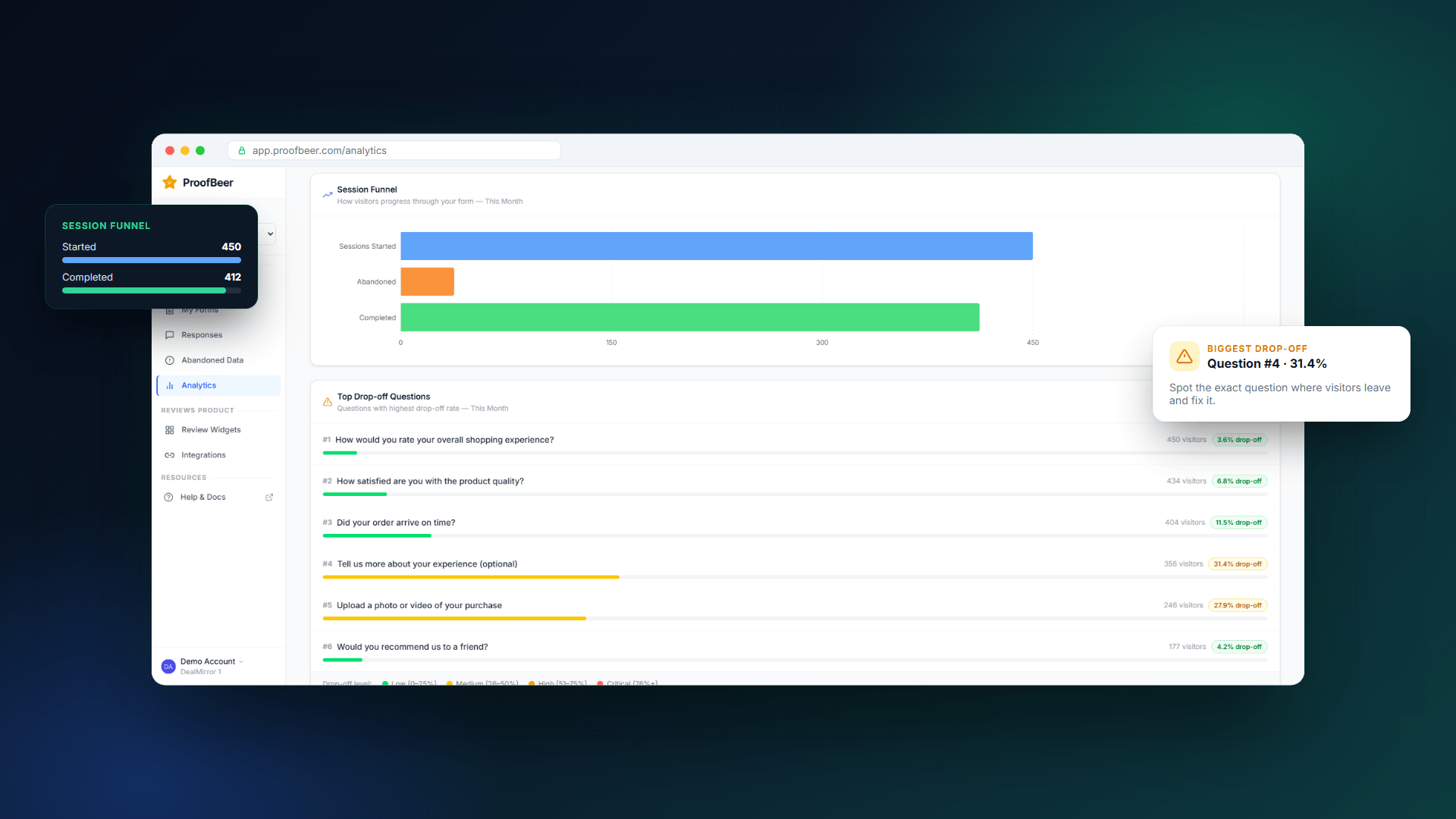
Analytics
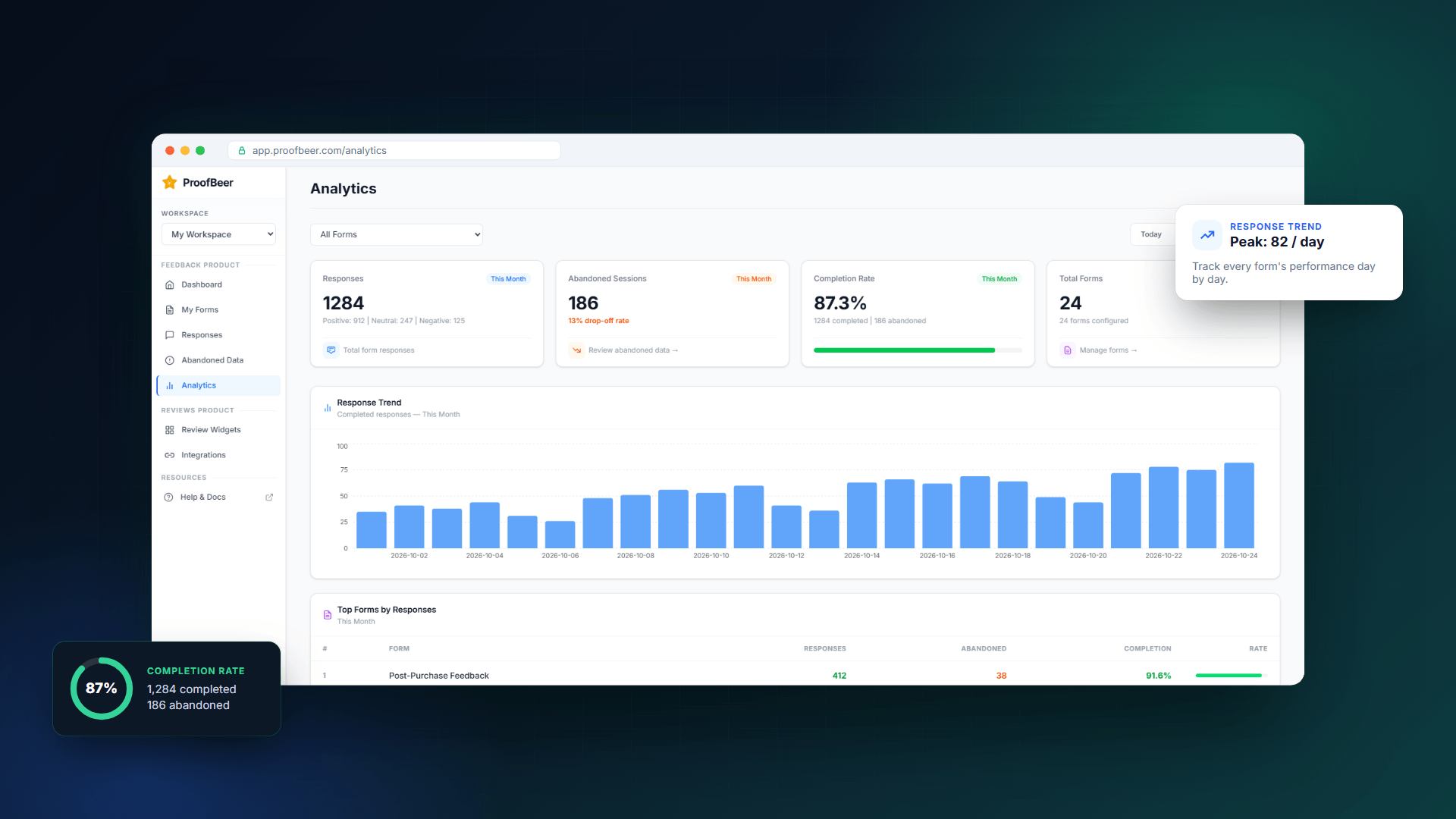
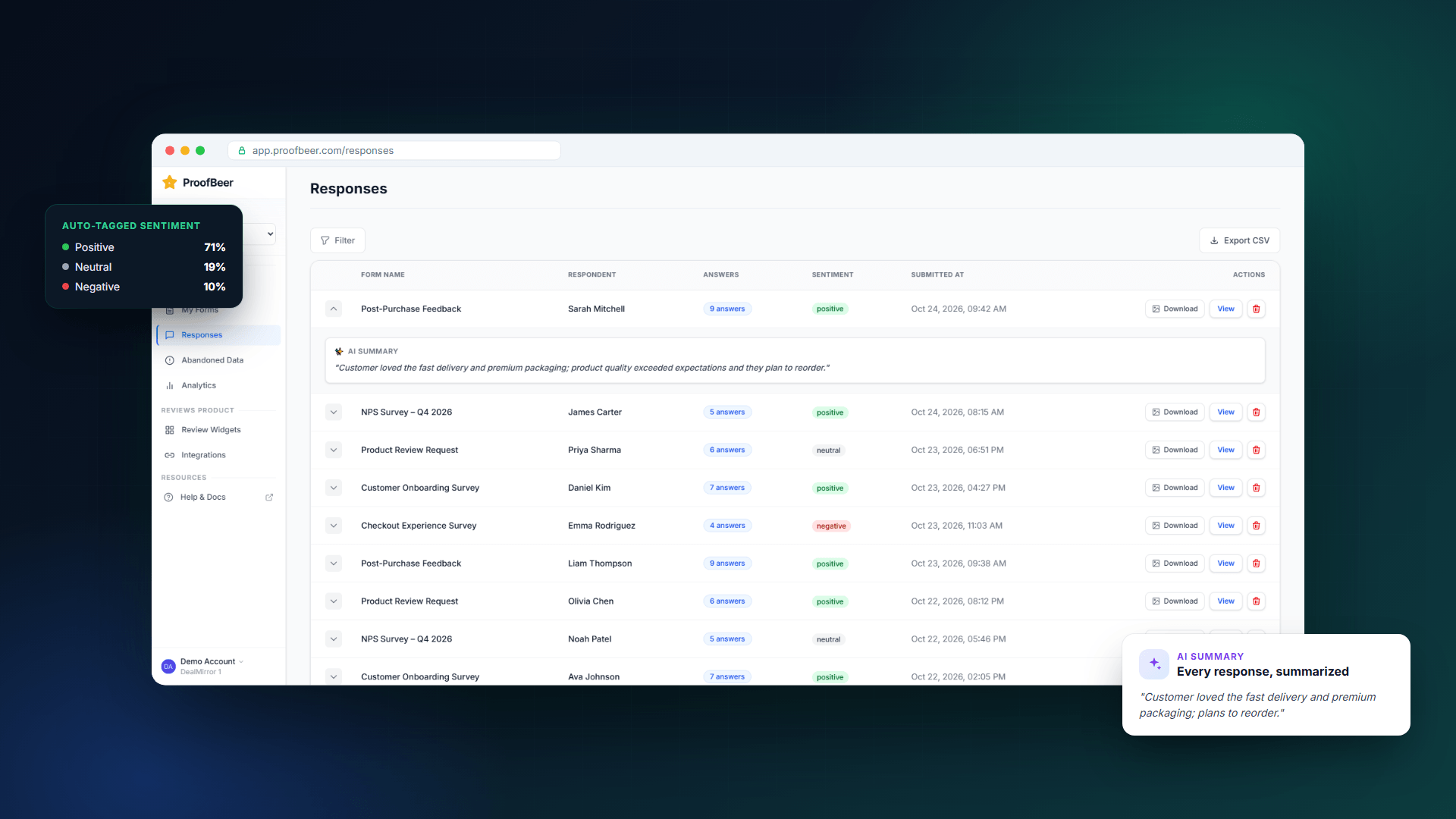
Responses
How ProofBeer Works
Step 1: Create a feedback form
Describe your requirements to the AI form builder or create your form using the visual editor. Add the questions and fields that suit your collection goals.
Step 2: Collect customer responses
Share your form through a link or embed it on your website. Connect supported review platforms to bring eligible external reviews into the dashboard.
Step 3: Organize and understand feedback
Review submissions in one place. Use available sentiment insights, summaries, filters, and analytics to organize the information.
Step 4: Customize your testimonial display
Choose a widget layout and adjust its styling to fit your website and brand.
Step 5: Embed your social proof
Add the widget to a suitable page so visitors can see genuine customer feedback while evaluating your product or service.
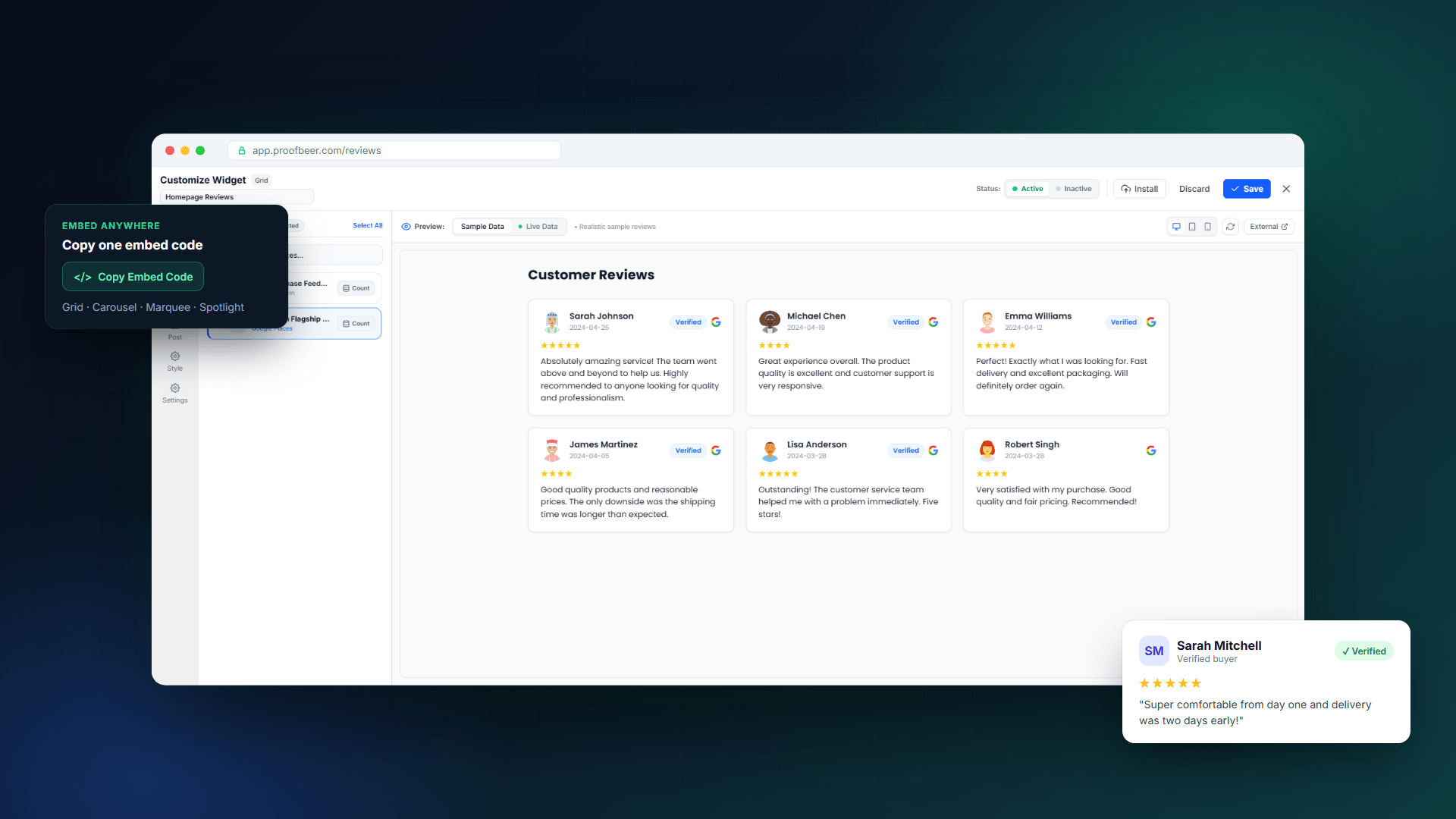
Customize Widget
Integrations
Key Features
1. AI-Powered Feedback Form Builder
Creating feedback forms from scratch can take time, especially when you need different questions for different audiences or campaigns.
- AI-assisted form creation
- Drag-and-drop visual editing
- Single-page forms and multi-step surveys
- Custom questions and answer options
- Conditional display logic
- Brand-matched colors, fonts, and backgrounds
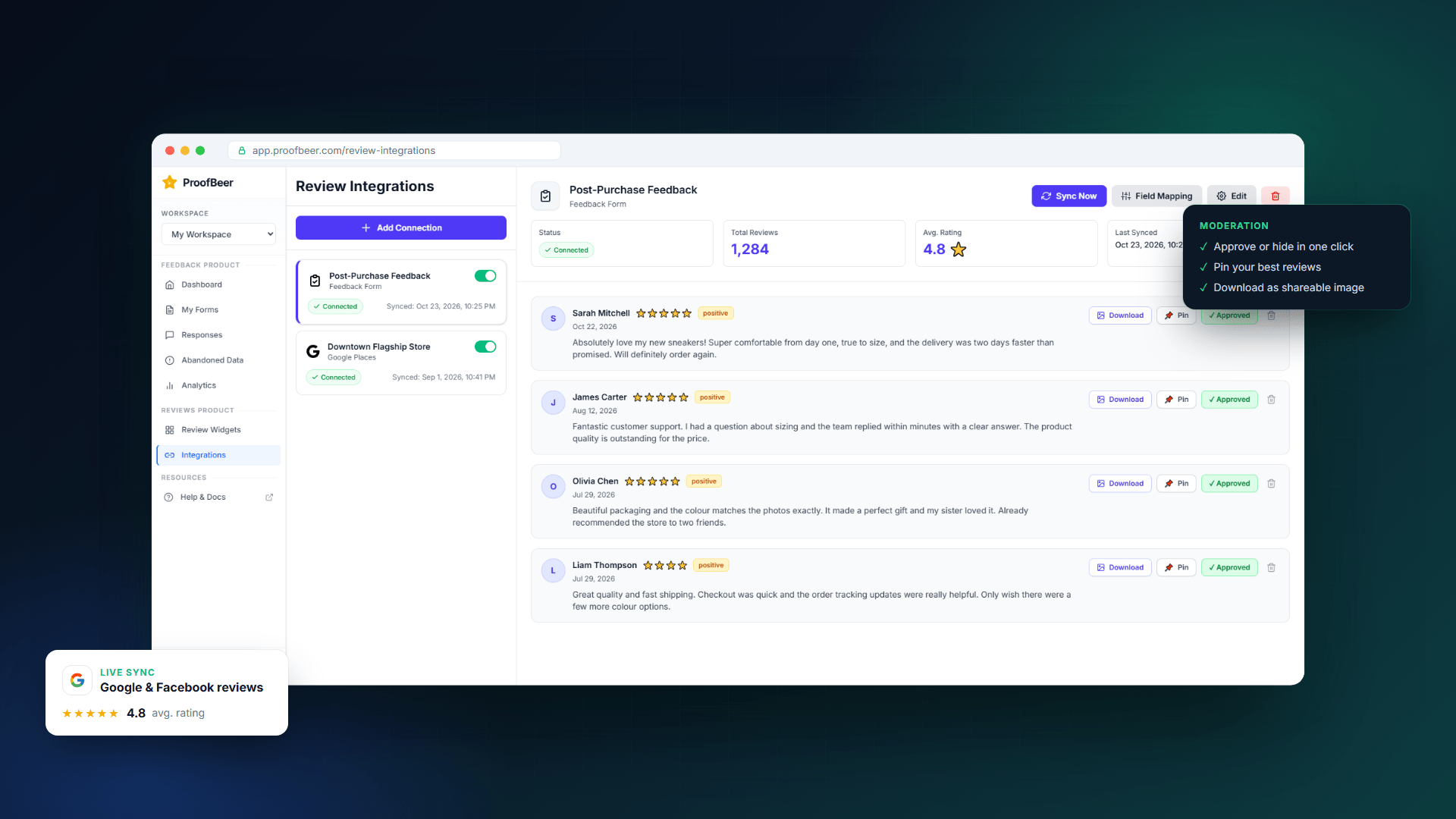
2. External Review Synchronization
Customer reviews can be scattered across different platforms, making them difficult to manage consistently.
- Google Business Profile
- Facebook Pages
- Instagram Business
3. Customizable Testimonial Widgets
Once you’ve collected customer feedback, you need a practical way to display it on your website.
- Grid widgets: Show multiple testimonials together on product or landing pages.
- Carousel widgets: Rotate through customer reviews in a compact presentation.
- Avatar widgets: Display reviewer photos or compact testimonial elements near calls to action.
- Wall of Love: Create a dedicated page featuring a collection of customer feedback.
- Marquee layouts: Present reviews in scrolling rows or columns.
- Spotlight slider: Highlight an individual testimonial at a time.
4. AI Sentiment Analysis and Feedback Summaries
Reading every response individually becomes harder as customer feedback grows.
Use these insights to understand customer sentiment and decide which issues need attention.
5. Abandoned Form Data
Not every visitor who starts a feedback form finishes it.
ProofBeer includes an Abandoned Data view designed to help you identify incomplete form sessions and understand where visitors may be dropping off.
This can help teams investigate friction in feedback collection and improve the form experience. The data available depends on the form setup and platform configuration.
6. Integrations With Your Existing Workflow
ProofBeer can connect feedback collection with other tools your team already uses.
Vendor-listed integrations include:
- Google Sheets: Send responses to a spreadsheet for analysis and reporting.
- Slack: Receive feedback notifications in team channels.
- Zapier: Connect response events to supported automation workflows.
- Custom webhooks: Send data to compatible endpoints.
- API access: Available on the Agency plan listed on the pricing page.
These integrations can reduce repetitive work and help teams respond to customer feedback more efficiently. Availability varies by plan.
7. Website Embedding Without a Complex Setup
You don’t need to rebuild your website to start displaying customer testimonials.
ProofBeer provides embed options that can be added to supported website platforms using a snippet or compatible embedding method. Its documentation includes setup guidance for platforms such as WordPress, Shopify, Webflow, Wix, and custom HTML websites.
This makes it easier to add social proof to landing pages, storefronts, pricing pages, and other areas where customers make decisions.
8. Review Filtering and Customization
Different pages may need different types of customer feedback.
ProofBeer supports filtering and sorting options for review widgets, including criteria such as rating, source, and date where available. You can customize the presentation to better match your brand and the purpose of each page.
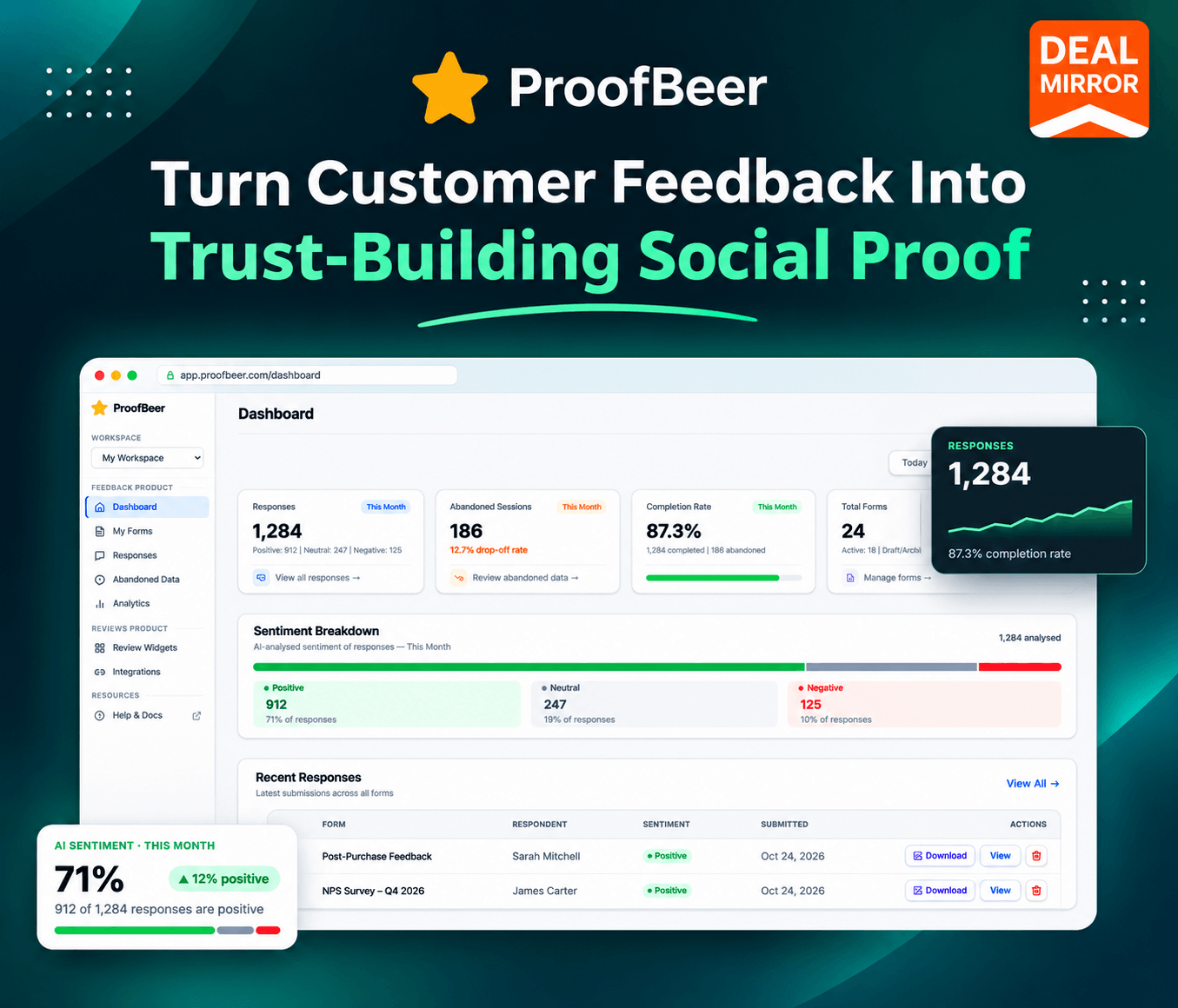
9. Feedback Analytics Dashboard
Collecting feedback is useful, but understanding how your forms perform is equally important.
ProofBeer provides dashboard analytics for monitoring response activity and form performance. Depending on the available reporting options, you can review response trends, active forms, recent activity, and incomplete submissions.
10. Multiple Workspaces for Teams and Agencies
Businesses managing multiple brands or client websites need a way to keep their feedback organized.
ProofBeer supports separate workspaces so teams can manage forms, responses, widgets, and integrations in distinct environments.
UseCases
-
- eCommerce Stores: Display customer testimonials and external reviews on product pages, storefronts, and other purchase-related pages to help shoppers evaluate their options.
- SaaS Companies: Collect product feedback, build a Wall of Love, and showcase customer experiences on landing pages and pricing pages.
- Marketing Agencies: Organize feedback for multiple clients through separate workspaces and create branded testimonial displays for different websites.
- Local Businesses: Bring supported Google Business Profile and Facebook reviews into a central workflow and showcase customer feedback on your website.
- Course Creators and Consultants: Collect student feedback, client testimonials, and satisfaction responses through customizable forms.
- Startups and Growing Brands: Build a repeatable process for collecting customer opinions, monitoring feedback, and displaying authentic social proof without managing every step manually.
Roadmap
https://proofbeer.featurebase.app/roadmap
Deal Terms:
- Length of access: Lifetime
- Redemption deadline: 60 days from purchase
- 30 Days Money Back Guarantee (For Non-Prime Members/Regular Users).
- 60 Days Money Back Guarantee (For DealMirror Prime Members Only).




Reviews
There are no reviews yet.