Home » Store » Mailly: The AI Email Marketing Tool That Knows Your WooCommerce Store
Mailly: The AI Email Marketing Tool That Knows Your WooCommerce Store
TL;DR
Smarter AI email campaigns powered by your WooCommerce data.
Smart customer insights and product recommendations.
Automated journeys that bring customers back.
Track real orders and revenue, not just opens.
Mailly Lifetime Deal
Turn Your WooCommerce Order History Into Smarter Emails and More Sales.
Your store already knows who buys from you, what they purchase, how much they spend, and when they stop coming back.
But most email tools barely use that information.
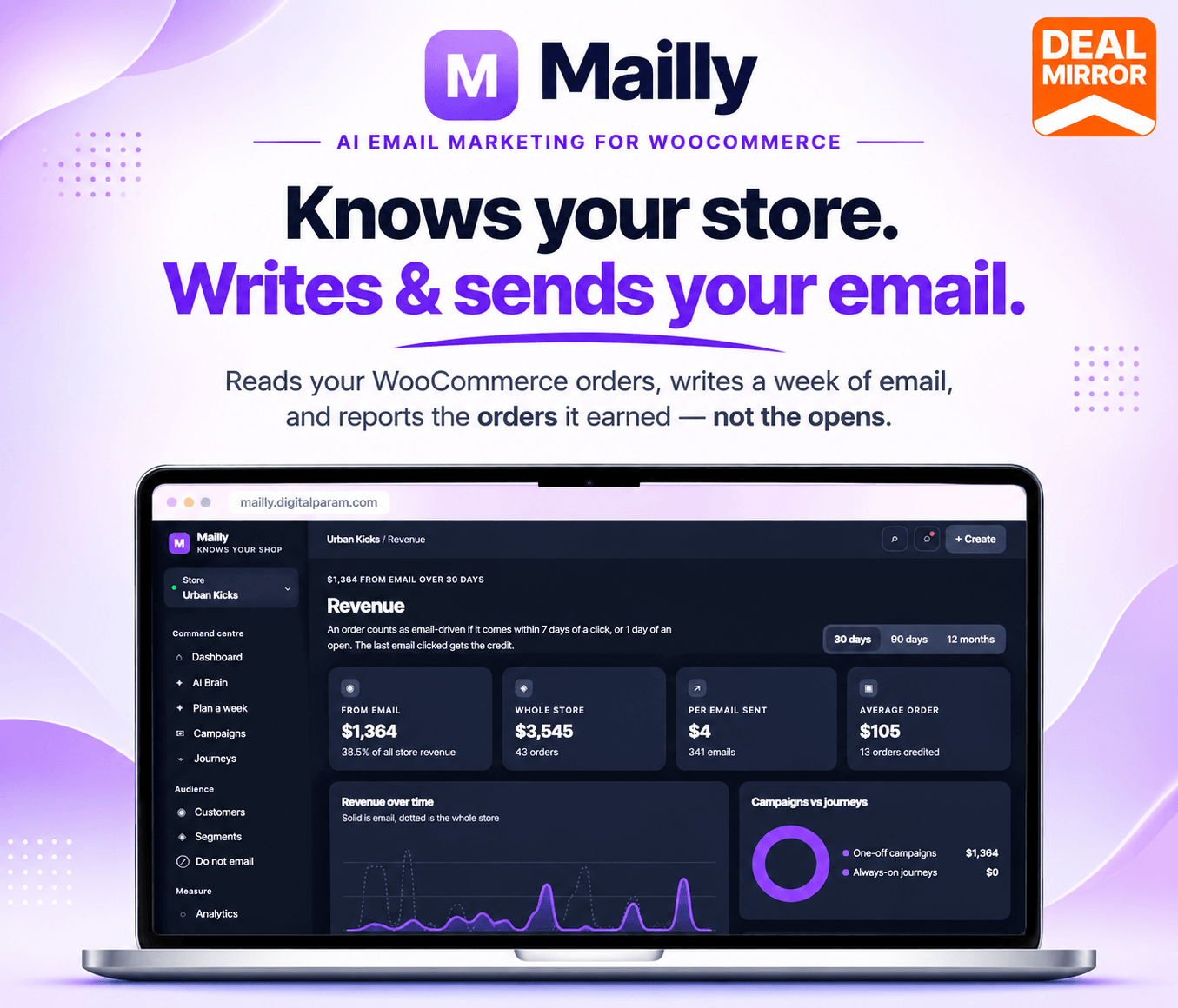
Mailly connects to your WooCommerce store through one WordPress plugin and a simple pairing code. It reads your order history, understands customer behavior, recommends relevant products, and helps you plan a week of email campaigns.
Nothing sends until you approve it.
Review the emails, edit what you want, and approve the rest. Once enabled, your customer journeys can run automatically.
And Mailly tells you what your campaigns earned—attributed orders and revenue, not just opens and clicks.
Your store already has the data. Mailly knows how to put it to work.
One payment. Lifetime access. All future updates are included.
How to Connect Mailly to WooCommerce—2 Minutes
How It Works
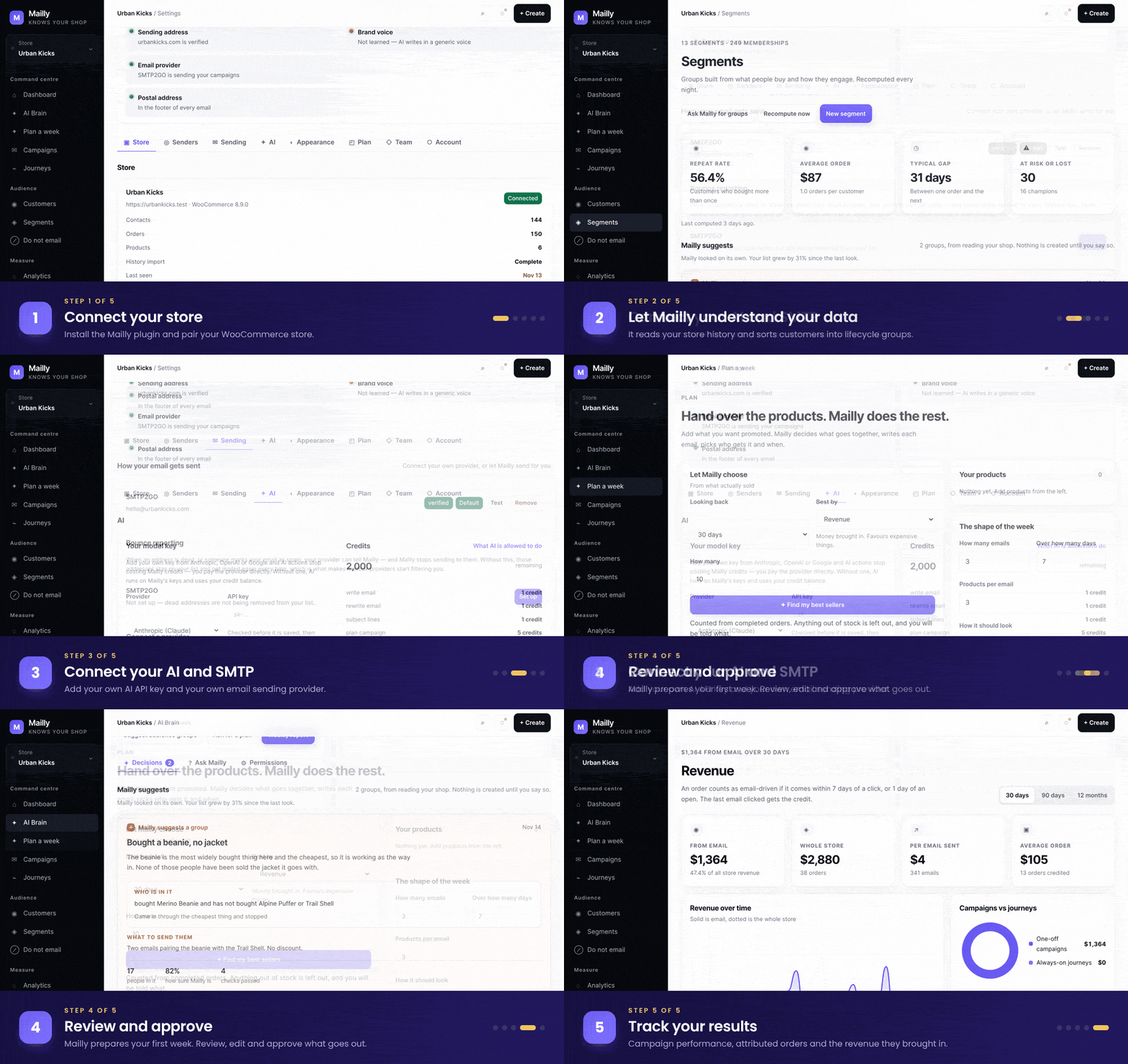
Getting started is straightforward:
Step 1—Connect Your Store
Install the Mailly WordPress plugin and pair your WooCommerce store.
Step 2 — Let Mailly Understand Your Data
Mailly reads your store history and organises customers into useful lifecycle groups.
Step 3—Connect Your AI and SMTP
Add your own AI API key and email sending provider.
Step 4 — Review and Approve
Let Mailly prepare your first week of campaigns. Review, edit, and approve what you want to send.
Step 5 — Track Your Results
Monitor campaign performance, attributed orders, and revenue.
Create one short four-to-five-second clip for each step, combined into one sequence.
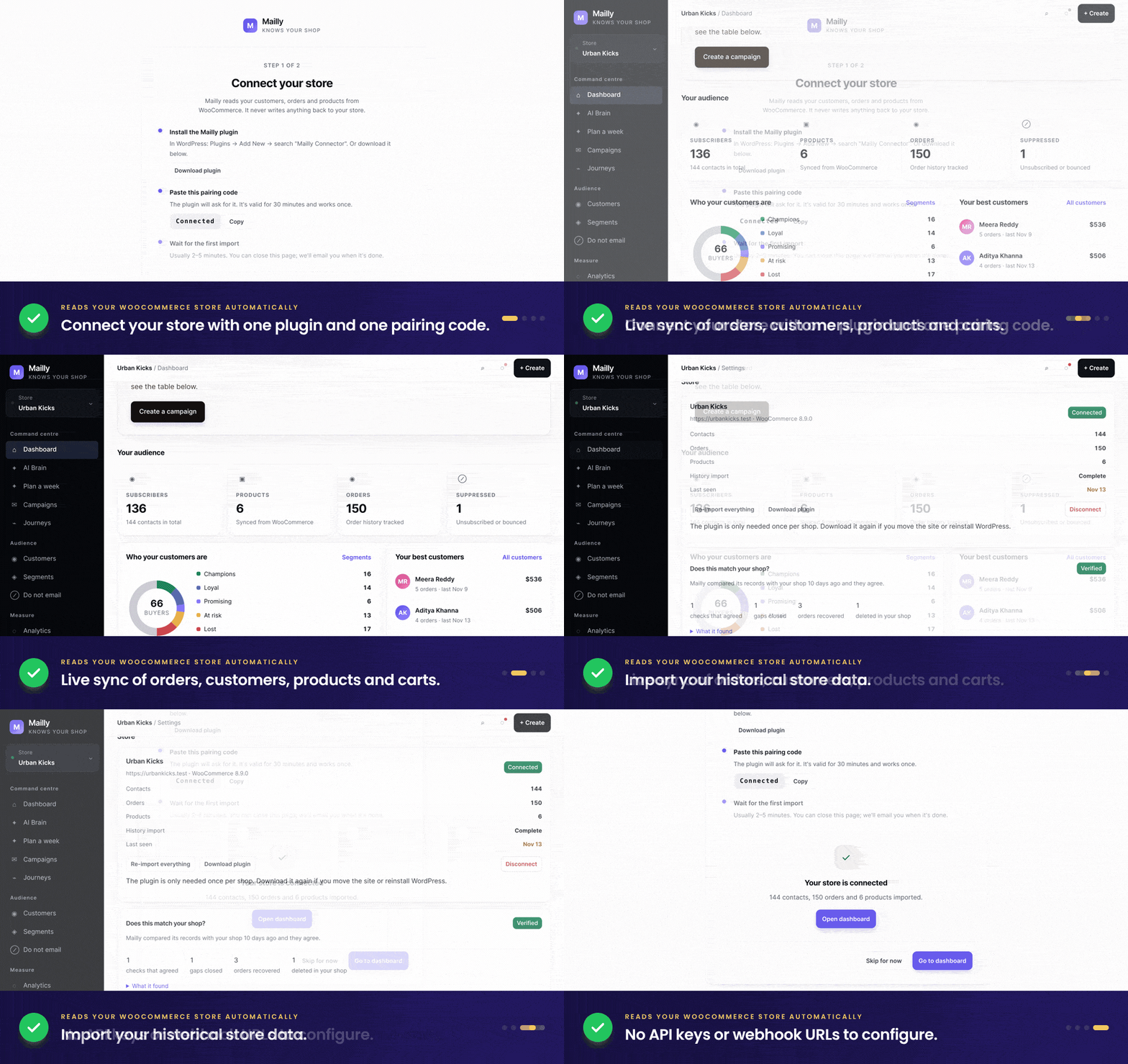
Connect your store with one plugin and one pairing code.
Live sync of orders, customers, products, and cart activity.
Import historical store data.
No API keys or webhook URLs to configure for the WooCommerce connection.
Show the pairing screen followed by the store data syncing.
2. Understands Every Customer’s Value
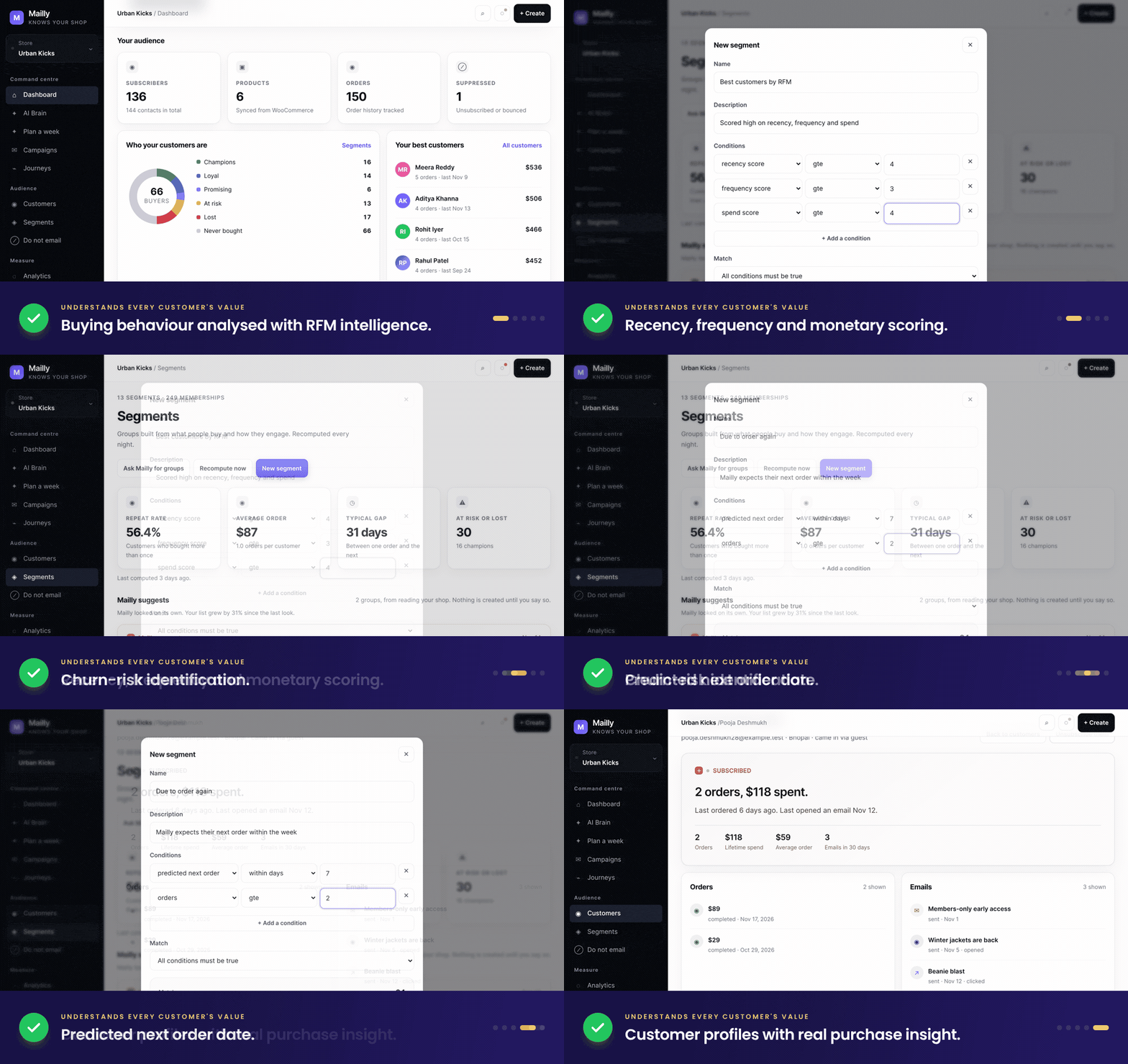
Mailly analyses customer buying behaviour using RFM intelligence.
Recency, frequency, and monetary scoring.
Churn-risk identification.
Predicted next order date.
Customer profiles with useful purchase insights.
Show a customer profile with RFM scores, churn risk, and predicted next order date.
3. Nine Customer Lifecycle Stages
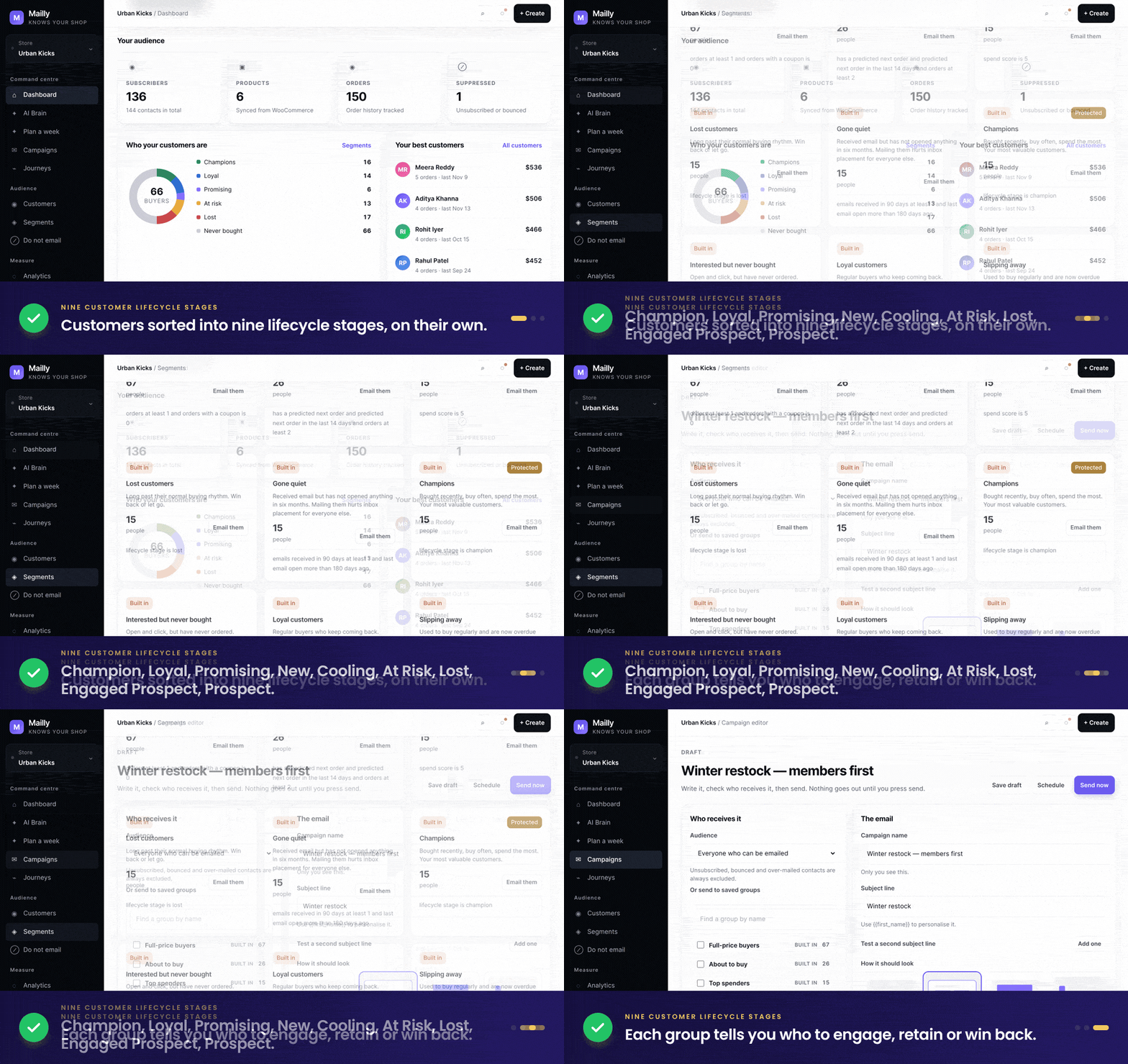
Automatically sorts customers into nine lifecycle stages:
Champion, Loyal, Promising, New Customer, Cooling, At Risk, Lost, Engaged Prospect, and Prospect.
Each group helps you understand who to engage, retain, or win back.
Show all nine lifecycle stages with their live customer counts.
4. Customer Groups That Update Themselves
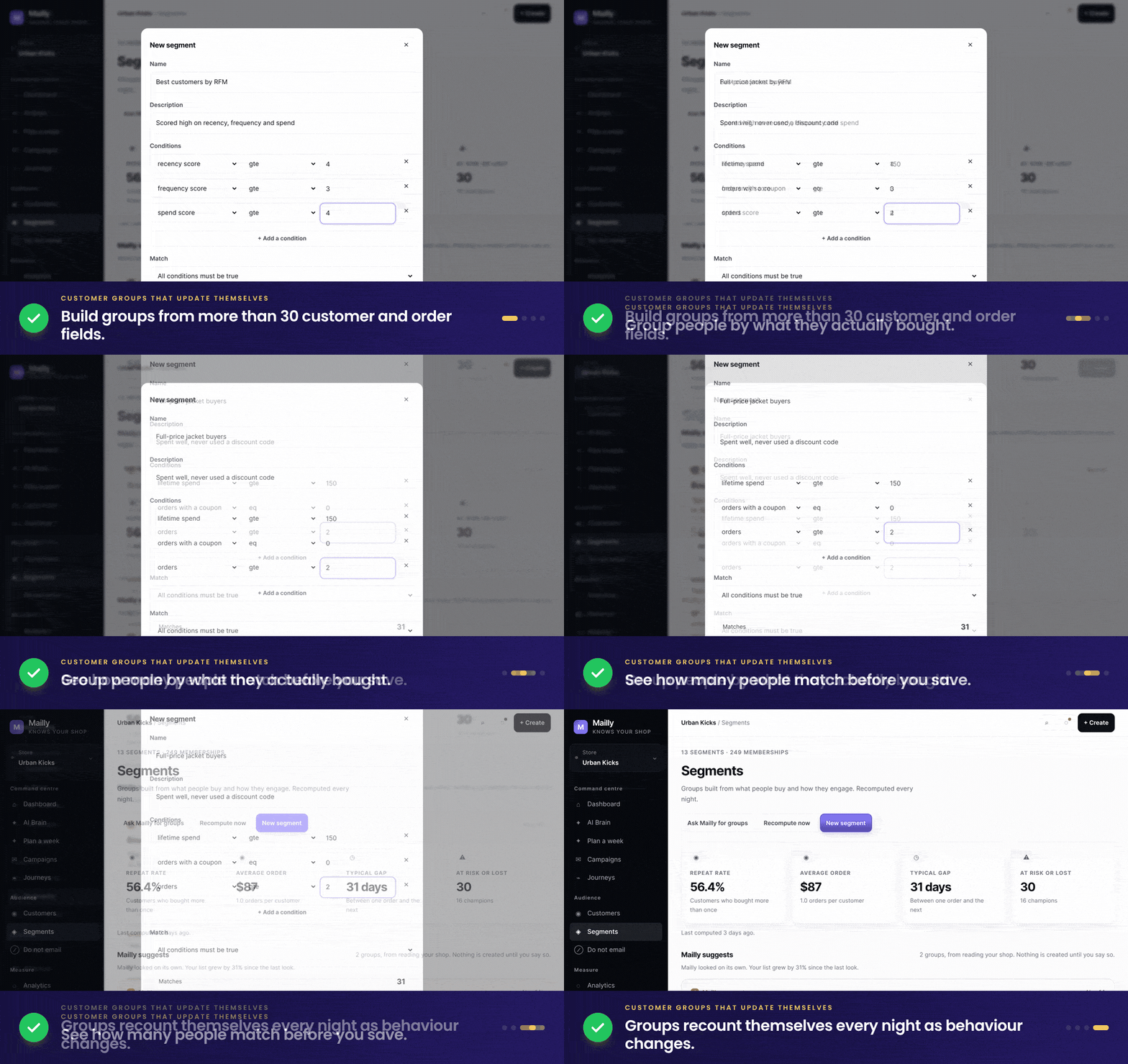
Build dynamic customer segments using more than 30 customer and order fields.
Create segments using purchase behavior.
Preview the matching customer count before saving.
Segments update as customer activity changes.
Create a segment rule and show the live count changing.
5. AI That Writes a Week of Emails
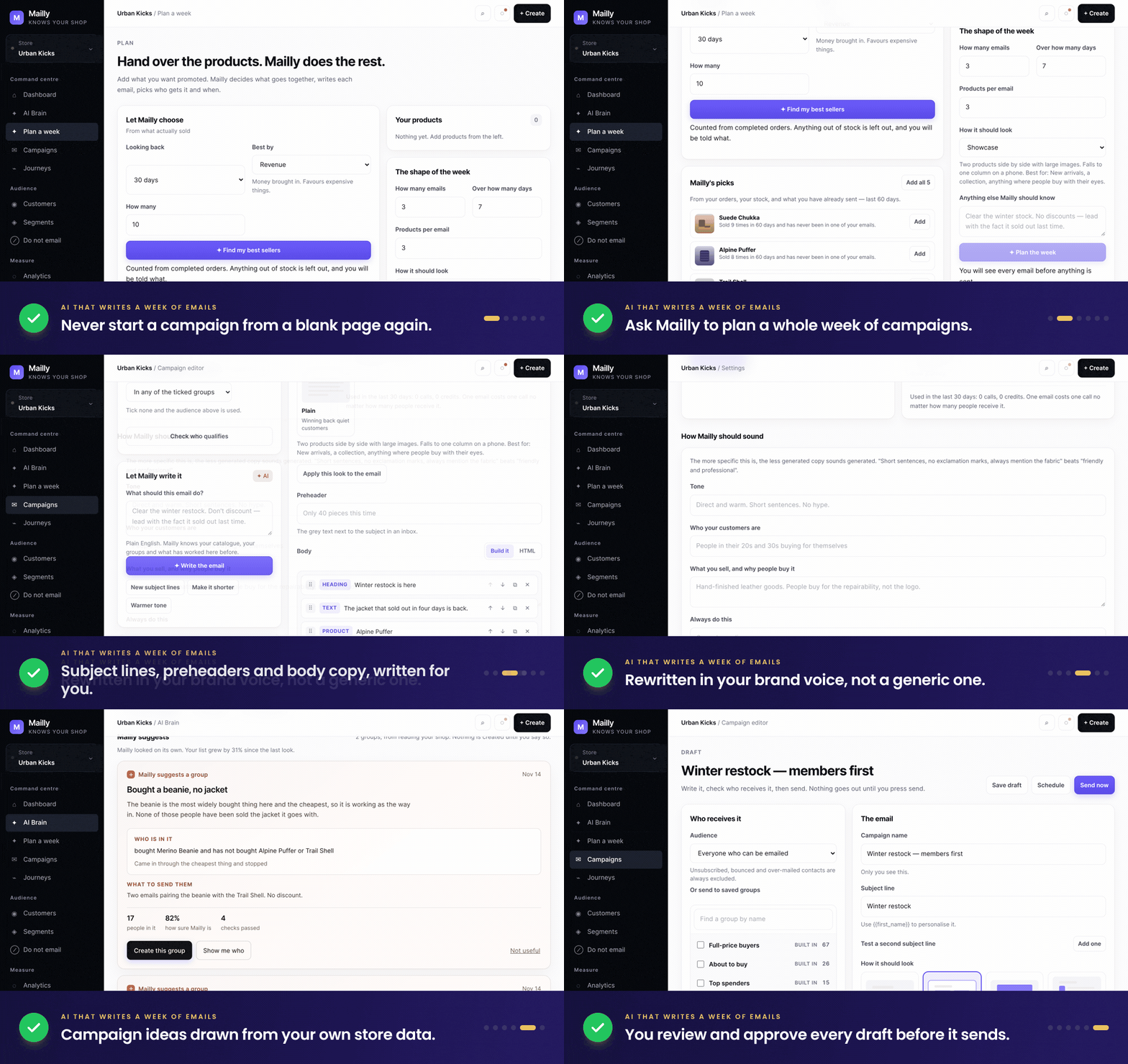
Stop starting every campaign from a blank page.
Ask Mailly to plan a week of campaigns.
Generate subject lines, preheaders, and email copy.
Rewrite emails in your brand voice.
Get campaign ideas based on your store data.
Review and approve drafts before sending.
Click “Plan a week” and show the generated campaign drafts.
6. Product Recommendations Based on Real Store Data
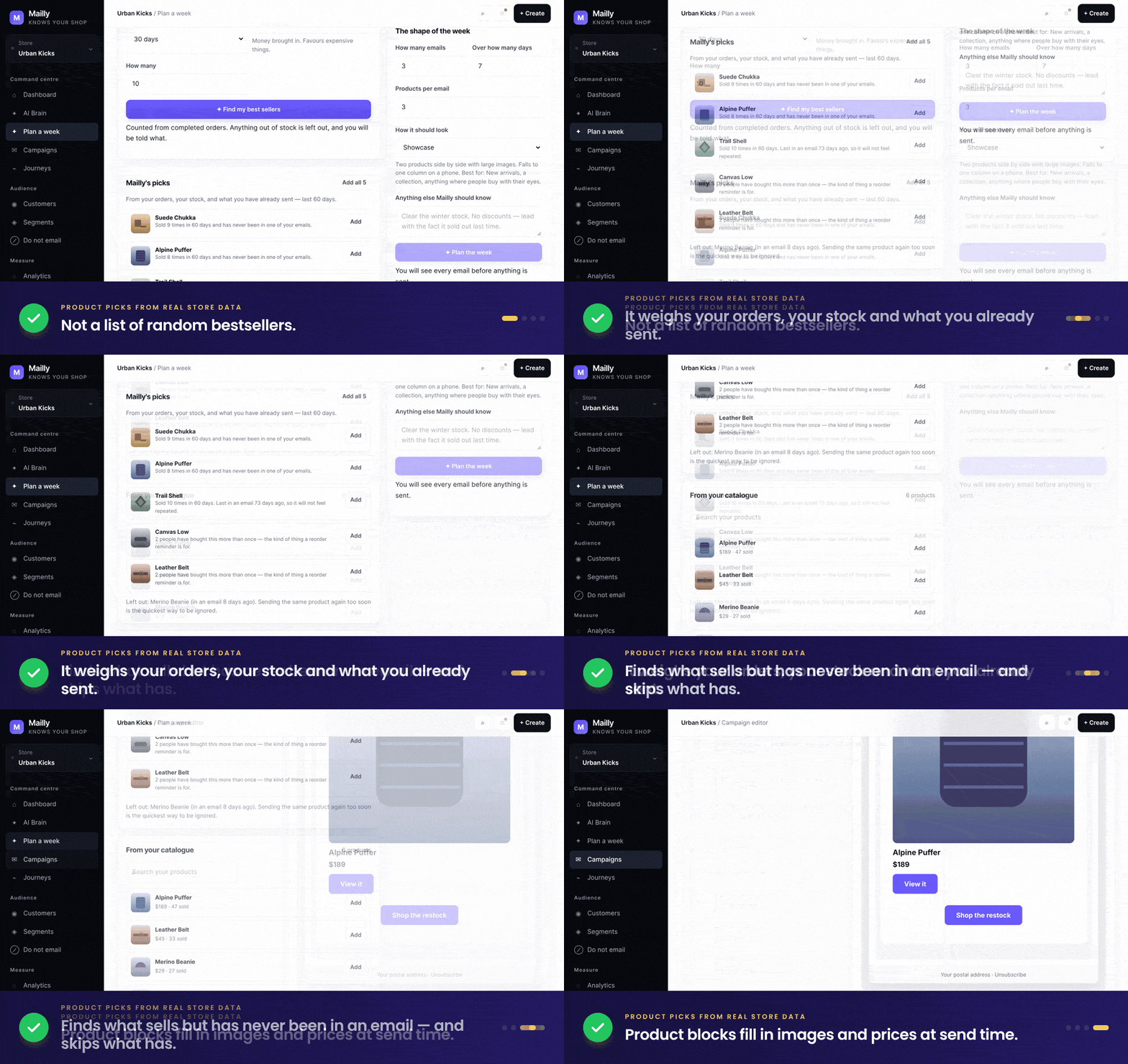
Mailly does not simply pick random bestsellers.
It considers your orders, inventory, and previous email campaigns.
Find products that sell but have not been promoted.
Avoid repeatedly sending the same product.
Identify products worth featuring in upcoming campaigns.
Show product picks with reasons for each recommendation, including products that have never appeared in an email and products deliberately left out because they were recently emailed.
7. Drag-and-Drop Email Builder
Create professional email campaigns without coding.
Eight content blocks.
Drag-and-drop editing.
Product blocks that automatically populate product images and prices at send time.
Ready-to-use templates.
Test emails and campaign previews.
Drag a content block and show the product block filling in product details.
8. Upload Your Own HTML
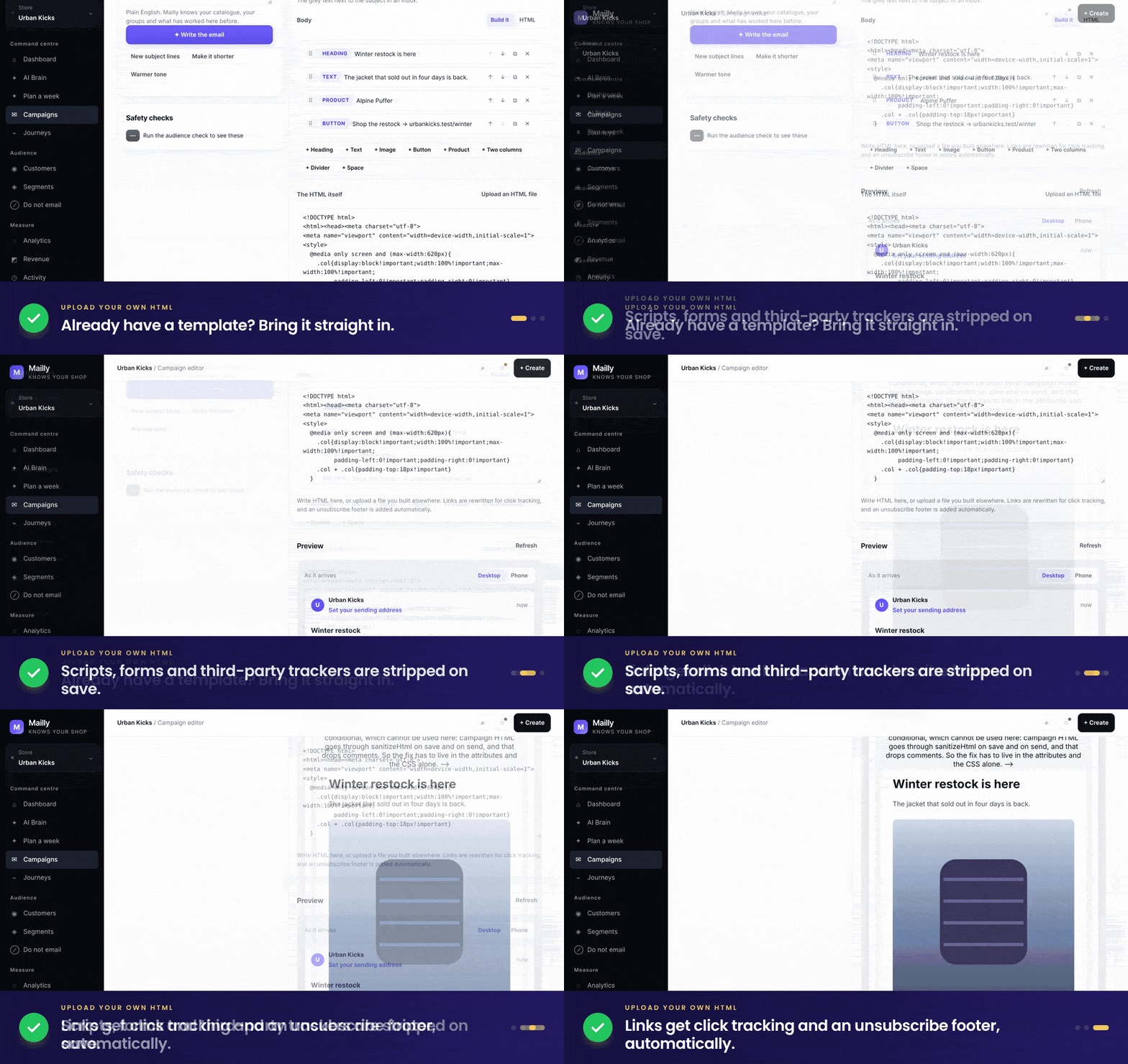
Already have an email template? Bring it into Mailly.
Upload your HTML email.
Mailly cleans unsupported scripts, forms, and third-party tracking elements.
Use your existing design as a starting point.
Show HTML upload and the cleanup report.
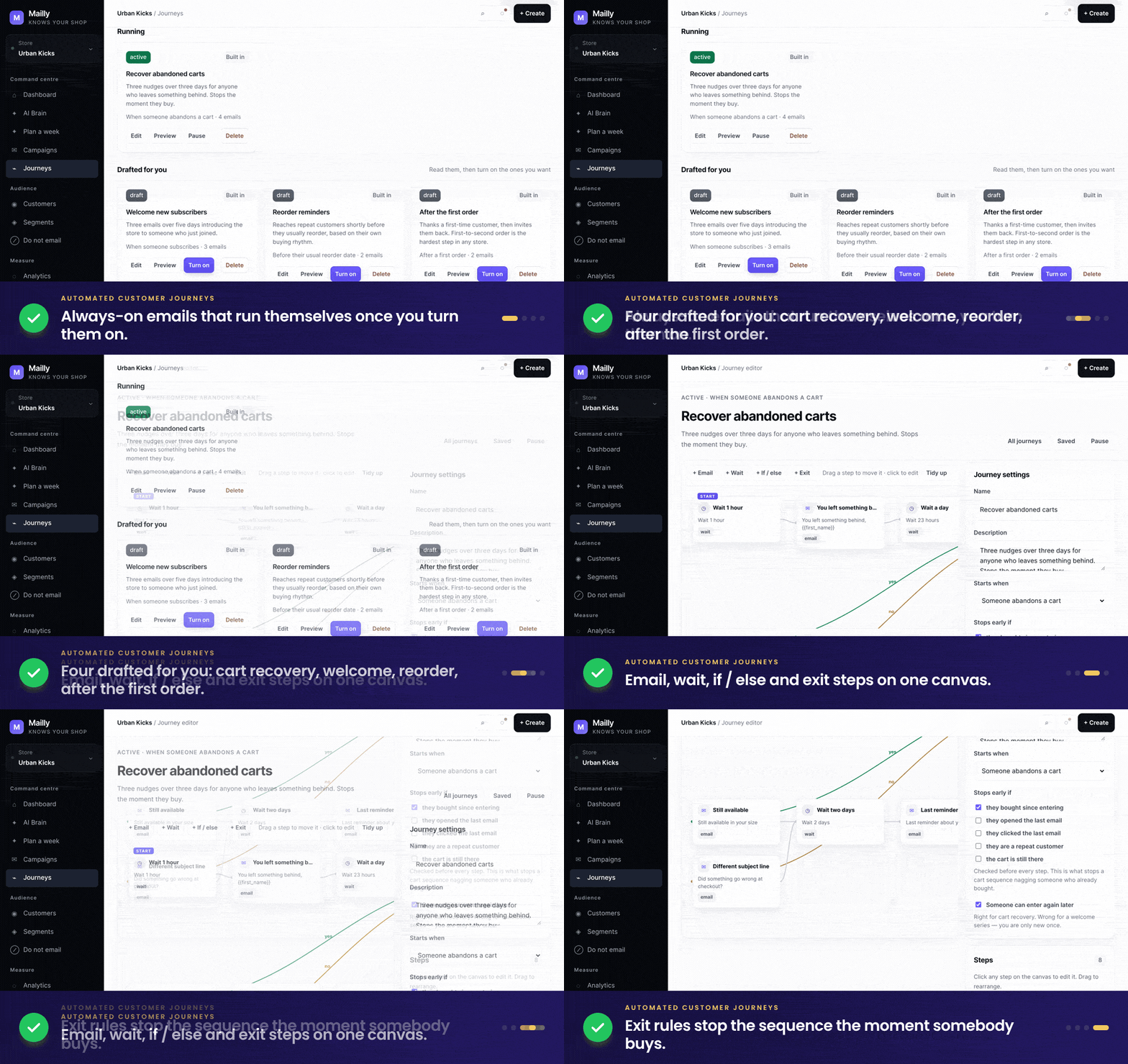
9. Automated Customer Journeys
Build behaviour-based email journeys for your store.
Four useful starting points:
Cart recovery.
Welcome emails.
Reorder reminders.
Post-purchase follow-ups.
Use triggers, waits, conditions, and exit rules to make journeys more relevant.
Show a cart recovery journey with a wait step, purchase condition, and exit path.
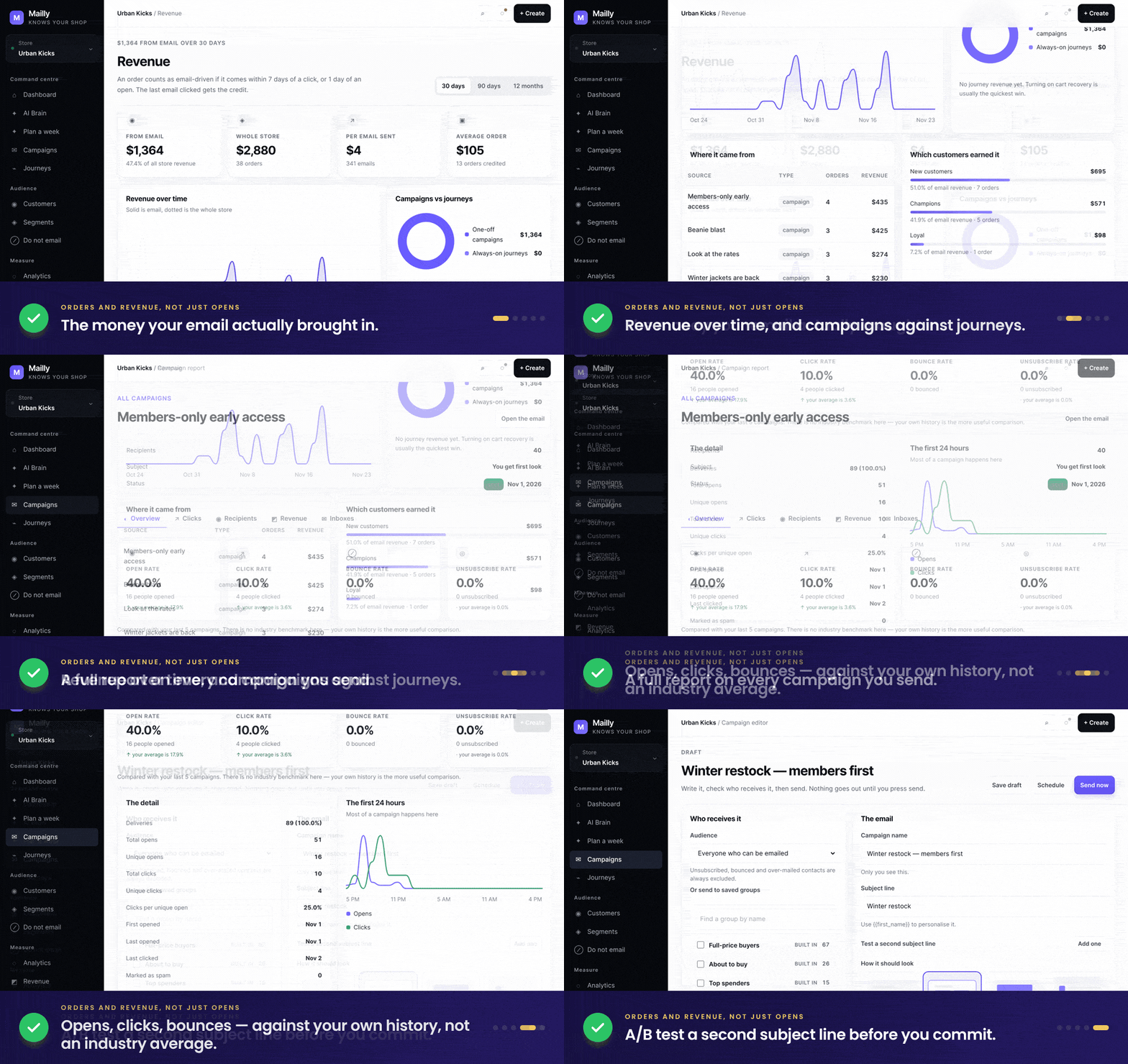
10. Orders and Revenue, Not Just Opens
Understand which campaigns are contributing to sales.
Revenue per campaign.
Attributed orders.
Revenue per product and email.
Campaign performance reports.
A/B testing.
CSV export.
Mailly shows the orders behind the attributed revenue figure so you can inspect the results.
Show the Revenue tab with attributed orders and revenue.
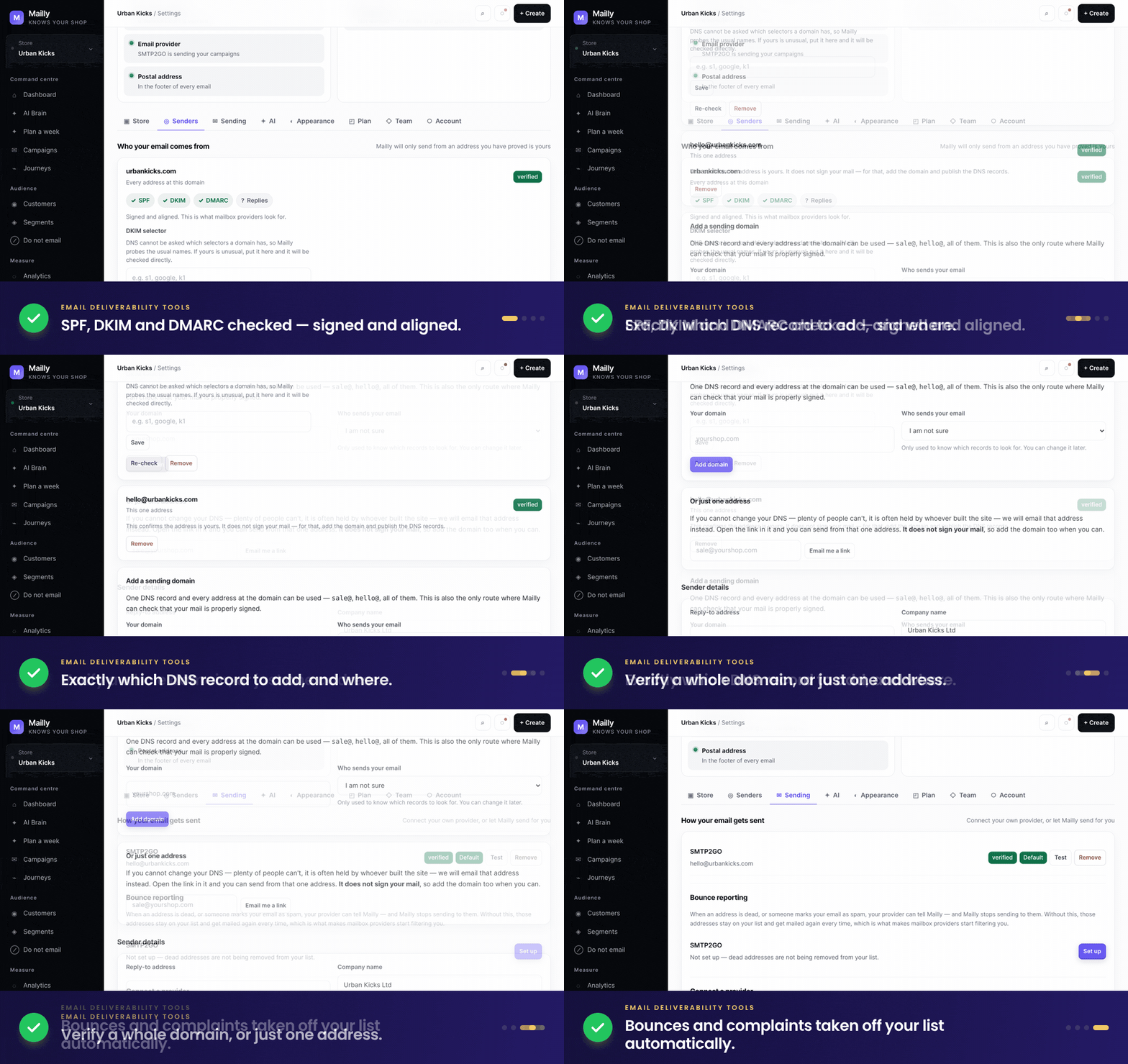
11. Email Deliverability Tools
Get help with the technical setup that supports reliable email delivery.
SPF, DKIM, and DMARC checks.
Domain and sender verification.
DNS record guidance.
Bounce and complaint monitoring where supported.
Inbox placement tests.
Show the DNS setup page with authentication checks.
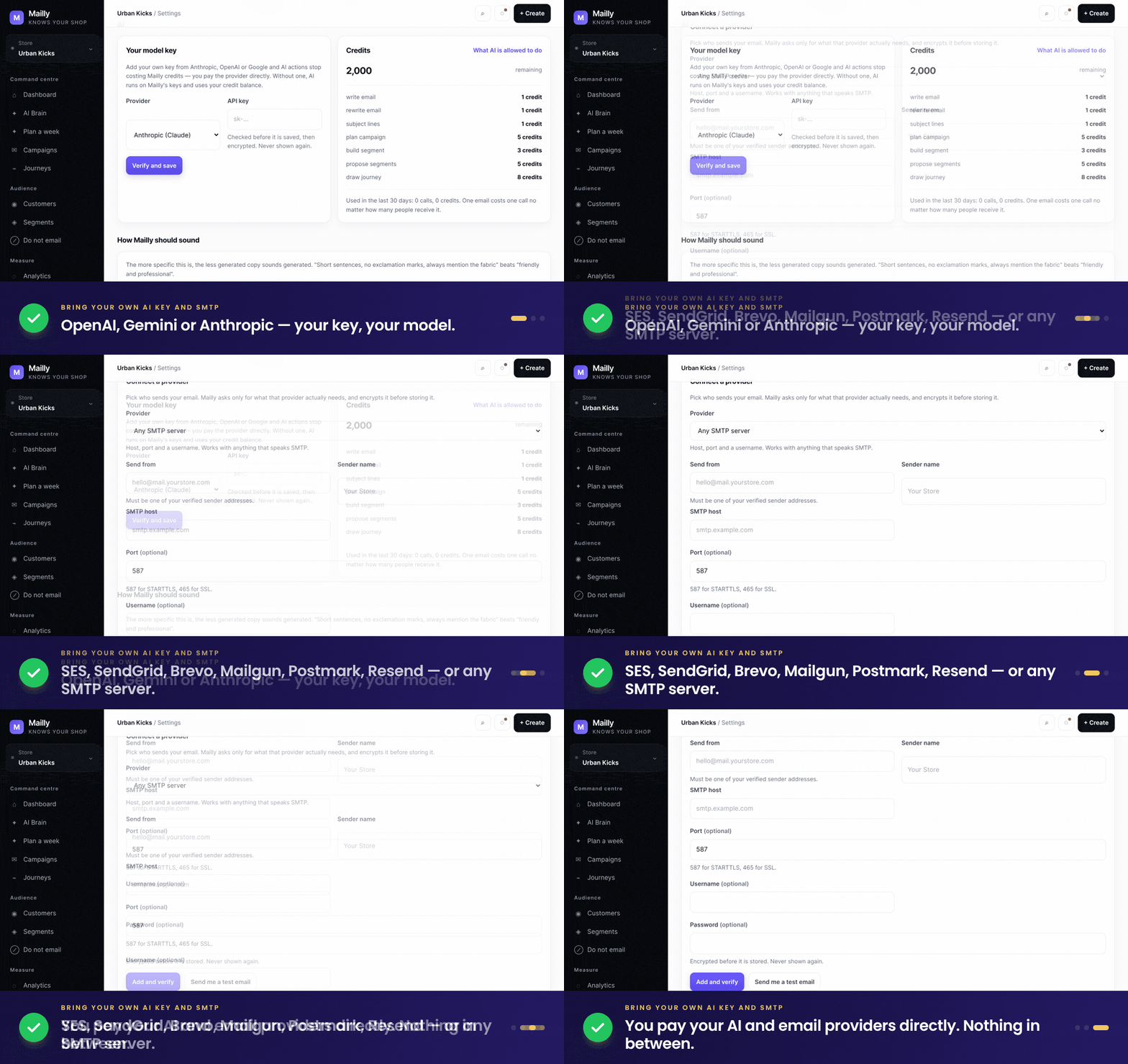
12. Bring Your Own AI Key and SMTP
Use your own provider accounts.
OpenAI, Gemini, or Anthropic for AI.
Amazon SES, SendGrid, Brevo, Mailgun, Postmark, Resend, Mailjet, SparkPost, Elastic Email, SMTP2GO, ZeptoMail, or another SMTP server for sending.
You pay your AI and email providers directly.
Show the AI provider and SMTP provider selection screens.
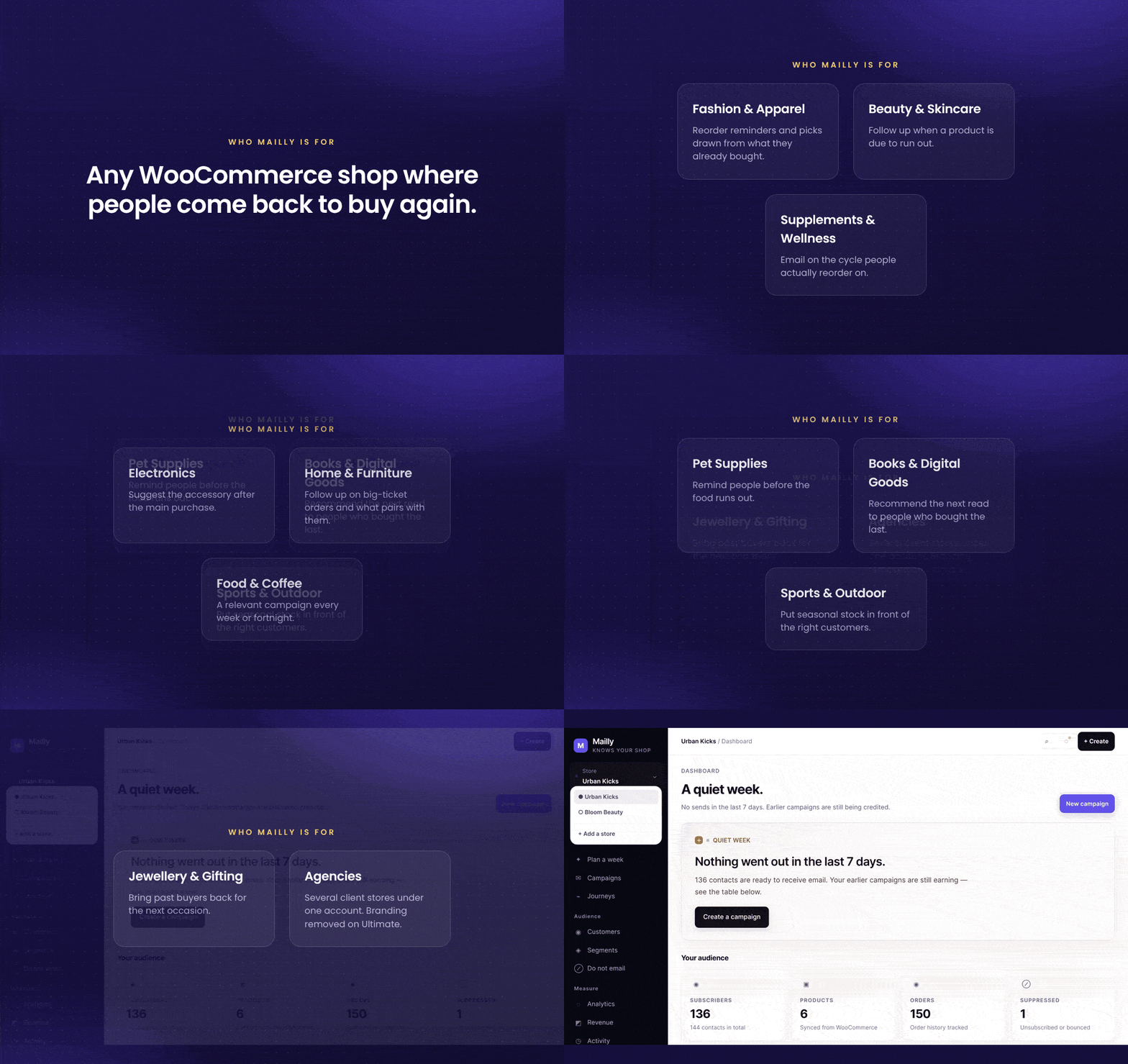
Use Cases
Fashion & Apparel: Reorder reminders and product recommendations based on buying history.
Beauty & Skincare: Follow up on products customers may need to replenish.
Supplements & Wellness: Support recurring purchase cycles.
Electronics: Recommend accessories after a customer buys a main product.
Home & Furniture: Follow up on higher-value purchases and related products.
Food & Coffee: Create relevant weekly or fortnightly campaigns.
Pet Supplies: Remind customers when regular supplies may be running low.
Books & Digital Goods: Recommend related products to existing buyers.
Sports & Outdoor: Promote seasonal products to relevant customers.
Jewellery & Gifting: Re-engage previous buyers for new occasions.
Agencies: Manage multiple client stores under one account. Remove branding is available on Ultimate.
Show the multi-store switcher with multiple demo stores.
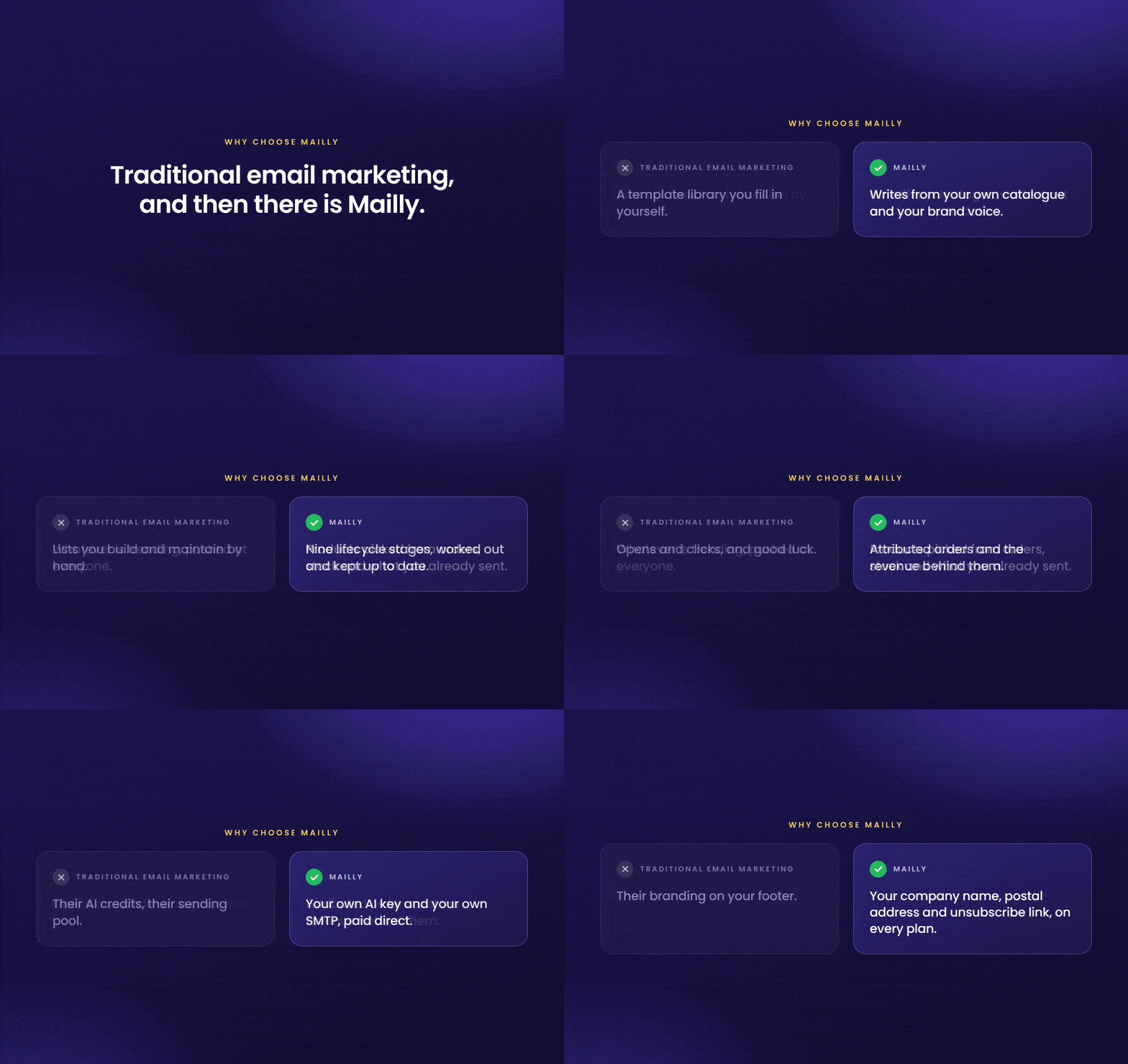
Why Choose Mailly?
Writes campaigns using your own product catalogue and brand voice.
Identifies nine customer lifecycle stages.
Recommends products using orders, stock, and previous sends.
Reports attributed orders and revenue.
Helps automate customer journeys.
Uses your own AI and SMTP accounts.
Marketing emails carry your company’s own name, postal address, and unsubscribe link on every plan.
Comparison graphic—”Traditional Email Marketing” vs. “Mailly.”
Deal Terms:
Length of access: Lifetime
Redemption deadline: 60 days from purchase
30 Days Money Back Guarantee (For Non-Prime Members/Regular Users).
A: Yes. Mailly’s lifetime deal requires your own SMTP provider. You can connect a supported provider or another SMTP server. Sending costs are paid directly to your chosen provider.
Q: 3. Do I need my own AI API key?
A: Yes. You need to connect your own OpenAI, Gemini, or Anthropic API key. AI usage is billed separately by your selected provider.
Q: 4. Is there a monthly Mailly subscription?
A: No. This is a one-time lifetime purchase with future Mailly updates included.
Q: 5. Will Mailly send campaigns without asking me?
A: No. Campaigns and customer journeys remain under your control. By default, nothing is sent until you approve it. You can configure automation permissions later.
Q: 6. Do I need to know HTML?
A: No. Mailly includes a drag-and-drop editor and ready-to-use templates. You can also upload your own HTML if preferred.
Q: 7. How does Mailly calculate attributed revenue?
A: Mailly attributes an order to an email if it occurs within 7 days of a tracked click or 1 day of an open. When multiple emails are involved, the last clicked email receives credit. You can also view the orders behind the reported revenue.
Q: 8. Does Mailly work without WooCommerce?
A: No. Mailly is specifically designed for WooCommerce stores running on WordPress.
Q: 9. Can I manage multiple client stores?
A: Yes. The Pro plan supports up to 3 stores, while the Ultimate plan supports unlimited stores and includes branding removal. Each store maintains separate data and reports.
Q: 10. Can I import my existing contacts?
A: Yes. You can import contacts through CSV with a preview before importing. Mailly also includes consent checks and suppression handling. Only import contacts you have permission to email.
Q: 11. Is branding removal included?
A: Yes, branding removal is included in the Ultimate plan. You can use your own product name, logo, colours, and domain instead of Mailly branding, with the “Powered by Mailly” label hidden.
Q: 12. Do marketing emails show Mailly branding?
A: No. Marketing emails display your own company name, postal address, and unsubscribe link on every plan. Branding removal applies to the Mailly app, not the emails.
Q: 13. What happens to my data if I disconnect Mailly?
A: Your store data remains yours. Disconnecting Mailly does not automatically delete your data, and you can export supported data to CSV.
Q: 14. When should I redeem my DealMirror code?
A: You must redeem your DealMirror code within 60 days of purchase.
Q: 15. What is the refund policy?
A: Regular customers receive a 30-day money-back guarantee, while DealMirror Prime members receive an extended 60-day money-back guarantee.
Reviews
Reviews
There are no reviews yet.
Be the first to review “Mailly: The AI Email Marketing Tool That Knows Your WooCommerce Store” Cancel reply


Reviews
There are no reviews yet.