Your Cart

No products in the cart.

Our Top Picks

RARHost : High-performance servers with NVMe SSD storage and LiteSpeed Web Server
RARHost
$59.00 Starter
Add to Cart
1forAll : Your All-in-One Tool For Voice, Image & Video AI
1forAll
$29.00 Tier 1
Add to Cart
We.Inc: Build Chatbots, Websites & More with AI
We.Inc
$349.00 LTD Tier 1
Add to Cart
Brand2Social : Social Media Management tool for generating automated messages
Brand2Social
$29.00 Brand
Add to Cart

Our Biggest Sale of the Year is Live – Shop & Save 20% OFF Sitewide

Shop Now
00 : 00 : 00 : 00
Day Hour Min Sec
Home » Store » KadeEmail : Anonymous Email Generator & Spam Protection

KadeEmail : Anonymous Email Generator & Spam Protection

KadeEmail : Anonymous Email Generator & Spam Protection

TL;DR

KadeEmail Lifetime Deal

Want to promote your e-commerce product or simply send bulk messages to your customers, but don’t want to compromise your email’s privacy? What if I tell you that you can do it all with just one tool?

Meet KadeEmail, an Anonymous email generator lifetime deal. It helps you generate anonymous, real anonymous email addresses that actually work everywhere and automatically detect OTP and copy codes. You can easily compose and schedule emails and set up automatic replies to incoming emails based on predefined conditions.

KadeEmail lets you create custom rules to automatically sort, delete, or forward incoming emails based on sender, subject, or content pattern so you can manage emails with advanced reading features, thread organization, and quick-action tools.

And not just this, you can create bulk email addresses at once for different purposes and organize your emails with smart tagging, categorization, and advanced search capabilities. KadeEmail provides real-time notifications. Plus, you can simply transfer your anonymous email address to another user account.

Overview Images

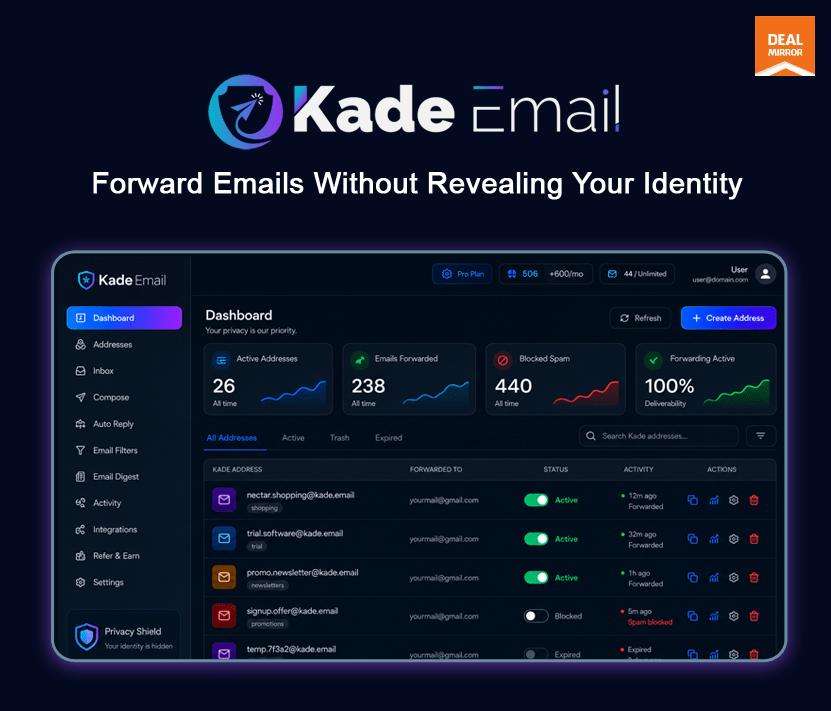
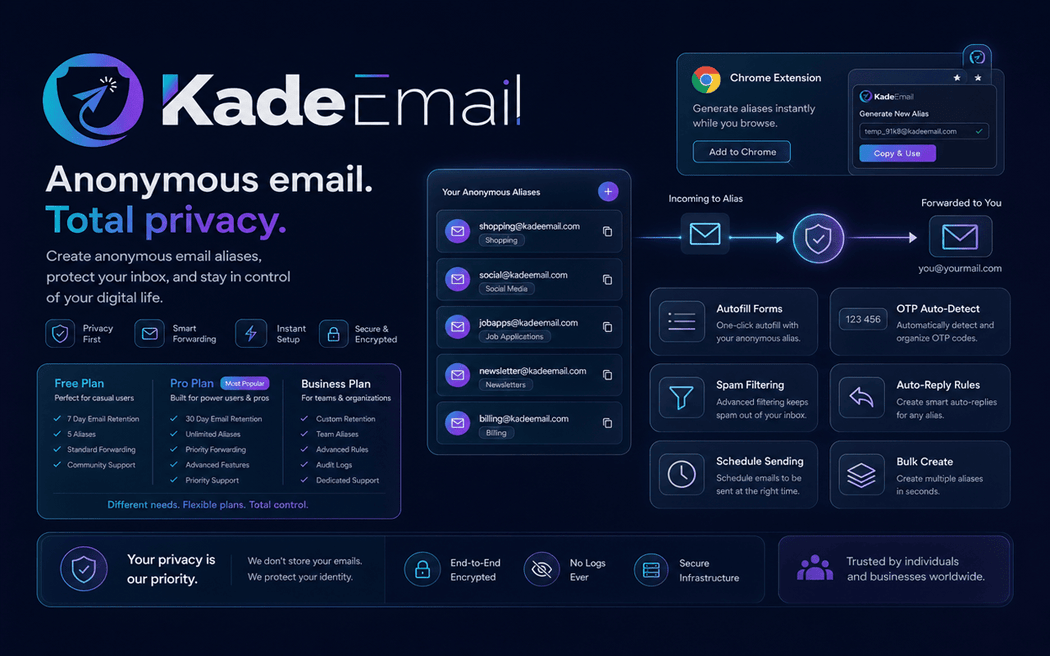
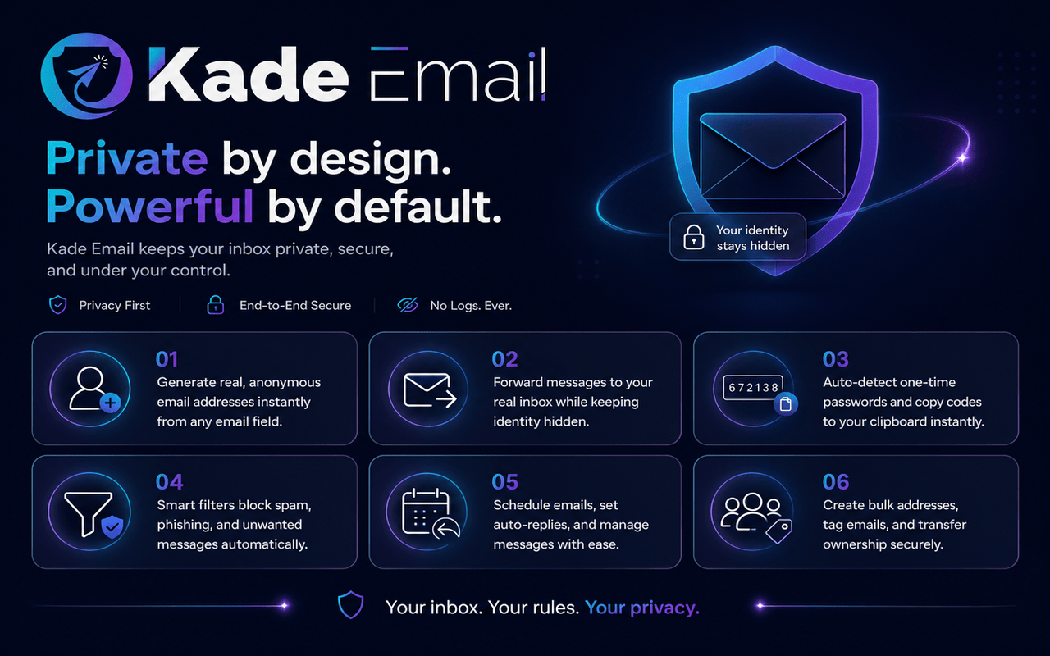
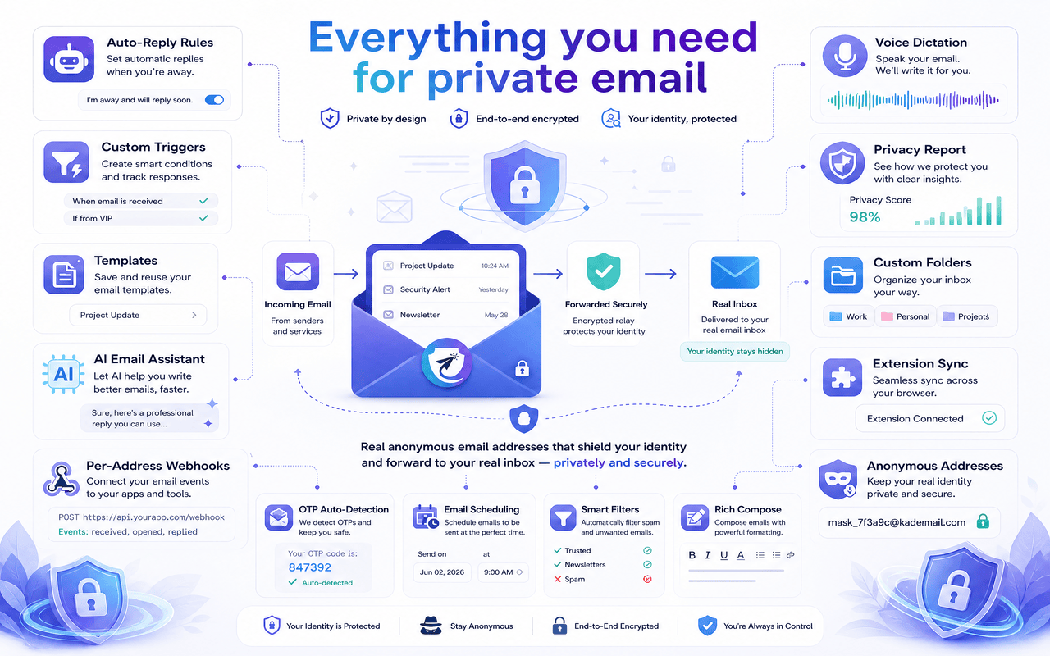
KadeEmail is a smart AI tool that lets you generate multiple anonymous email addresses.

Key Features

  • Instant Anonymous Email Generation: Create real, fully functional temporary email addresses in seconds.
  • Privacy Protection: Keep your real email address hidden from spammers, data collectors, and trackers.
  • Auto OTP Detection & Copy: Automatically detect and copy OTP codes for seamless verification.
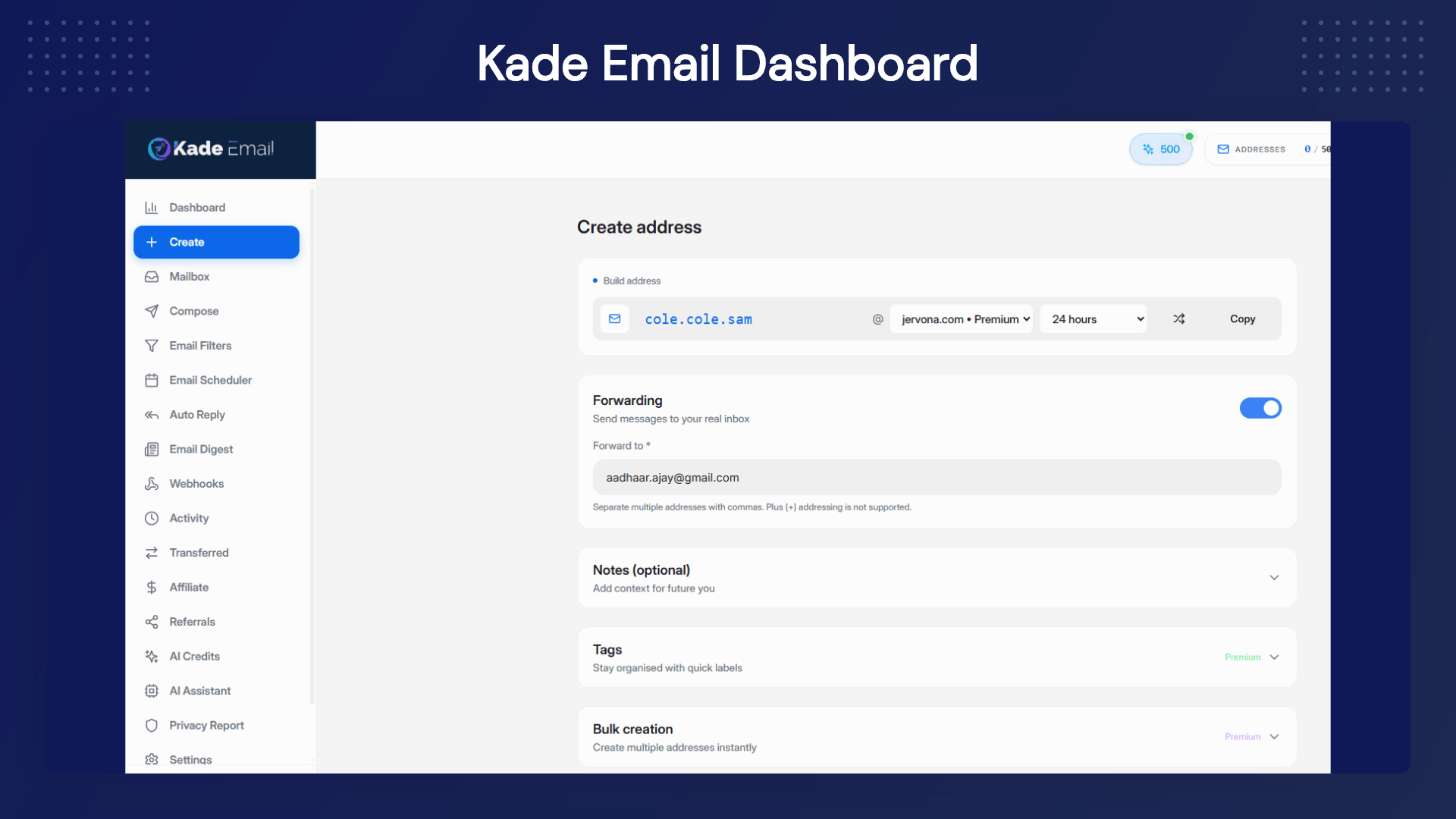
  • Email Forwarding: Forward emails to your real inbox without revealing your identity.
  • Smart Auto-Reply: Set automatic replies with custom rules and smart triggers.
  • Advanced Spam Filtering: Automatically block spam, phishing, and unwanted emails.
  • Email Scheduling: Compose now, send later with the scheduled emails feature.
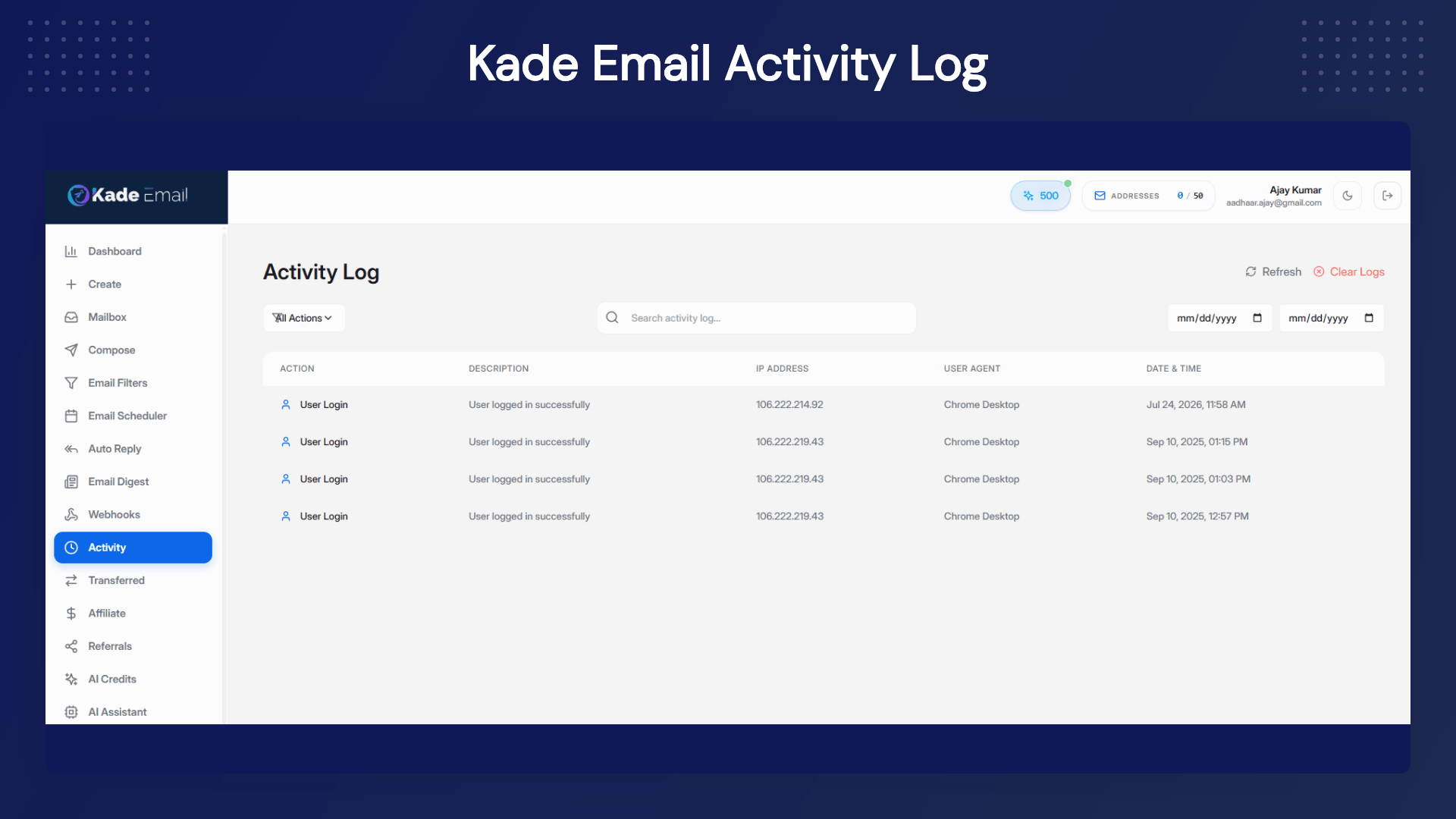
  • Real-Time Analytics: Monitor email statistics, delivery status, and spam protection in real-time.
  • Bulk Email Creation: Generate multiple anonymous email addresses at once for different purposes.
  • Advanced Configuration: Customize forwarding rules, privacy settings, and personal preferences.
  • AI Inbox Classification: Categorize incoming emails by intent and urgency.
  • AI Priority Signals: Surface billing alerts, account notices, and high-value messages first.
  • AI Thread Summaries: Understand long conversations quickly with concise summaries.
  • Smart Rule Suggestions: Improve filtering and forwarding setup with intelligent recommendations.
  • Bulk Identity Management: Create and manage many addresses for campaigns, projects, and testing.
  • Address-Level Control: Pause, disable, or repurpose any address independently.

Why AI Matters in Anonymous Email

Anonymous email protects your identity, but AI helps you manage the inbox at scale.

With KadeEmail, you are not just creating disposable addresses. You are building a smarter workflow where incoming email is automatically prioritized, categorized, and actioned.

  • AI-assisted inbox triage for faster processing
  • AI-based categorization for cleaner organization
  • AI summaries for long email threads
  • AI trigger-ready workflows for forwarding and auto-replies
  • Better spam signal detection through pattern recognition

AI Workflow Examples

  1. Signup & Verification Workflow: Create a dedicated anonymous address for each platform, receive OTP quickly, and isolate spam if the platform starts sending too many promos.
  2. Ecommerce Operations Workflow: Use separate addresses for order tools, supplier portals, ad accounts, and shipping dashboards. Let AI tag messages by priority so critical alerts are never missed.
  3. Support Workflow: Route support-related messages into dedicated labels, auto-respond based on rules, and use AI summaries to reduce manual reading time.
  4. Team/Agency Workflow: Generate project-specific addresses in bulk, assign workflows by client, and avoid mixing all communication in one inbox.

Use Cases:

  • Online shopping
  • Newsletter signups
  • Software trials
  • Contest entries
  • Developer testing
  • Freelancing
  • Client projects
  • Travel bookings
  • Social media verification
  • Affiliate dashboard registrations
  • Marketplace seller accounts
  • Hiring portals and candidate workflows
  • Webinar and event registrations
  • Community access and gated content signups
  • Competitive research signups without exposing business inboxes
  • QA/UAT tests for email verification flows

Benefits

  • Inbox Quality: KadeEmail keeps your main inbox focused by reducing irrelevant subscriptions and random third-party email exposure.
  • Identity Control: Instead of sharing one permanent address everywhere, create context-specific identities and turn them off if needed.
  • Operational Speed: From OTP handling to AI classification and scheduling, KadeEmail reduces repetitive email tasks.
  • Risk Reduction: If one alias is compromised or spammed, disable that alias without impacting your primary address.

 Product Roadmap (2025):

Deal Terms:

  • Lifetime access
  • Redeem your code within 60 days of purchase
  • Previous DealMirror customers will be grandfathered into any new features and feature limits.
  • 30-Days Money-Back Guarantee (For Non-Prime Members and Regular users)
  • 60-Day Money-Back Guarantee (For DealMirror Prime Members Only)

Conversion Copy

One Tool for Privacy + Productivity

Most tools solve only one side of the problem:

  • Either they generate temporary emails
  • Or they help organize your existing inbox

KadeEmail does both. You get anonymous identity protection plus AI-assisted inbox workflows in a single platform.

Intro Video

Roadmap & Use Cases:

Discount code auto-applied at checkout.

KadeEmail : Anonymous Email Generator & Spam Protection

One-time payment. Lifetime access.

What you get in this deal

100 Kade Addresses
100 AI Credits (one-time)
5 Premium Domains
All future temp emails

$79.00/$99.00 20% Saving

Select Plan Check Plan Details


30 Days Money-back Guarantee

Day
Hrs
Min
Sec

TL;DR

KadeEmail Lifetime Deal

Want to promote your e-commerce product or simply send bulk messages to your customers, but don’t want to compromise your email’s privacy? What if I tell you that you can do it all with just one tool?

Meet KadeEmail, an Anonymous email generator lifetime deal. It helps you generate anonymous, real anonymous email addresses that actually work everywhere and automatically detect OTP and copy codes. You can easily compose and schedule emails and set up automatic replies to incoming emails based on predefined conditions.

KadeEmail lets you create custom rules to automatically sort, delete, or forward incoming emails based on sender, subject, or content pattern so you can manage emails with advanced reading features, thread organization, and quick-action tools.

And not just this, you can create bulk email addresses at once for different purposes and organize your emails with smart tagging, categorization, and advanced search capabilities. KadeEmail provides real-time notifications. Plus, you can simply transfer your anonymous email address to another user account.

Overview Images

KadeEmail is a smart AI tool that lets you generate multiple anonymous email addresses.

Key Features

  • Instant Anonymous Email Generation: Create real, fully functional temporary email addresses in seconds.
  • Privacy Protection: Keep your real email address hidden from spammers, data collectors, and trackers.
  • Auto OTP Detection & Copy: Automatically detect and copy OTP codes for seamless verification.
  • Email Forwarding: Forward emails to your real inbox without revealing your identity.
  • Smart Auto-Reply: Set automatic replies with custom rules and smart triggers.
  • Advanced Spam Filtering: Automatically block spam, phishing, and unwanted emails.
  • Email Scheduling: Compose now, send later with the scheduled emails feature.
  • Real-Time Analytics: Monitor email statistics, delivery status, and spam protection in real-time.
  • Bulk Email Creation: Generate multiple anonymous email addresses at once for different purposes.
  • Advanced Configuration: Customize forwarding rules, privacy settings, and personal preferences.
  • AI Inbox Classification: Categorize incoming emails by intent and urgency.
  • AI Priority Signals: Surface billing alerts, account notices, and high-value messages first.
  • AI Thread Summaries: Understand long conversations quickly with concise summaries.
  • Smart Rule Suggestions: Improve filtering and forwarding setup with intelligent recommendations.
  • Bulk Identity Management: Create and manage many addresses for campaigns, projects, and testing.
  • Address-Level Control: Pause, disable, or repurpose any address independently.

Why AI Matters in Anonymous Email

Anonymous email protects your identity, but AI helps you manage the inbox at scale.

With KadeEmail, you are not just creating disposable addresses. You are building a smarter workflow where incoming email is automatically prioritized, categorized, and actioned.

  • AI-assisted inbox triage for faster processing
  • AI-based categorization for cleaner organization
  • AI summaries for long email threads
  • AI trigger-ready workflows for forwarding and auto-replies
  • Better spam signal detection through pattern recognition

AI Workflow Examples

  1. Signup & Verification Workflow: Create a dedicated anonymous address for each platform, receive OTP quickly, and isolate spam if the platform starts sending too many promos.
  2. Ecommerce Operations Workflow: Use separate addresses for order tools, supplier portals, ad accounts, and shipping dashboards. Let AI tag messages by priority so critical alerts are never missed.
  3. Support Workflow: Route support-related messages into dedicated labels, auto-respond based on rules, and use AI summaries to reduce manual reading time.
  4. Team/Agency Workflow: Generate project-specific addresses in bulk, assign workflows by client, and avoid mixing all communication in one inbox.

Use Cases:

  • Online shopping
  • Newsletter signups
  • Software trials
  • Contest entries
  • Developer testing
  • Freelancing
  • Client projects
  • Travel bookings
  • Social media verification
  • Affiliate dashboard registrations
  • Marketplace seller accounts
  • Hiring portals and candidate workflows
  • Webinar and event registrations
  • Community access and gated content signups
  • Competitive research signups without exposing business inboxes
  • QA/UAT tests for email verification flows

Benefits

  • Inbox Quality: KadeEmail keeps your main inbox focused by reducing irrelevant subscriptions and random third-party email exposure.
  • Identity Control: Instead of sharing one permanent address everywhere, create context-specific identities and turn them off if needed.
  • Operational Speed: From OTP handling to AI classification and scheduling, KadeEmail reduces repetitive email tasks.
  • Risk Reduction: If one alias is compromised or spammed, disable that alias without impacting your primary address.

 Product Roadmap (2025):

Deal Terms:

  • Lifetime access
  • Redeem your code within 60 days of purchase
  • Previous DealMirror customers will be grandfathered into any new features and feature limits.
  • 30-Days Money-Back Guarantee (For Non-Prime Members and Regular users)
  • 60-Day Money-Back Guarantee (For DealMirror Prime Members Only)

Conversion Copy

One Tool for Privacy + Productivity

Most tools solve only one side of the problem:

  • Either they generate temporary emails
  • Or they help organize your existing inbox

KadeEmail does both. You get anonymous identity protection plus AI-assisted inbox workflows in a single platform.

Pricing

Tier 1

One-time payment. Lifetime access.

$79.00$99.00


100 Kade Addresses
100 AI Credits (one-time)
5 Premium Domains
All future temp emails
Advanced forwarding
Unlimited retention
Premium spam protection
Compose emails
Reply to emails
Email filters
Email scheduler
Auto-reply rules
Email digest
Webhooks
Priority support

Tier 2

One-time payment. Lifetime access.

$129.00$199.00


500 Kade Addresses
500 AI Credits (one-time)
5 Premium Domains
All future temp emails
Advanced forwarding
Unlimited retention
Premium spam protection
Compose emails
Reply to emails
Email filters
Email scheduler
Auto-reply rules
Email digest
Webhooks
Priority support

Tier 3

One-time payment. Lifetime access.

$199.00$1999.00


Unlimited Kade Addresses
1,000 AI Credits (one-time)
5 Premium Domains
All future temp emails
Advanced forwarding
Unlimited retention
Premium spam protection
Compose emails
Reply to emails
Email filters
Email scheduler
Auto-reply rules
Email digest
Webhooks
Priority support

From The Founders

KadeEmail Logo

KadeEmail

In an era where digital privacy is constantly under threat, KadeEmail was born from a simple yet powerful idea: everyone should have the right to protect their personal email address from spam, data breaches, and unwanted intrusions.

We’ve built the most secure, user-friendly anonymous email service that empowers individuals and businesses to take control of their digital footprint without sacrificing convenience.

“Privacy shouldn’t be a luxury—it should be a fundamental right. Kade Email exists to make that right accessible to everyone, everywhere.”

FAQ's

Q: 1. How do I get support?

A: They offer 24/7 support through multiple channels. Free users can access our help center and community forum. Premium users get priority email support and live chat. User also reach us at [email protected]  for urgent issues.

Q: 2. What is KadeEmail?

A: KadeEmail is an anonymous email service that allows you to create real email addresses that protect your identity. These addresses can forward messages to your real inbox while keeping your actual email address private. It’s perfect for signups, online shopping, and protecting yourself from spam and data breaches.

Q: 3. Are KadeEmail addresses real email addresses?

A: Yes! KadeEmail creates real, fully functional email addresses that can receive and send emails just like any other email address. The difference is that they protect your identity by acting as a shield between you and the outside world.

Q: 4. How does email forwarding work?

A: When you create a KadeEmail address, you can enable email forwarding to your real email address. Any emails sent to your KadeEmail address will be automatically forwarded to your real inbox. The sender will only see your KadeEmail address, keeping your real email private. You can toggle forwarding on or off for each KadeEmail address individually.

Q: 5. Can I reply to emails I receive?

A: Yes! With our premium plan, you can reply directly to emails from your real inbox, and the response will appear to come from your anonymous KadeEmail address. This maintains your anonymity while allowing two-way communication. Free users can still reply by logging into the KadeEmail dashboard.

Q: 6. How long do kade addresses last?

A: Free users can create addresses that last up to 7 days. Premium users can create addresses with custom durations, including 1 month, 1 year, or even permanent addresses that never expire. You can also manually delete any address at any time if you start receiving unwanted emails.

Q: 7. Is KadeEmail secure?

A: Absolutely! KadeEmail uses enterprise-grade encryption and security measures to protect your data. They’re GDPR compliant, SOC 2 certified, and follow industry best practices for data protection. Your emails are encrypted in transit and at rest.

Q: 8. What happens if I lose access to my account?

A: They provide multiple recovery options including email verification and backup codes. Premium users also get priority support for account recovery. They recommend setting up 2FA and keeping your recovery information up to date.

Q: 9. Can I use KadeEmail for business?

A: Yes! Many businesses use KadeEmail for testing, customer support, and protecting their main business email from spam. Premium plans include features specifically designed for business use, including custom domains and team management.

Q: 10. Is KadeEmail only for temporary throwaway use?

A: No, It supports both temporary and long-term operational use depending on your workflow and plan.

Q: 11. Can I use KadeEmail addresses for real product signups?

A: Yes, KadeEmail addresses are designed for practical real-world use cases including signups, tools, marketplaces, and testing flows.

Q: 12. How does AI improve daily usage?

A: AI reduces manual inbox sorting by classifying, prioritizing, and summarizing incoming email so you can respond faster.

Q: 13. Is this useful for teams?

A: Yes, Teams can create project-specific addresses, apply routing rules, and keep communication organized by workflow.

Q: 14. What happens when an alias receives too much spam?

A: You can isolate and disable that alias without replacing your primary inbox identity.
Reviews

5 reviews for KadeEmail : Anonymous Email Generator & Spam Protection

  1. Rated 4 out of 5

    copyglov

    Hi,
    1-from how many domains names can we create emails?
    2-will you add transfert of ownership for emails?
    3-there is bulk creation of emails?
    4-can we use theses emails to warm up our sending campaing for our own domain email?
    thank

    • Shivam Sharma

      1- From how many domain names can we create emails?:
      There are a total of 6 domains; more are on the way.

      2- Will you add transfer of ownership for emails?
      Yes — you can transfer an email to another Kade user.

      3- Is there bulk creation of emails?
      Yes — you can create emails in bulk.

      4- Can we use these emails to warm up our sending campaign for our own domain email?
      Unfortunately no—Kade email is a temporary email service to prevent spam.

      Thank you!

  2. Rated 4 out of 5

    Greg Reykdal (verified owner)

    It’s pretty good, I like how easy it is to use. I yet to test to see if websites will allow the Domains, and hopefully will be more soon.
    My main concern is that there is currently no 2FA currently, which in my opinion, is a big security risk.
    Otherwise, it does look promising.

  3. Rated 4 out of 5

    Greg Reykdal (verified owner)

    It’s pretty good, I like how easy it is to use. I yet to test to see if websites will allow the Domains, and hopefully will be more soon.
    My main concern is that there is currently no 2FA, which in my opinion is a big security risk.
    Otherwise, it does look promising, it just needs some quick implementations! Otherwise, this would be a 5 star.

  4. Rated 5 out of 5

    Aldy Ar

    Finally! This is an awesome product. Have been trying to find something like it for ages. Looks like Combination of Burner Email and Vend Email
    Really cool!! Kinda wish this was done like 10 years ago! So many e-mail subscriptions…lol
    I think this will be my favorite product EVER! I’ve found several companies selling my email address to others using it. It’s great to be able to unsubscribe to the whole email account when they sell your information.
    I don’t want to win, but I’ve been looking for this product for ages.
    Good Luck For You launch On Deal Mirror.

  5. Rated 5 out of 5

    ghaldouni (verified owner)

    ⭐️⭐️⭐️⭐️⭐️ Essential for online privacy!

    This is my go-to tool for protecting my main inbox. Kade.Email lets me generate anonymous aliases instantly. Now I can sign up for anything without giving my real email. If spam starts, I just disable that alias. It’s simple and brilliantly effective. A must-have tool

    Do yourself a favor and start using this today. Your inbox will thank you!

Add a review

Questions & Answers

You need to log in to ask a question.

  • Loading questions...