Your Cart

No products in the cart.

Our Top Picks

RARHost : High-performance servers with NVMe SSD storage and LiteSpeed Web Server
RARHost
$59.00 Starter
Add to Cart
1forAll : Your All-in-One Tool For Voice, Image & Video AI
1forAll
$29.00 Tier 1
Add to Cart
We.Inc: Build Chatbots, Websites & More with AI
We.Inc
$349.00 LTD Tier 1
Add to Cart
Brand2Social : Social Media Management tool for generating automated messages
Brand2Social
$29.00 Brand
Add to Cart

Our Mega Anniversary Giveaway Is Live — Join Now & Win Exciting Rewards!

Join Now
00 : 00 : 00 : 00
Day Hour Min Sec
Home » Store » HookLab: Webhook Inspector & Replay Tool for Developers

HookLab: Webhook Inspector & Replay Tool for Developers

HookLab dashboard capturing and inspecting webhook requests in real time

TL;DR

HookLab Lifetime Deal

Webhooks are supposed to make integrations seamless, but when something goes wrong, finding the cause isn’t always straightforward. A payment may not update, a notification might not arrive, or an automation may simply not run—even if the provider indicates that the webhook was successfully delivered. Without seeing the actual request that reached your application, you’re left digging through logs and making educated guesses.

The biggest challenge is that many debugging tools don’t show the complete picture. Missing headers, invalid signatures, unexpected payloads, or formatting differences can all cause integrations to fail. Recreating those exact requests manually takes time, slows development, and can turn a simple bug into hours of frustrating troubleshooting.

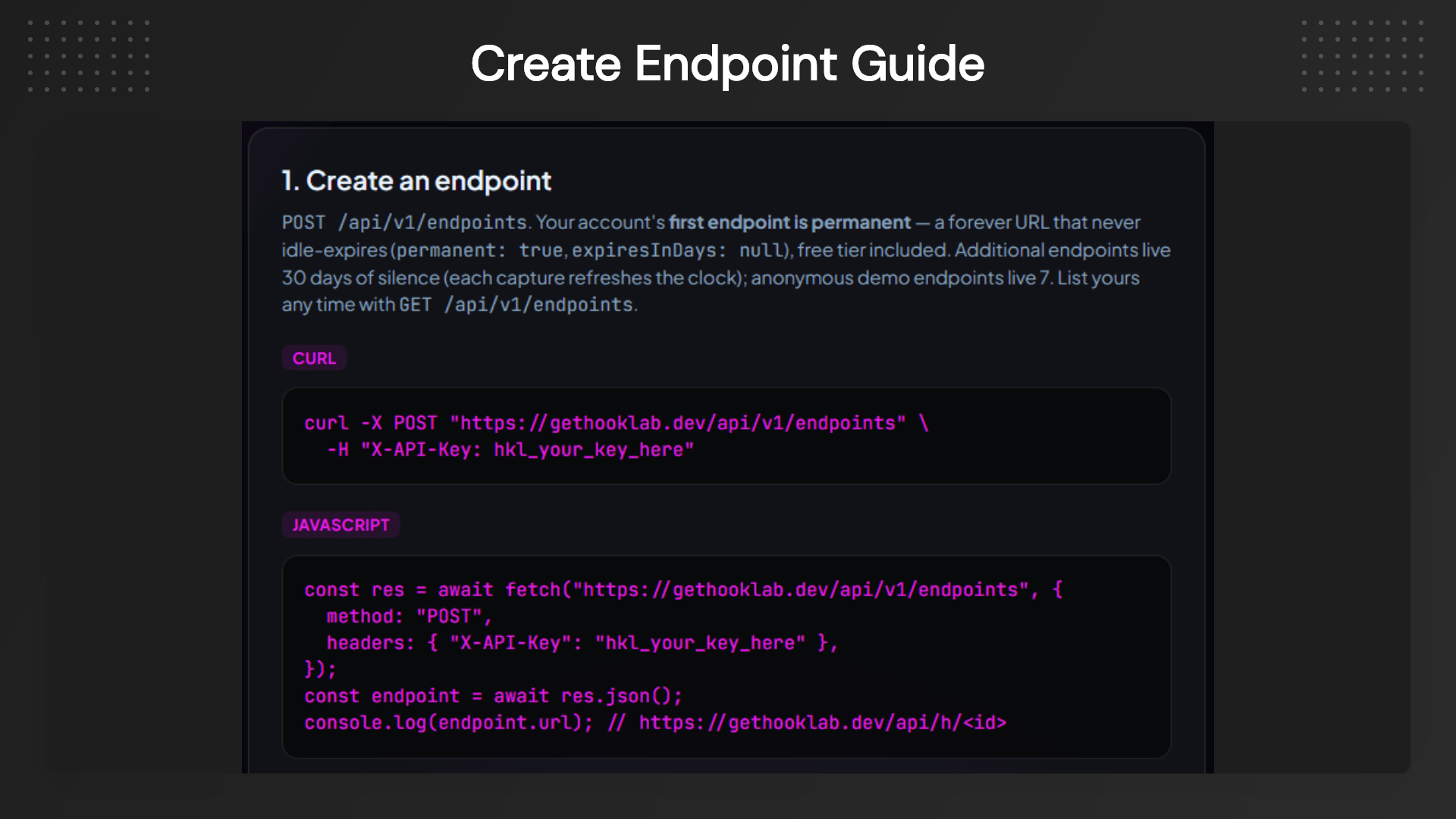
HookLab simplifies webhook debugging by showing you exactly what your application receives. Create a webhook endpoint in seconds, capture incoming requests in real time, inspect headers and payloads, verify signatures, and replay the same request whenever you need to test a fix. Instead of trying to reproduce an issue from scratch, you can work with the original request and resolve problems much faster.

Whether you’re integrating Stripe, GitHub, payment gateways, or your APIs, HookLab gives you the tools to debug with confidence. From one-click request replay to built-in signature verification and privacy-focused request handling, everything is designed to help developers spend less time troubleshooting and more time building reliable applications.

Why Choose HookLab?

Webhook integrations often fail for reasons that are difficult to identify. Missing headers, invalid signatures, unexpected payloads, or formatting differences can consume hours of debugging.

HookLab removes the guesswork by showing every incoming request exactly as it arrives. You can inspect headers, query parameters, JSON bodies, and replay captured events against your local, staging, or production environments. Whether you’re testing Stripe, GitHub, payment gateways, or custom APIs, HookLab provides everything you need to troubleshoot webhooks quickly and confidently.

Dashboard Image
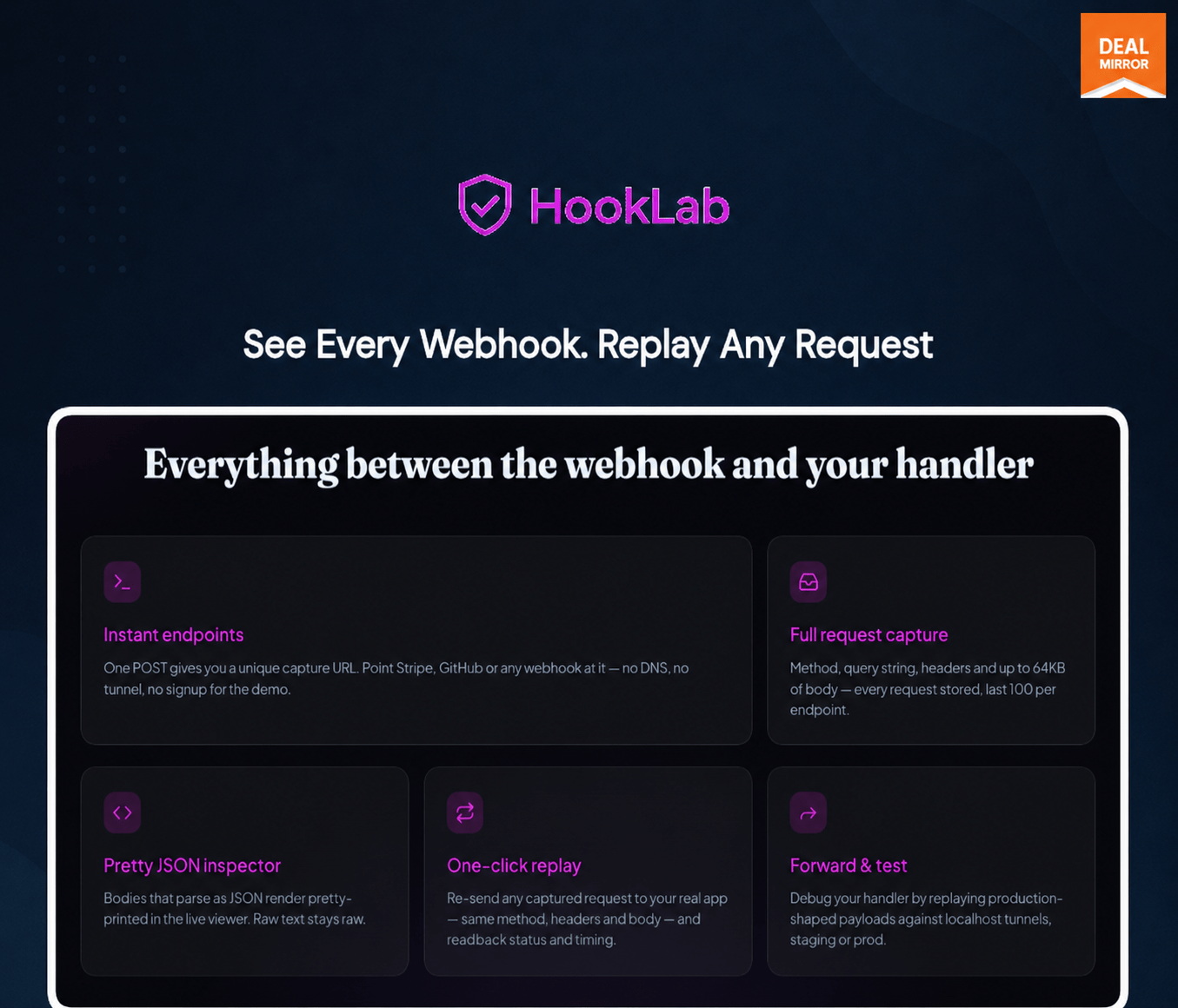
HookLab replaying failed webhook requests to local development environment

HookLab is a developer-friendly webhook inspection and replay platform that helps you capture incoming requests, validate webhook signatures, inspect raw payloads, and replay events without rebuilding test environments.

Key Features

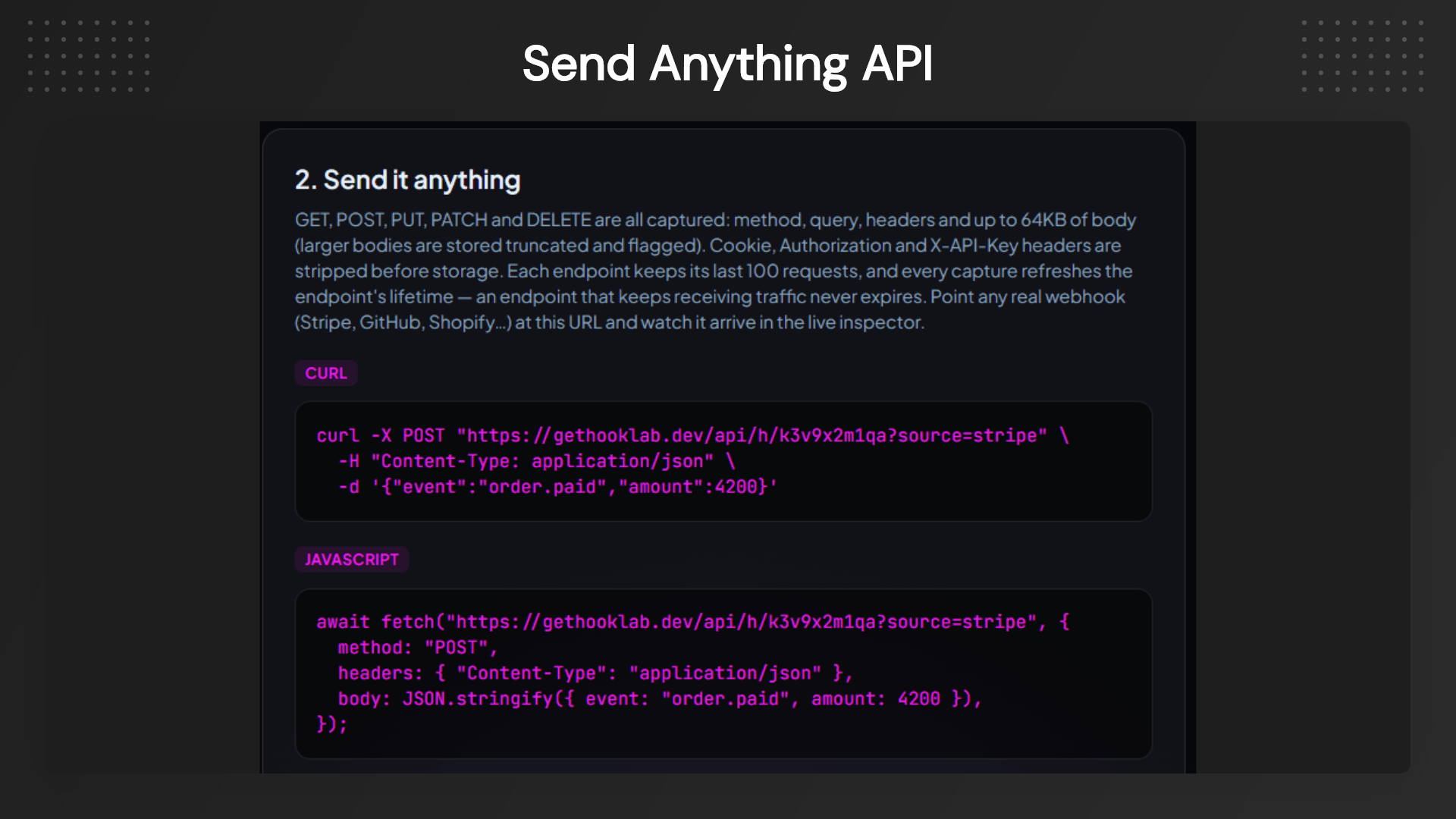
  • Capture Every Incoming Webhook: Generate a unique webhook endpoint instantly and inspect every request as it arrives. View HTTP methods, headers, query parameters, and request bodies without additional setup.
  • Replay Requests with One Click: Resend captured webhook events to localhost, staging, or production environments. Reproduce issues consistently without asking external services to trigger events again.
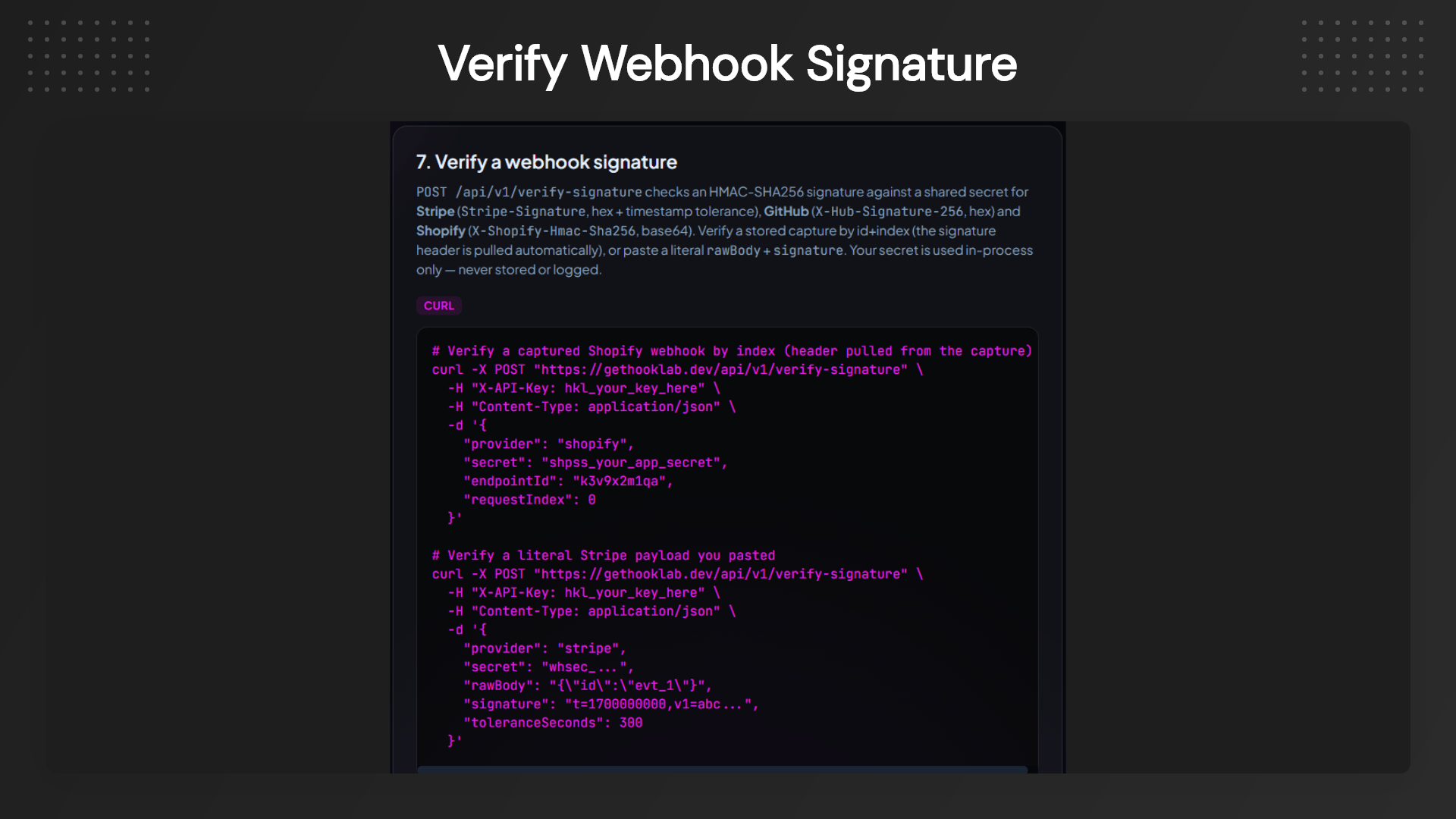
  • Verify Webhook Signatures: Built-in verification for Stripe and GitHub signatures helps ensure your webhook requests are authentic and haven’t been modified during transmission.
  • Inspect Raw Payloads: See webhook data exactly as it was received. Pretty-printed JSON makes large payloads easy to read while preserving the original request for accurate debugging.
  • Create Unlimited Endpoints: Organize multiple projects using dedicated webhook endpoints, making it easier to separate development, testing, and production workflows.
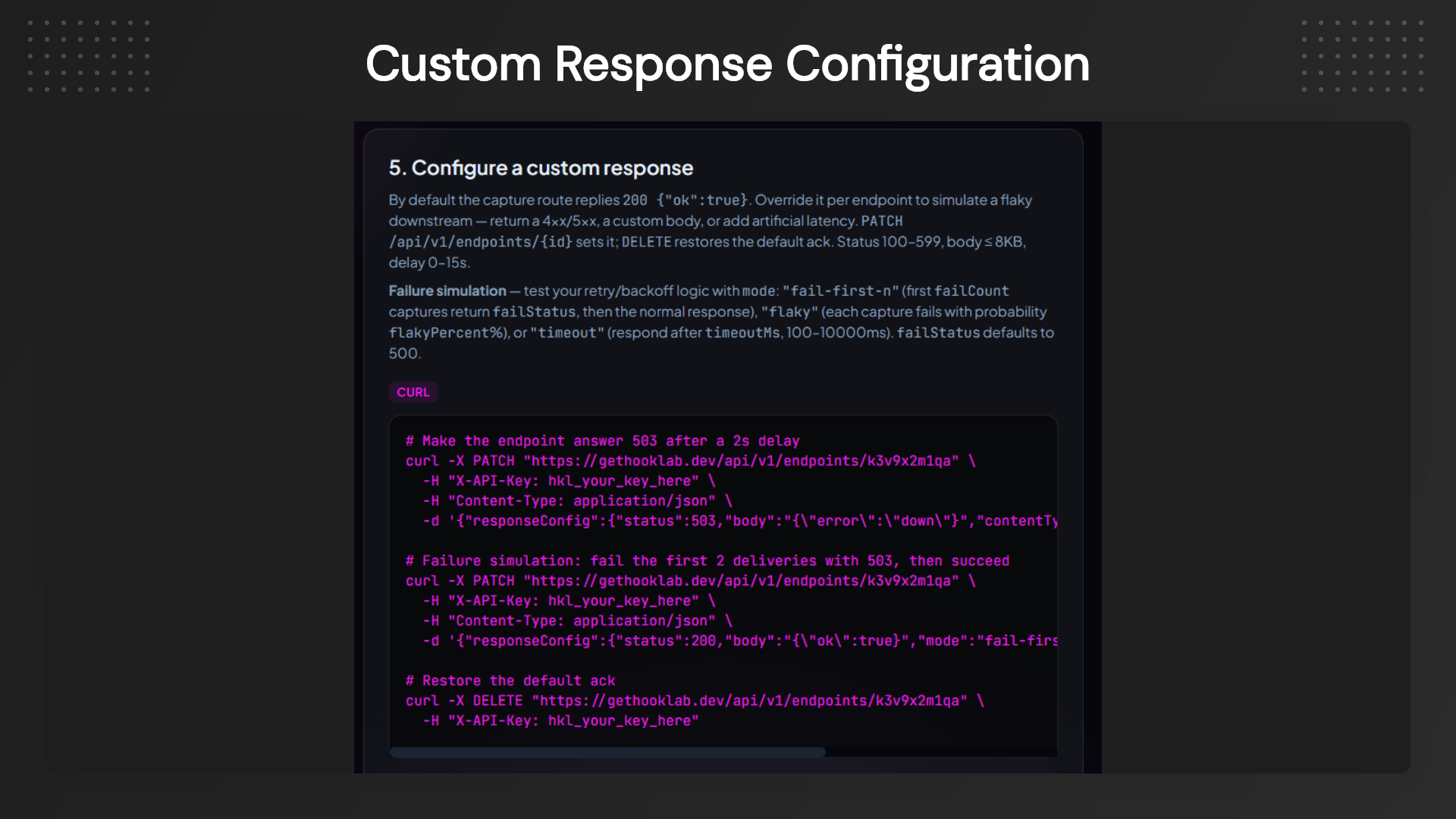
  • Custom Response Simulation: Return custom HTTP status codes or delayed responses to test retry logic and error-handling behavior before deployment.
  • Replay Across Any Environment: Forward captured requests to local development servers, QA environments, staging, or live applications with identical payloads.
  • Privacy-First Request Handling: Sensitive headers like Authorization, Cookies, and API keys are automatically excluded before storage, helping protect confidential information.
  • White-Label Endpoints: Use your own custom domain for webhook endpoints to provide a more professional experience for internal teams and clients.
  • Developer-Friendly Dashboard: Monitor requests in real time through a clean interface designed to help developers quickly identify payload issues, header mismatches, and integration failures.

HookLab verifying Stripe and GitHub webhook signatures

Use Cases

  • Debug Payment Webhooks: Quickly troubleshoot Stripe payment events, subscription updates, refunds, and checkout notifications without waiting for another transaction.
  • Test GitHub Webhooks: Capture repository events, verify signatures, and replay requests while building GitHub Apps or CI/CD workflows.
  • Validate Third-Party Integrations: Inspect webhook payloads from CRMs, marketing tools, payment gateways, and automation platforms before they reach your application.
  • Improve Local Development: Replay production webhook events directly to your localhost to reproduce bugs without affecting live systems.
  • Test Error Handling: Return custom HTTP responses and delays to verify retry mechanisms, fallback logic, and webhook resilience.
  • Support Client Integrations: Provide branded webhook endpoints using your own domain for agencies managing integrations across multiple client projects.

Developer dashboard displaying webhook headers, payloads, and request history

Product Roadmap

Current Features

  • Instant webhook endpoints
  • Request capture
  • Request replay
  • JSON request inspector
  • Stripe verification
  • GitHub verification
  • Custom response simulation
  • Privacy-first request handling

Coming Soon

  • Slack signature verification
  • Shopify verification
  • Twilio verification
  • Shared team workspaces
  • Saved replay collections
  • Request comparison tool

Future Vision

  • CLI support
  • Webhook monitoring alerts
  • Advanced request history
  • Payload schema validation
  • Automated webhook testing

HookLab webhook debugging tool for testing APIs and webhooks online

Deal Terms:

  • Length of access: Lifetime
  • Redemption deadline: 60 days from purchase
  • 30 Days Money Back Guarantee (For Non-Prime Members/Regular Users).
  • 60 Days Money Back Guarantee (For DealMirror Prime Members Only).

Intro Video

Roadmap & Use Cases:

Discount code auto-applied at checkout.

HookLab: Webhook Inspector & Replay Tool for Developers

One-time payment. Lifetime access.

What you get in this deal

Unlimited endpoints + Unlimited captured requests
Custom domain
White-label endpoints
Dedicated support

$39.00/$279.00 86% Saving

Select Plan Check Plan Details


30 Days Money-back Guarantee

Day
Hrs
Min
Sec

TL;DR

HookLab Lifetime Deal

Webhooks are supposed to make integrations seamless, but when something goes wrong, finding the cause isn’t always straightforward. A payment may not update, a notification might not arrive, or an automation may simply not run—even if the provider indicates that the webhook was successfully delivered. Without seeing the actual request that reached your application, you’re left digging through logs and making educated guesses.

The biggest challenge is that many debugging tools don’t show the complete picture. Missing headers, invalid signatures, unexpected payloads, or formatting differences can all cause integrations to fail. Recreating those exact requests manually takes time, slows development, and can turn a simple bug into hours of frustrating troubleshooting.

HookLab simplifies webhook debugging by showing you exactly what your application receives. Create a webhook endpoint in seconds, capture incoming requests in real time, inspect headers and payloads, verify signatures, and replay the same request whenever you need to test a fix. Instead of trying to reproduce an issue from scratch, you can work with the original request and resolve problems much faster.

Whether you’re integrating Stripe, GitHub, payment gateways, or your APIs, HookLab gives you the tools to debug with confidence. From one-click request replay to built-in signature verification and privacy-focused request handling, everything is designed to help developers spend less time troubleshooting and more time building reliable applications.

Why Choose HookLab?

Webhook integrations often fail for reasons that are difficult to identify. Missing headers, invalid signatures, unexpected payloads, or formatting differences can consume hours of debugging.

HookLab removes the guesswork by showing every incoming request exactly as it arrives. You can inspect headers, query parameters, JSON bodies, and replay captured events against your local, staging, or production environments. Whether you’re testing Stripe, GitHub, payment gateways, or custom APIs, HookLab provides everything you need to troubleshoot webhooks quickly and confidently.

Dashboard Image
HookLab replaying failed webhook requests to local development environment

HookLab is a developer-friendly webhook inspection and replay platform that helps you capture incoming requests, validate webhook signatures, inspect raw payloads, and replay events without rebuilding test environments.

Key Features

  • Capture Every Incoming Webhook: Generate a unique webhook endpoint instantly and inspect every request as it arrives. View HTTP methods, headers, query parameters, and request bodies without additional setup.
  • Replay Requests with One Click: Resend captured webhook events to localhost, staging, or production environments. Reproduce issues consistently without asking external services to trigger events again.
  • Verify Webhook Signatures: Built-in verification for Stripe and GitHub signatures helps ensure your webhook requests are authentic and haven’t been modified during transmission.
  • Inspect Raw Payloads: See webhook data exactly as it was received. Pretty-printed JSON makes large payloads easy to read while preserving the original request for accurate debugging.
  • Create Unlimited Endpoints: Organize multiple projects using dedicated webhook endpoints, making it easier to separate development, testing, and production workflows.
  • Custom Response Simulation: Return custom HTTP status codes or delayed responses to test retry logic and error-handling behavior before deployment.
  • Replay Across Any Environment: Forward captured requests to local development servers, QA environments, staging, or live applications with identical payloads.
  • Privacy-First Request Handling: Sensitive headers like Authorization, Cookies, and API keys are automatically excluded before storage, helping protect confidential information.
  • White-Label Endpoints: Use your own custom domain for webhook endpoints to provide a more professional experience for internal teams and clients.
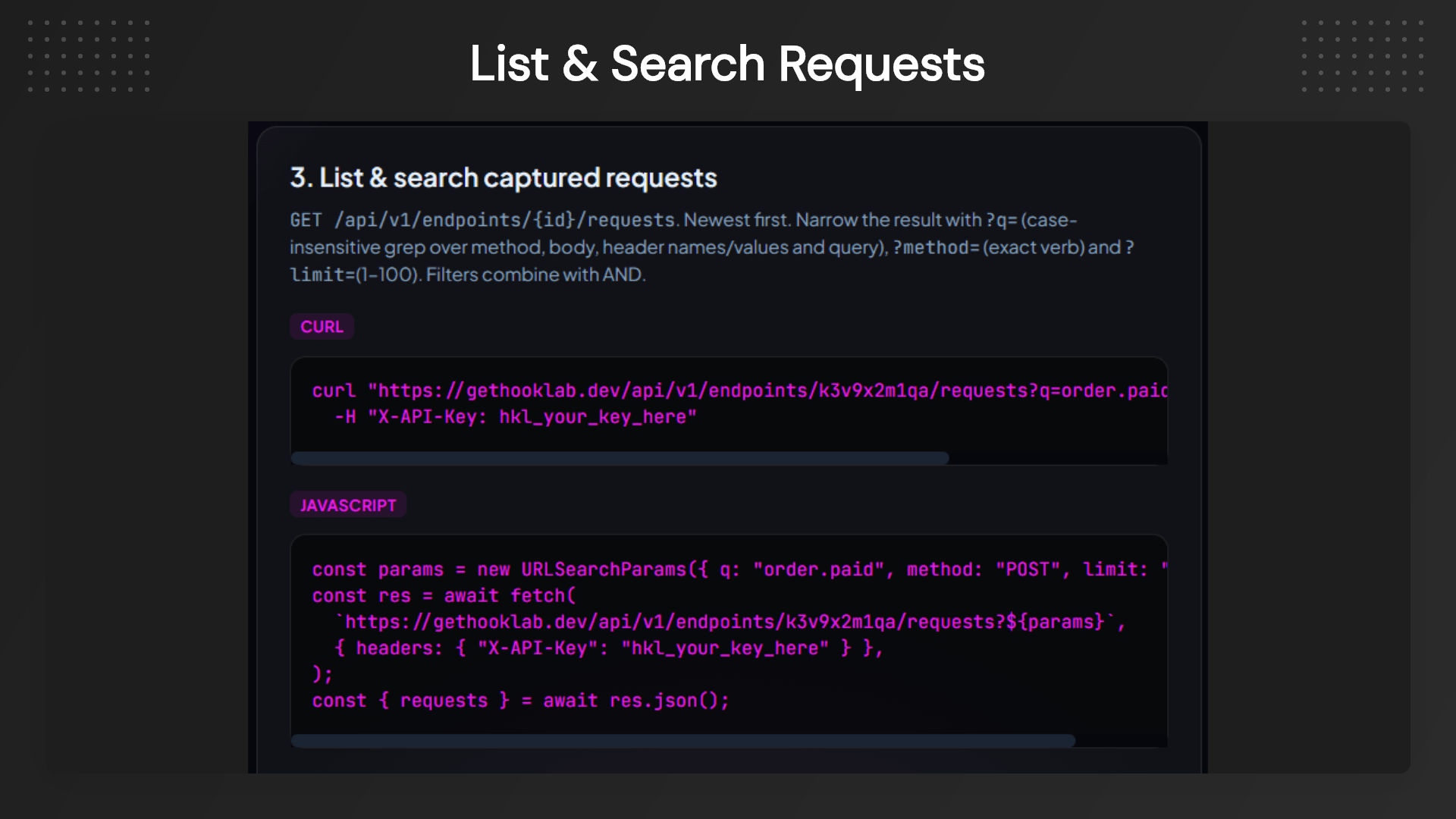
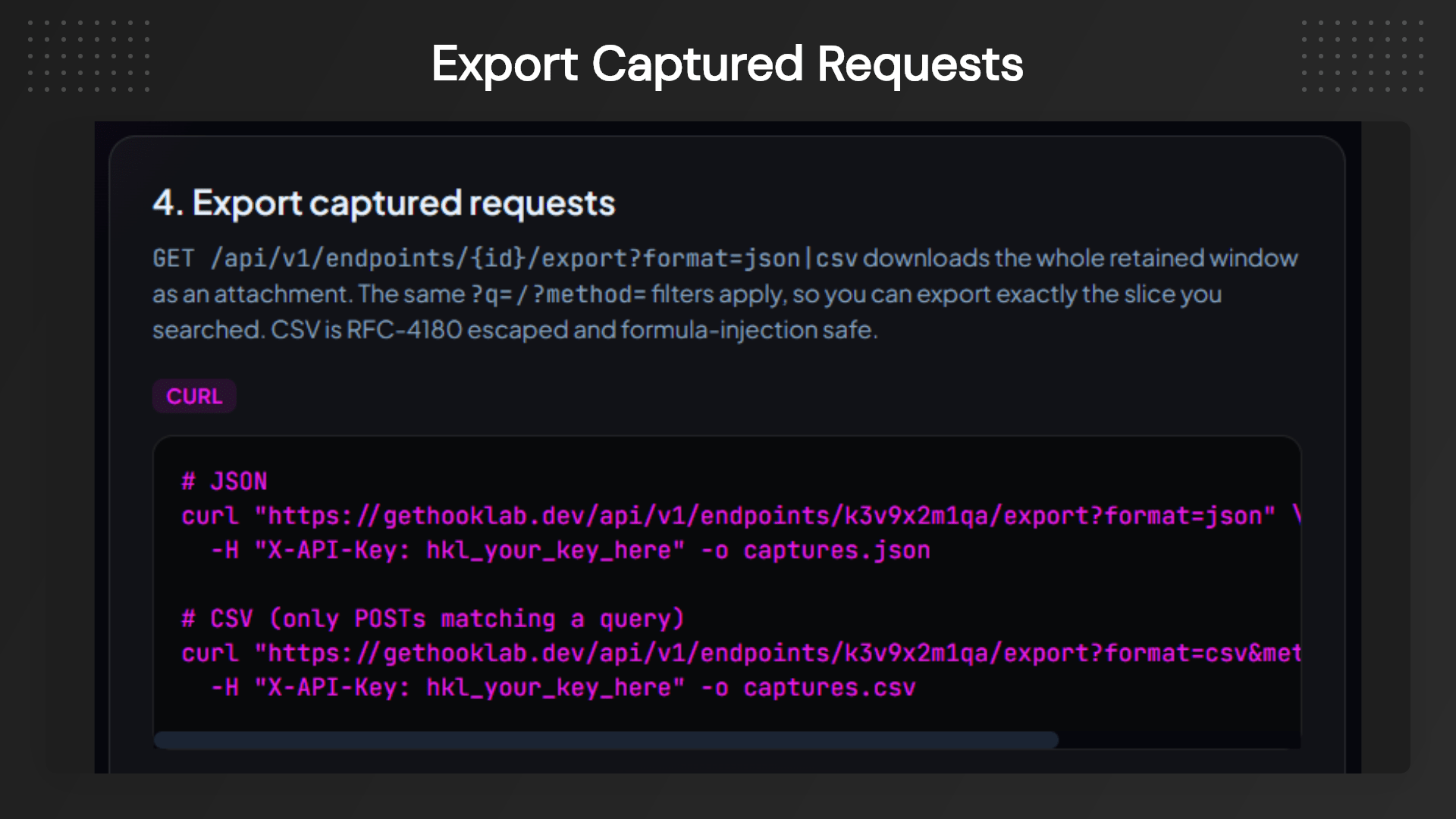
  • Developer-Friendly Dashboard: Monitor requests in real time through a clean interface designed to help developers quickly identify payload issues, header mismatches, and integration failures.
HookLab verifying Stripe and GitHub webhook signatures

Use Cases

  • Debug Payment Webhooks: Quickly troubleshoot Stripe payment events, subscription updates, refunds, and checkout notifications without waiting for another transaction.
  • Test GitHub Webhooks: Capture repository events, verify signatures, and replay requests while building GitHub Apps or CI/CD workflows.
  • Validate Third-Party Integrations: Inspect webhook payloads from CRMs, marketing tools, payment gateways, and automation platforms before they reach your application.
  • Improve Local Development: Replay production webhook events directly to your localhost to reproduce bugs without affecting live systems.
  • Test Error Handling: Return custom HTTP responses and delays to verify retry mechanisms, fallback logic, and webhook resilience.
  • Support Client Integrations: Provide branded webhook endpoints using your own domain for agencies managing integrations across multiple client projects.
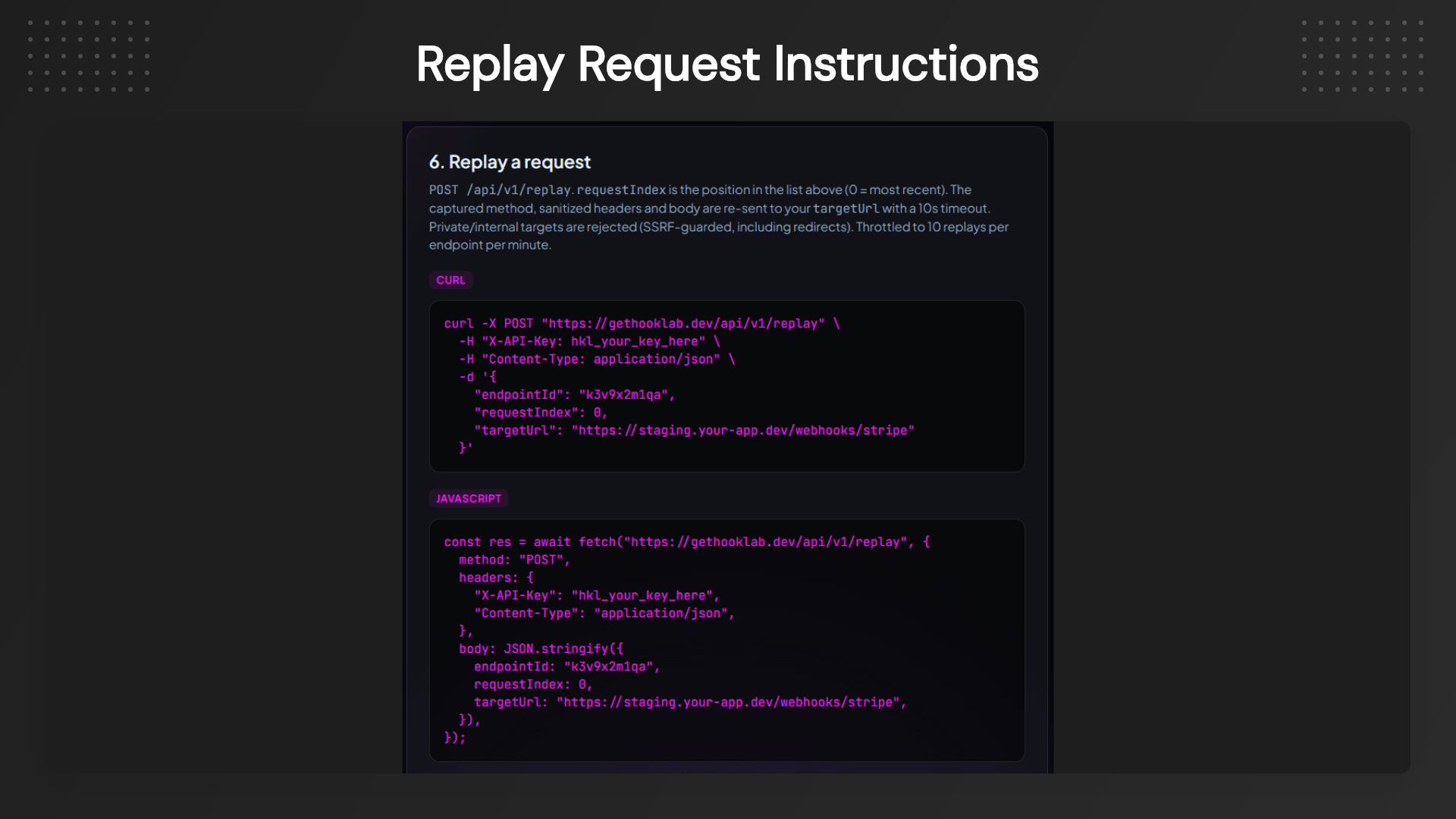
Developer dashboard displaying webhook headers, payloads, and request history

Product Roadmap

Current Features

  • Instant webhook endpoints
  • Request capture
  • Request replay
  • JSON request inspector
  • Stripe verification
  • GitHub verification
  • Custom response simulation
  • Privacy-first request handling

Coming Soon

  • Slack signature verification
  • Shopify verification
  • Twilio verification
  • Shared team workspaces
  • Saved replay collections
  • Request comparison tool

Future Vision

  • CLI support
  • Webhook monitoring alerts
  • Advanced request history
  • Payload schema validation
  • Automated webhook testing

HookLab webhook debugging tool for testing APIs and webhooks online

Deal Terms:

  • Length of access: Lifetime
  • Redemption deadline: 60 days from purchase
  • 30 Days Money Back Guarantee (For Non-Prime Members/Regular Users).
  • 60 Days Money Back Guarantee (For DealMirror Prime Members Only).

Pricing

Tier 1

One-time payment. Lifetime access.

$39.00$279.00


Unlimited endpoints + Unlimited captured requests
Custom domain
White-label endpoints
Dedicated support
All current and future webhook-inspection features

From The Founders

HookLab Logo

Antonio

Founder

Hi — I’m Antonio, the developer behind HookLab (DevToolsmith).

I built HookLab because I kept losing entire afternoons to the same maddening bug: a webhook returns `200 OK`, the provider swears it was delivered, and yet nothing actually happens. Every time, the real cause was buried in bytes I couldn’t see—usually a Stripe signature verified against a re-serialized body instead of the raw payload. I was tired of guessing, so I made the request visible: an instant capture URL, the full raw request in front of me, signature verification built in, and one-click replay so I could reproduce the exact failing event on demand.

That single change turned two-hour mysteries into two-minute fixes. The lifetime deal here is my promise: pay once, and you get the business tier—unlimited endpoints, white-label, custom domain, and dedicated support—for as long as HookLab exists, including every future webhook-debugging feature I ship. No subscription, no surprises. If something gets in your way, email me directly. I read every message.

— Antonio, HookLab

FAQ's

Q: 1. How do I contact support?

A: You can contact support at [email protected] and[email protected]

Q: 2. Does HookLab work with any webhook provider?

A: Yes, HookLab works with virtually any service that sends HTTP webhooks, including payment gateways, Git providers, CRM platforms, automation tools, and custom applications.

Q: 3. Can I replay captured webhook requests?

A: Yes, Every captured request can be replayed to your local machine, staging server, or production environment with a single click.

Q: 4. Is HookLab suitable for Stripe integrations?

A: Absolutely, HookLab includes built-in Stripe signature verification, making it much easier to validate incoming payment events during development and troubleshooting.

Q: 5. Does it support GitHub webhooks?

A: Yes, GitHub webhook signatures can also be verified directly from the dashboard.

Q: 6. Are my webhook requests stored securely?

A: HookLab automatically removes sensitive authentication headers before storing requests, helping protect confidential information.

Q: 7. Do I need ngrok or other tunneling software?

A: No, HookLab instantly generates webhook endpoints that you can use right away. A tunnel is only needed if you choose to replay requests directly to your local machine.

Reviews

Reviews

There are no reviews yet.

Be the first to review “HookLab: Webhook Inspector & Replay Tool for Developers”

Questions & Answers

You need to log in to ask a question.

  • Loading questions...