Home » Store » GiantWP Discount Rules : Automate WooCommerce Discounts and Boost Store Sales
GiantWP Discount Rules : Automate WooCommerce Discounts and Boost Store Sales
TL;DR
Create automatic WooCommerce discounts without making customers enter coupon codes.
Set up bulk pricing, tiered discounts, BOGO deals, and Buy X Get Y offers.
Best for WooCommerce store owners, eCommerce businesses, wholesalers, and WordPress agencies.
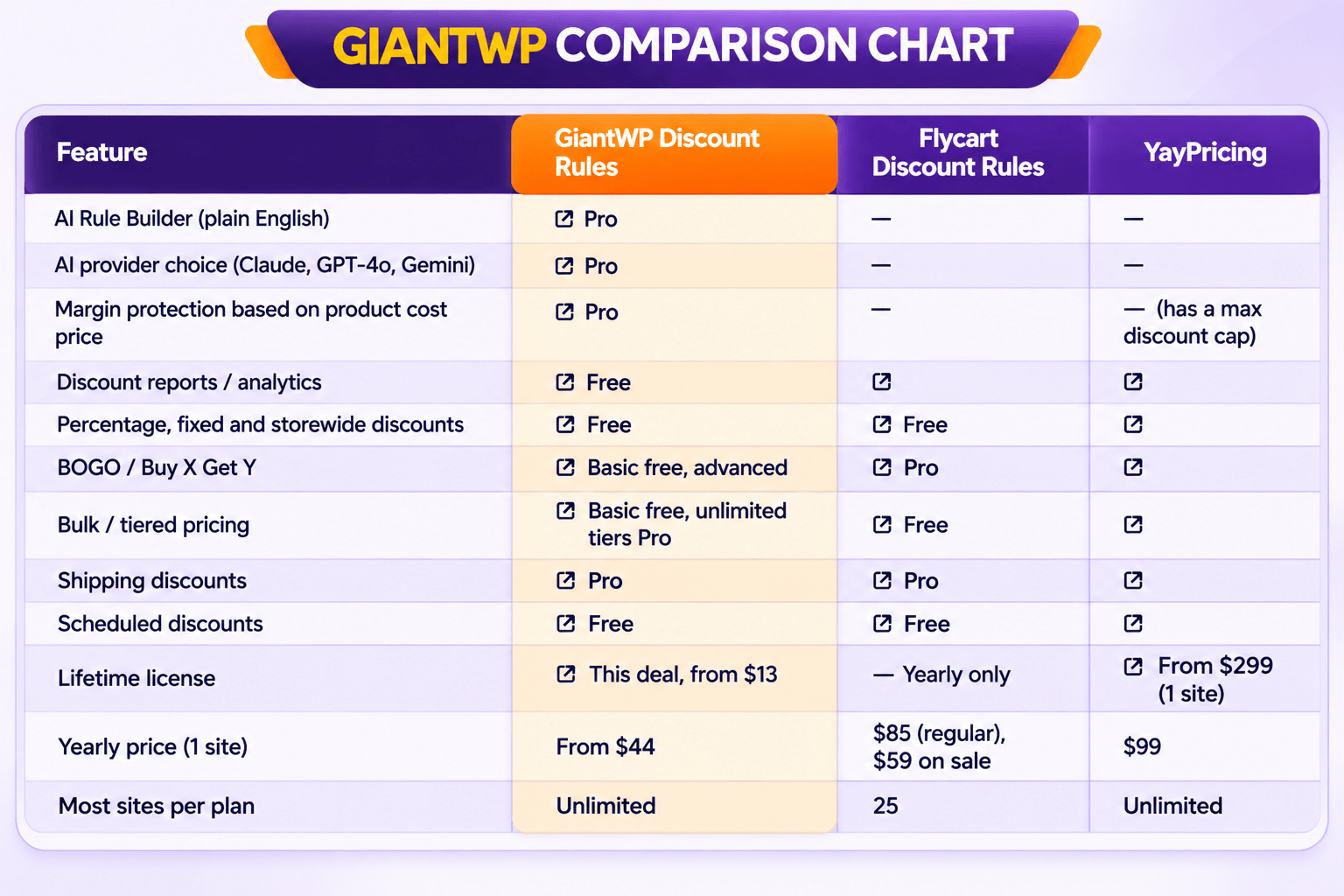
Alternative to Flycart Discount Rules, YayPricing, WooCommerce Dynamic Pricing.
Stop Managing Discounts Manually and Start Selling Smarter
Running promotions can be a great way to attract customers and increase order value. But when every discount requires a coupon code, manual setup, or complicated pricing adjustments, managing sales quickly becomes frustrating.
Customers may forget coupon codes, miss eligible offers, or abandon their cart because the discount isn’t clear. Meanwhile, store owners spend valuable time configuring promotions instead of growing their business.
GiantWP Discount Rules makes WooCommerce discount management easier by automating your pricing strategy.
Create discounts based on products, quantities, cart totals, customer roles, and other conditions. Once your rules are configured, eligible discounts can apply automatically at checkout—without customers having to remember or enter coupon codes.
From everyday promotions and wholesale pricing to seasonal sales and Buy One Get One offers, GiantWP Discount Rules helps you build flexible pricing strategies directly inside WooCommerce.
What Is GiantWP Discount Rules?
GiantWP Discount Rules is a WooCommerce discount and dynamic pricing plugin that lets store owners create automated promotional offers using flexible conditions.
Instead of relying only on WooCommerce’s default coupon functionality, you can build rules that determine when a discount should apply, which products qualify, and how much customers save.
The plugin supports fixed and percentage discounts, product and category offers, BOGO promotions, bulk pricing, scheduled sales, shipping discounts, and customer-based pricing.
It also includes advanced Pro features such as AI-assisted rule creation, personalized discount recommendations, discount analytics, and margin protection.
Whether you’re running a small online shop or managing a large WooCommerce store, GiantWP Discount Rules gives you more control over how your promotions work.
GiantWP Discount Rules is a WooCommerce discount plugin that builds BOGO, bulk, cart, and dynamic pricing rules from plain English.
How to Get Started
Step 1: Install the Plugin
Install and activate GiantWP Discount Rules on your WordPress website with WooCommerce enabled.
Step 2: Create a Discount Rule
Choose the type of promotion you want to run, such as a percentage discount, BOGO offer, bulk pricing, or shipping discount.
Step 3: Set Conditions
Select the products, categories, customer roles, cart values, quantities, or other conditions that determine when the discount should apply.
Step 4: Configure the Discount
Choose the discount amount, pricing behavior, schedule, and any applicable usage limits.
Step 5: Activate the Rule
Save and activate your discount. Eligible customers can receive the offer automatically when the configured conditions are met.
Step 6: Monitor Performance
Use the available analytics and rule usage information to understand how your promotions perform and adjust them when needed.
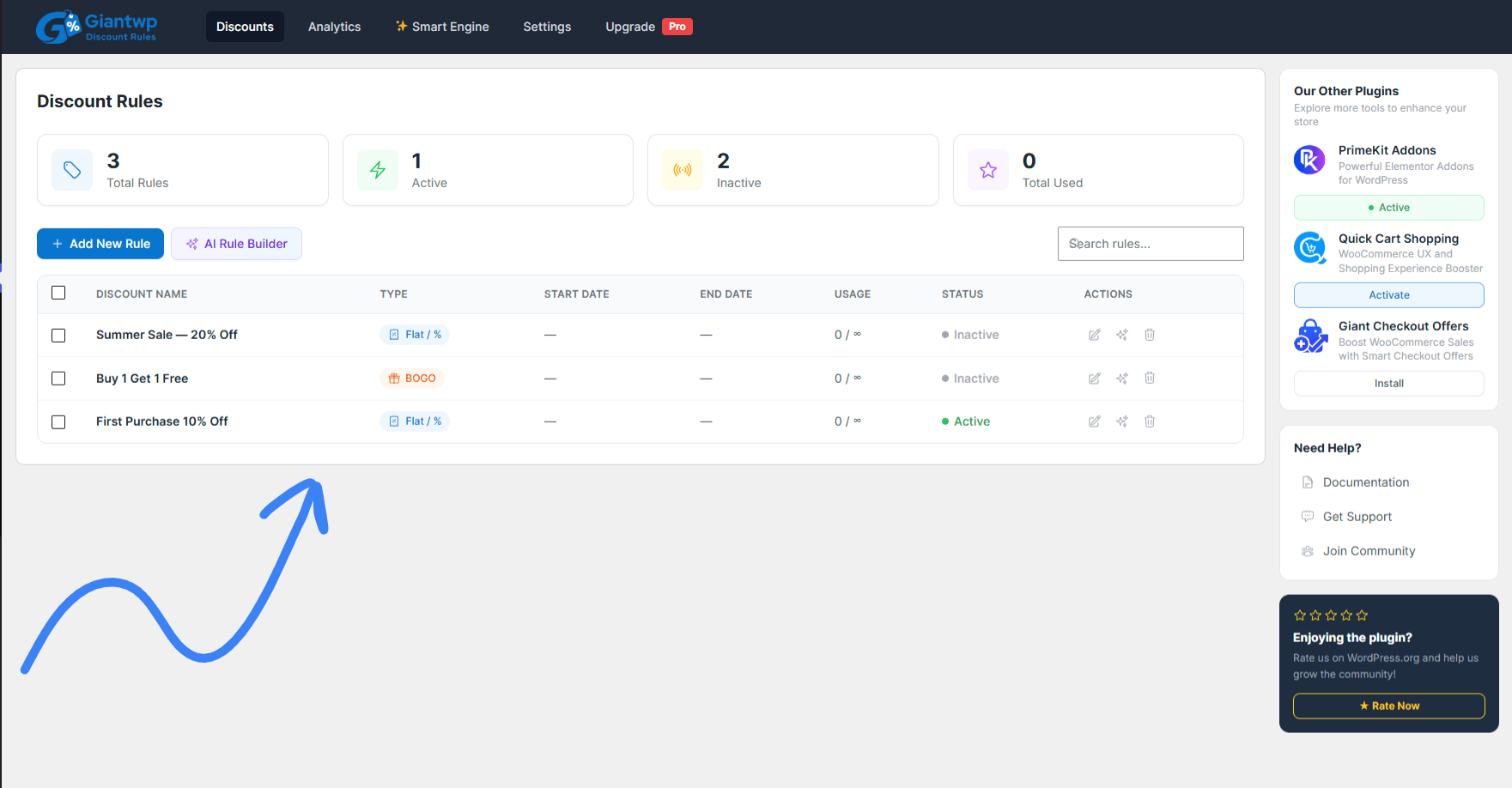
Discount Rules
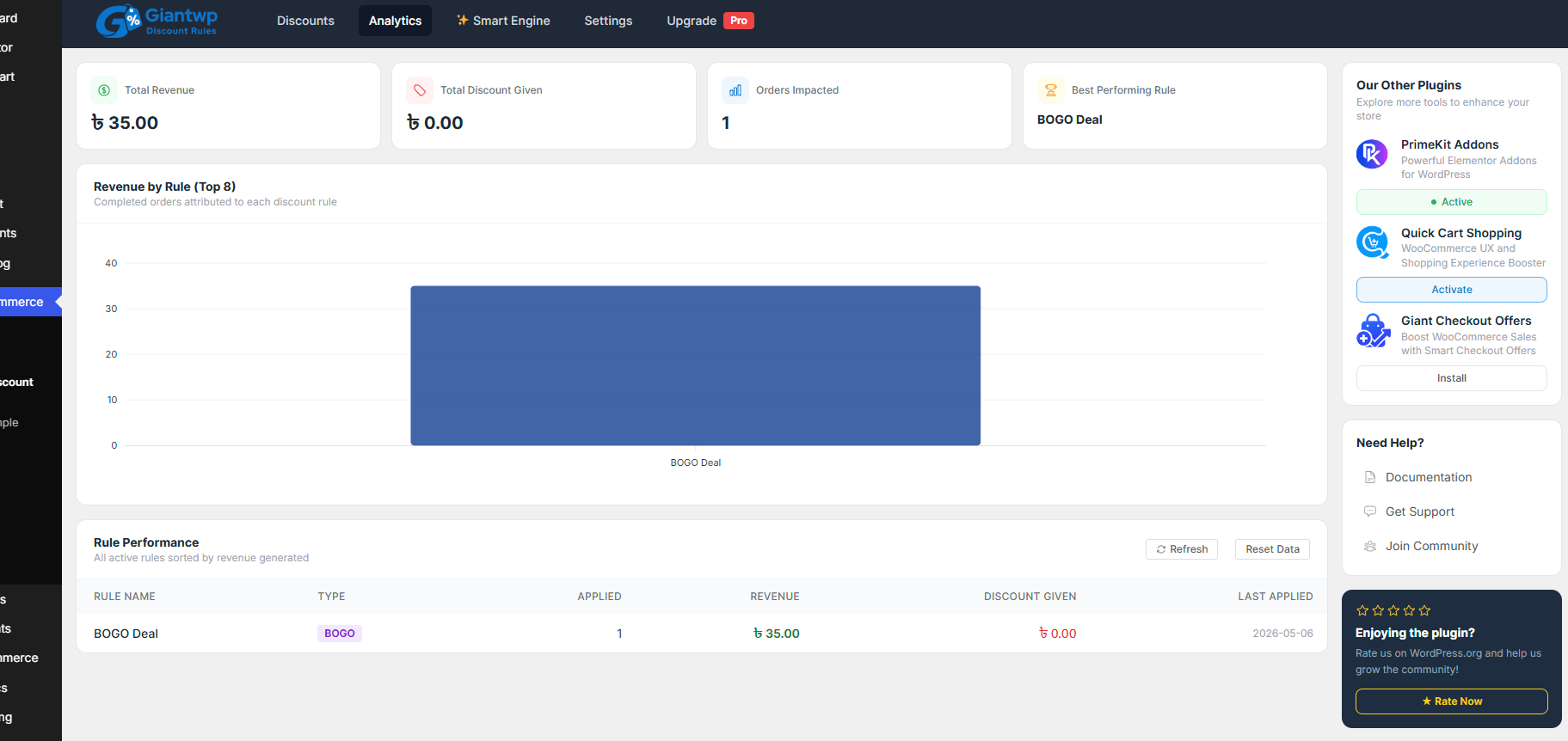
Rule Performance
Key Features
Flat & Percentage Discounts: Apply fixed amount or percentage-based discounts automatically to products or categories based on your pricing rules.
Cart-Based Discount Rules: Create discounts based on cart conditions such as subtotal, item quantity, or specific product combinations.
Product & Category Discounts: Apply automatic discounts to selected products or entire categories without manual coupon codes.
Buy X Get Y: Create Buy X Get Y offers where customers receive a free or discounted product when conditions are met.
Repeatable BOGO Offers: Allow Buy One Get One discounts to repeat based on quantity, supporting multiple products and variations.
Conditional Discount: Apply discounts using flexible conditions such as customer role, cart value, purchase history, or product rules.
Bulk & Tiered Pricing: Create tiered pricing rules like “buy more, pay less” based on quantity ranges.
Shipping Discount: Apply shipping discounts automatically based on cart contents, products, or pricing conditions.
Scheduled Discounts: Schedule discount rules to run automatically using specific dates, times, or promotional periods.
Use Cases
The holiday sale that doesn’t eat your margin: You want 25% off everything for Black Friday. You also have 40 products where 25% means selling at a loss. Set a 15% minimum margin. Those 40 get capped automatically. The rest get the full 25%.
“Buy 3, save more” for a clothing store: Type Buy 2 t-shirts get 10% off, buy 4 get 20% off. The AI builds the tiers. A pricing table shows up on the product page so shoppers see the next step.
Pushing the cart past a number: Your average order is $65. You want it at $80. Create “Spend $80, save $10.” The shopper sitting at $65 adds one more thing.
Clearing old stock: A BOGO on last season’s items. Buy one, get the second at 50% off. Stock moves, and the margin guard makes sure the second item never goes below cost.
The agency is running 30 client stores: Same rule logic, different stores. Build it once in plain English, check the analytics on each site, and show the client which promotion actually made money.
Rewarding first-time buyers: 10% off the first order, so a new visitor has a reason to buy today, not next week.
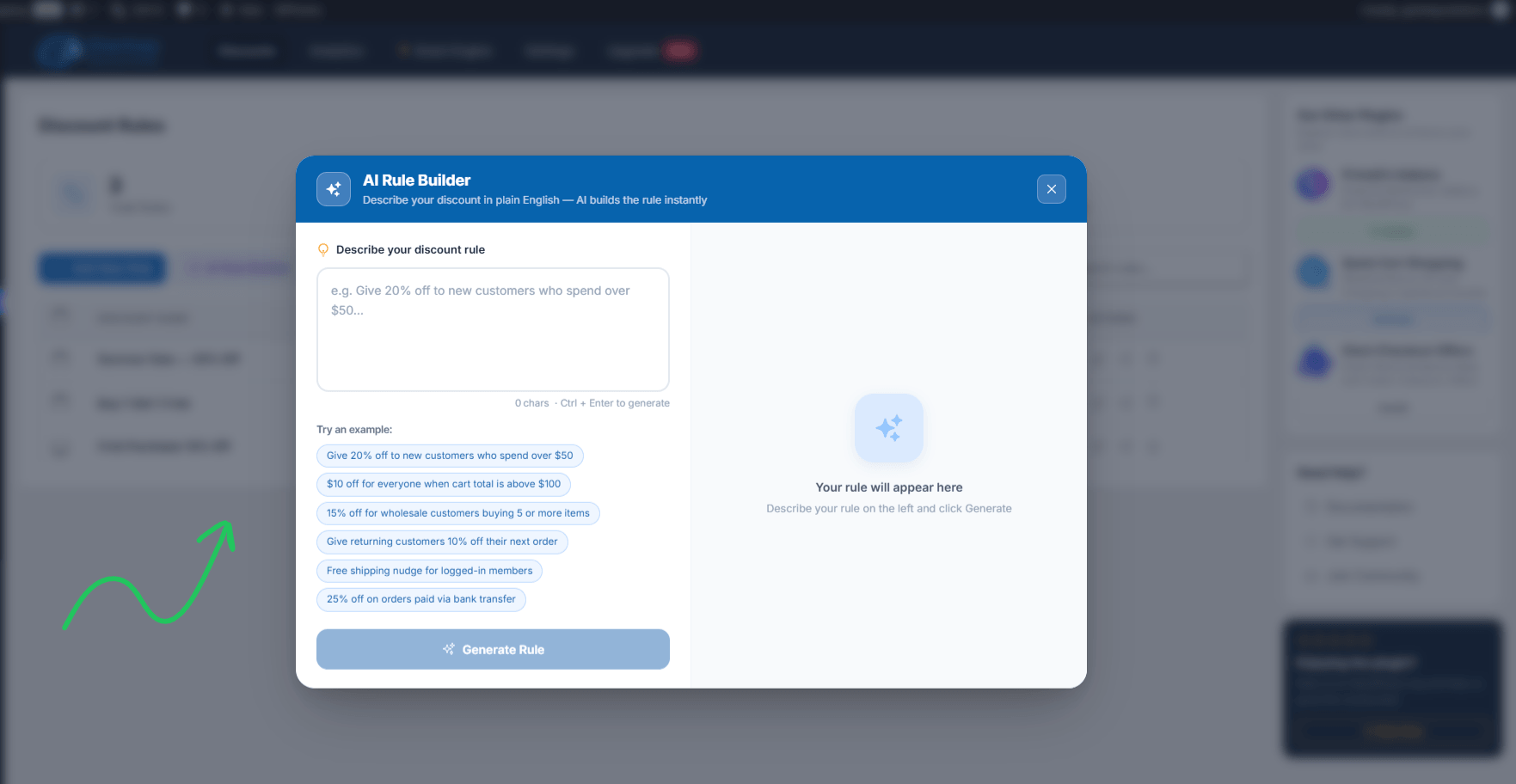
AI Rule Builder
Product Roadmap
Already shipped
AI Rule Builder: rules from plain English (v1.2.17).
Margin Protection Guard: cost price, minimum margin, global cap (v1.2.15).
AI Smart Engine: Claude, GPT-4o, and Gemini support.
Discount Analytics: revenue and usage per rule.
Coming next
Q1 2027: Cart progress bar (“Spend $20 more, get 10% off”) and discount badges.
Q2 2027: Ready-made rule templates and scheduled campaigns with countdown.
Q3 2027: AI discount suggestions based on your sales data.
Q4 2027: AOV-boosting features to raise average order value. Still in planning, shaped by customer feedback.
Deal Terms:
Lifetime access to GiantWP Discount Rules Pro
Redemption deadline: 60 days from purchase
All future Pro updates
All Pro features on every plan
30 Days Money Back Guarantee (For Non-Prime Members/Regular Users).
Create automatic WooCommerce discounts without making customers enter coupon codes.
Set up bulk pricing, tiered discounts, BOGO deals, and Buy X Get Y offers.
Best for WooCommerce store owners, eCommerce businesses, wholesalers, and WordPress agencies.
Alternative to Flycart Discount Rules, YayPricing, WooCommerce Dynamic Pricing.
Stop Managing Discounts Manually and Start Selling Smarter
Running promotions can be a great way to attract customers and increase order value. But when every discount requires a coupon code, manual setup, or complicated pricing adjustments, managing sales quickly becomes frustrating.
Customers may forget coupon codes, miss eligible offers, or abandon their cart because the discount isn’t clear. Meanwhile, store owners spend valuable time configuring promotions instead of growing their business.
GiantWP Discount Rules makes WooCommerce discount management easier by automating your pricing strategy.
Create discounts based on products, quantities, cart totals, customer roles, and other conditions. Once your rules are configured, eligible discounts can apply automatically at checkout—without customers having to remember or enter coupon codes.
From everyday promotions and wholesale pricing to seasonal sales and Buy One Get One offers, GiantWP Discount Rules helps you build flexible pricing strategies directly inside WooCommerce.
What Is GiantWP Discount Rules?
GiantWP Discount Rules is a WooCommerce discount and dynamic pricing plugin that lets store owners create automated promotional offers using flexible conditions.
Instead of relying only on WooCommerce’s default coupon functionality, you can build rules that determine when a discount should apply, which products qualify, and how much customers save.
The plugin supports fixed and percentage discounts, product and category offers, BOGO promotions, bulk pricing, scheduled sales, shipping discounts, and customer-based pricing.
It also includes advanced Pro features such as AI-assisted rule creation, personalized discount recommendations, discount analytics, and margin protection.
Whether you’re running a small online shop or managing a large WooCommerce store, GiantWP Discount Rules gives you more control over how your promotions work.
GiantWP Discount Rules is a WooCommerce discount plugin that builds BOGO, bulk, cart, and dynamic pricing rules from plain English.
How to Get Started
Step 1: Install the Plugin
Install and activate GiantWP Discount Rules on your WordPress website with WooCommerce enabled.
Step 2: Create a Discount Rule
Choose the type of promotion you want to run, such as a percentage discount, BOGO offer, bulk pricing, or shipping discount.
Step 3: Set Conditions
Select the products, categories, customer roles, cart values, quantities, or other conditions that determine when the discount should apply.
Step 4: Configure the Discount
Choose the discount amount, pricing behavior, schedule, and any applicable usage limits.
Step 5: Activate the Rule
Save and activate your discount. Eligible customers can receive the offer automatically when the configured conditions are met.
Step 6: Monitor Performance
Use the available analytics and rule usage information to understand how your promotions perform and adjust them when needed.
Discount Rules
Rule Performance
Key Features
Flat & Percentage Discounts: Apply fixed amount or percentage-based discounts automatically to products or categories based on your pricing rules.
Cart-Based Discount Rules: Create discounts based on cart conditions such as subtotal, item quantity, or specific product combinations.
Product & Category Discounts: Apply automatic discounts to selected products or entire categories without manual coupon codes.
Buy X Get Y: Create Buy X Get Y offers where customers receive a free or discounted product when conditions are met.
Repeatable BOGO Offers: Allow Buy One Get One discounts to repeat based on quantity, supporting multiple products and variations.
Conditional Discount: Apply discounts using flexible conditions such as customer role, cart value, purchase history, or product rules.
Bulk & Tiered Pricing: Create tiered pricing rules like “buy more, pay less” based on quantity ranges.
Shipping Discount: Apply shipping discounts automatically based on cart contents, products, or pricing conditions.
Scheduled Discounts: Schedule discount rules to run automatically using specific dates, times, or promotional periods.
Use Cases
The holiday sale that doesn’t eat your margin: You want 25% off everything for Black Friday. You also have 40 products where 25% means selling at a loss. Set a 15% minimum margin. Those 40 get capped automatically. The rest get the full 25%.
“Buy 3, save more” for a clothing store: Type Buy 2 t-shirts get 10% off, buy 4 get 20% off. The AI builds the tiers. A pricing table shows up on the product page so shoppers see the next step.
Pushing the cart past a number: Your average order is $65. You want it at $80. Create “Spend $80, save $10.” The shopper sitting at $65 adds one more thing.
Clearing old stock: A BOGO on last season’s items. Buy one, get the second at 50% off. Stock moves, and the margin guard makes sure the second item never goes below cost.
The agency is running 30 client stores: Same rule logic, different stores. Build it once in plain English, check the analytics on each site, and show the client which promotion actually made money.
Rewarding first-time buyers: 10% off the first order, so a new visitor has a reason to buy today, not next week.
AI Rule Builder
Product Roadmap
Already shipped
AI Rule Builder: rules from plain English (v1.2.17).
Margin Protection Guard: cost price, minimum margin, global cap (v1.2.15).
AI Smart Engine: Claude, GPT-4o, and Gemini support.
Discount Analytics: revenue and usage per rule.
Coming next
Q1 2027: Cart progress bar (“Spend $20 more, get 10% off”) and discount badges.
Q2 2027: Ready-made rule templates and scheduled campaigns with countdown.
Q3 2027: AI discount suggestions based on your sales data.
Q4 2027: AOV-boosting features to raise average order value. Still in planning, shaped by customer feedback.
Deal Terms:
Lifetime access to GiantWP Discount Rules Pro
Redemption deadline: 60 days from purchase
All future Pro updates
All Pro features on every plan
30 Days Money Back Guarantee (For Non-Prime Members/Regular Users).
Hi, I’m Habib, founder of Giant WP Solutions. I’m writing this from Bangladesh.
I build WooCommerce stores for clients. And the same thing kept happening. A store owner runs a sale. The sale does well. Then they look at the numbers, and some orders made no money at all. A few lost money. The discount plugin did its job. It just didn’t.
Know what the products cost.
GiantWP Discount Rules – DealMirror Sales Content
The other thing I kept seeing: people giving up on discount rules halfway through setup. Too many fields. Too many conditions. One wrong checkbox and the rule silently does nothing.
So in 2024 I started building GiantWP Discount Rules. Two goals. Make building a rule as easy as typing a sentence. And never let a discount sell below cost.
It’s a small team, and that has an upside. When you email support, you’ll often hear from the person who wrote the code. Your feedback goes straight into the next update. This is our first lifetime deal. I’d love for you to be part of it.
A: Not to us. You plug in your own API key from Claude, OpenAI, or Gemini and pay them directly.
Q: 3. Can I skip the AI completely?
A: Yes, every rule can be built by hand. The AI just saves you the clicking.
Q: 4. What does Margin Protection Guard actually do?
A: You tell it what each product costs you. You set the lowest margin you’ll accept. If a discount would cross that line, it won’t apply. Simple as that.
Q: 5. Will it work with my theme?
A: If your theme follows WooCommerce standards, yes. That includes Elementor and block themes.
Reviews
Reviews
There are no reviews yet.
Be the first to review “GiantWP Discount Rules : Automate WooCommerce Discounts and Boost Store Sales” Cancel reply





Reviews
There are no reviews yet.