Home » Store » Erioun: Your Personal ATS for a Smarter Job Search
Erioun: Your Personal ATS for a Smarter Job Search
TL;DR
Track applications automatically without constantly updating a spreadsheet
Connect employer replies to the right application with dedicated email aliases
Match your CV to jobs and discover relevant opportunities with AI-powered tools
Alternative: Use Trello for manual tracking
Erioun Lifetime Deal
Job searching becomes messy surprisingly quickly.
After dozens of applications, it is easy to forget which CV you used, whether a recruiter replied, when you planned to follow up, or which roles are still worth pursuing. A spreadsheet may help at first, but keeping it updated manually becomes another task on an already stressful to-do list.
And when an important recruiter email gets buried in your inbox, you may not notice it until much later. The problem isn’t applying. It’s keeping track of everything around the applications.
Erioun takes care of much of that administrative work. Each application can have its own email alias, allowing employer replies to be linked to the right role. Replies are classified, and the application stage can move accordingly, while you remain in control of every action.
You can also import existing applications, organize CV versions, prepare applications, and keep follow-ups visible from one workspace.
The goal is simple: you focus on the job search; Erioun handles the bookkeeping.
Erioun is a personal Applicant Tracking System (ATS) built for job seekers.
Every company you apply to runs your application through an ATS. You get a spreadsheet, browser tabs, and an inbox full of noise. Erioun levels the field: a personal applicant tracking system that gives job seekers the same weapons hiring teams already use. Companies have an ATS. Now you do too.
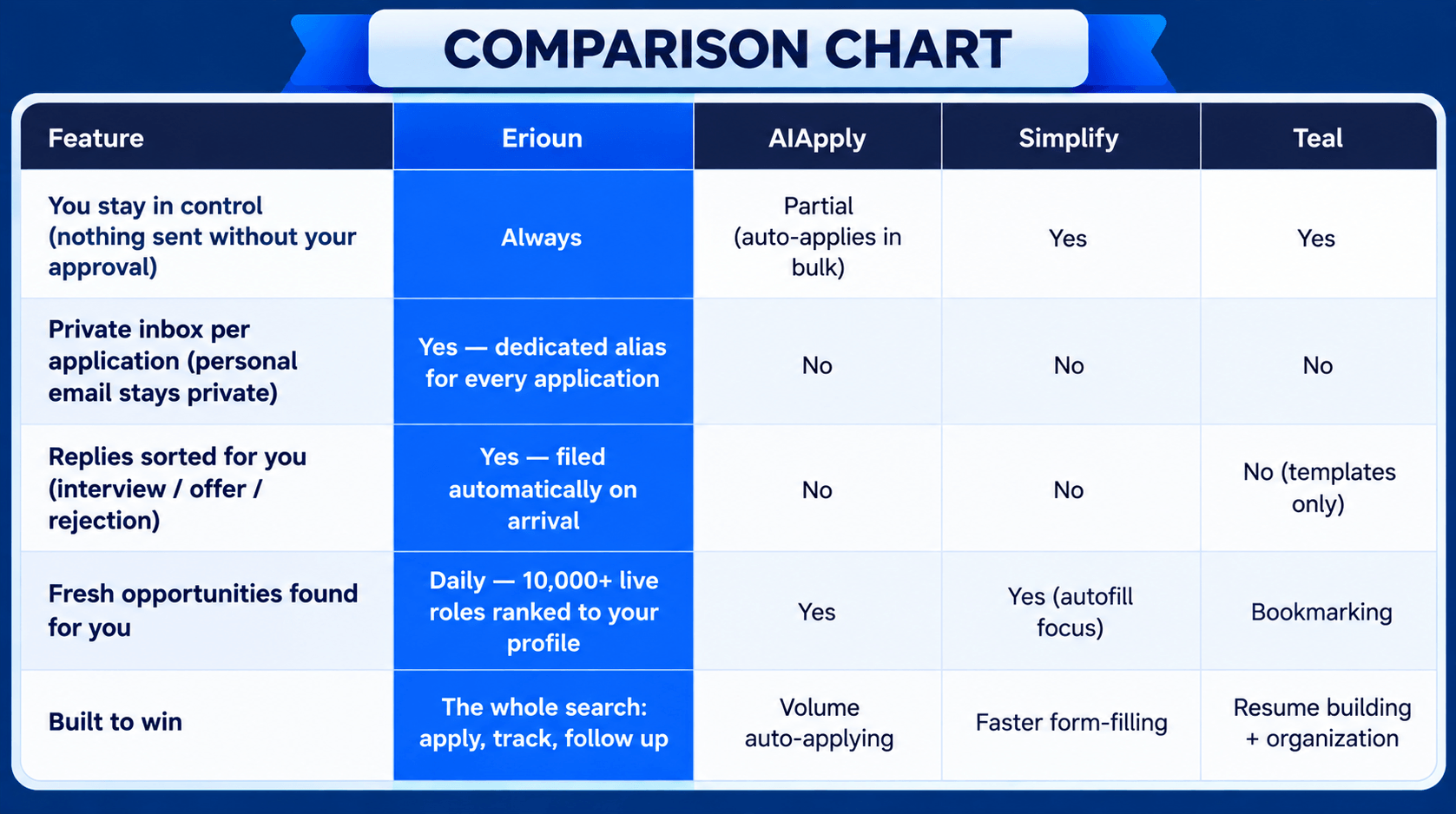
Every application gets its own private email alias, every reply files itself the moment it lands, and every status updates on its own, while nothing is ever sent without your approval.
Tutorial Video
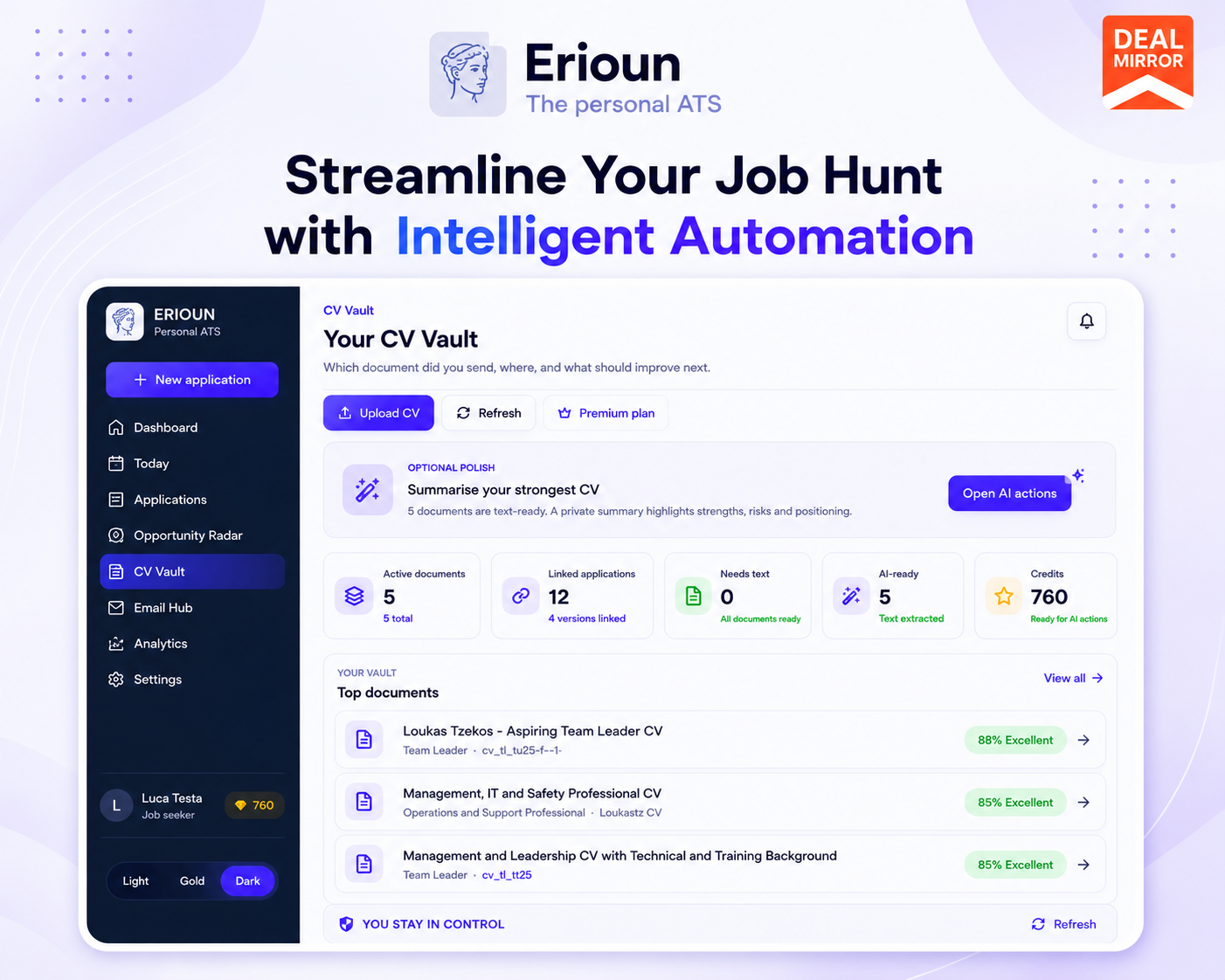
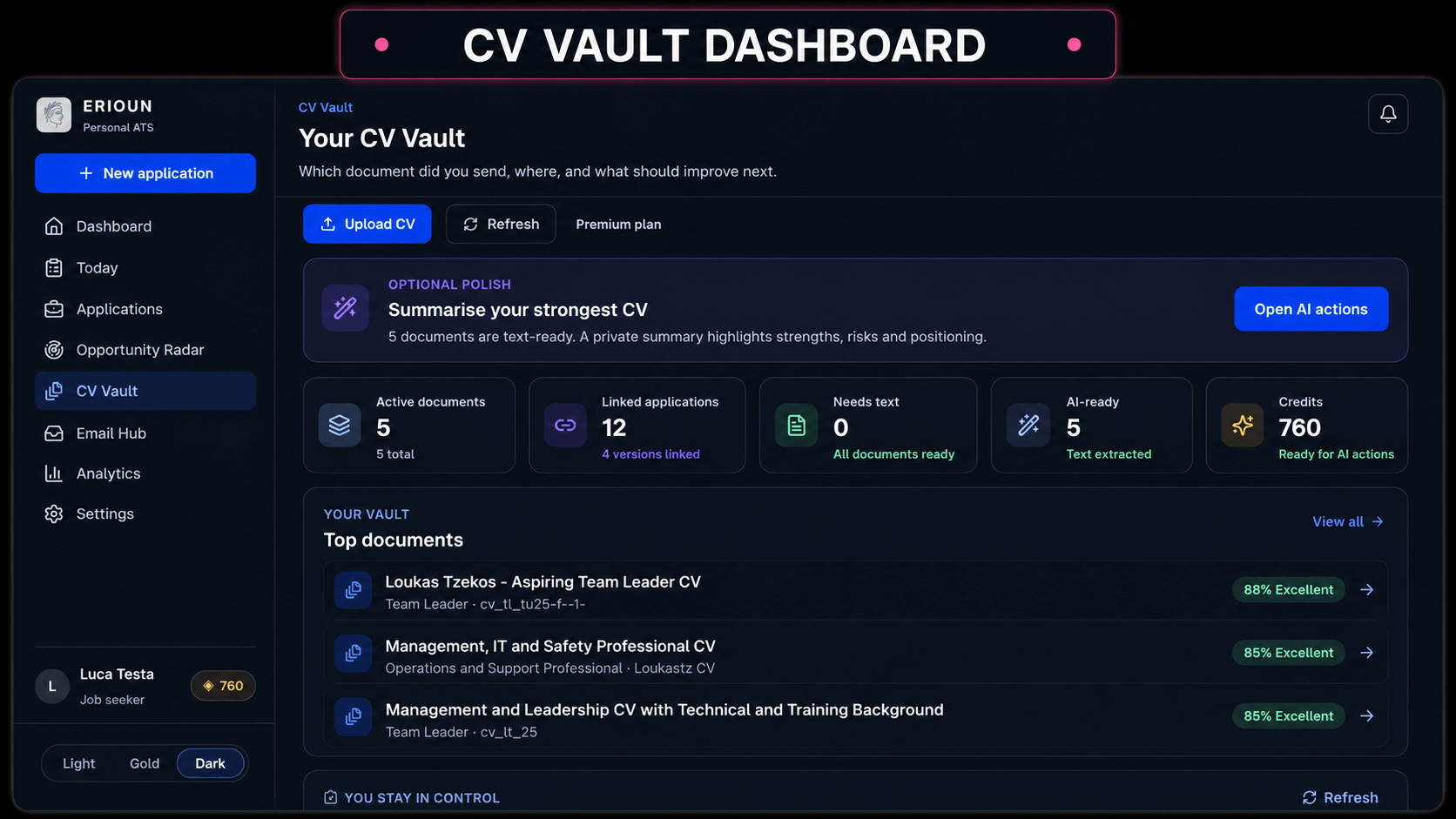
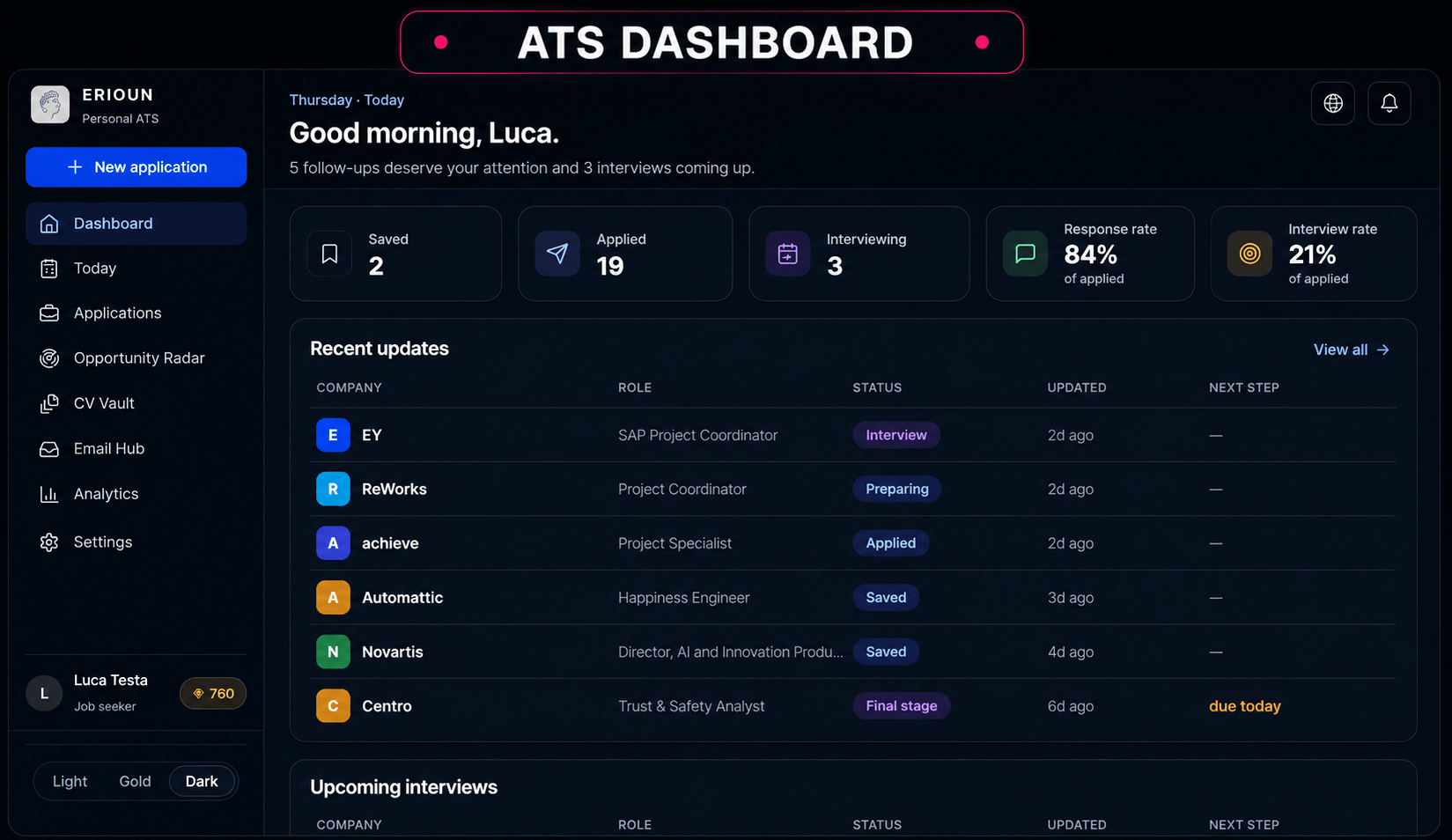
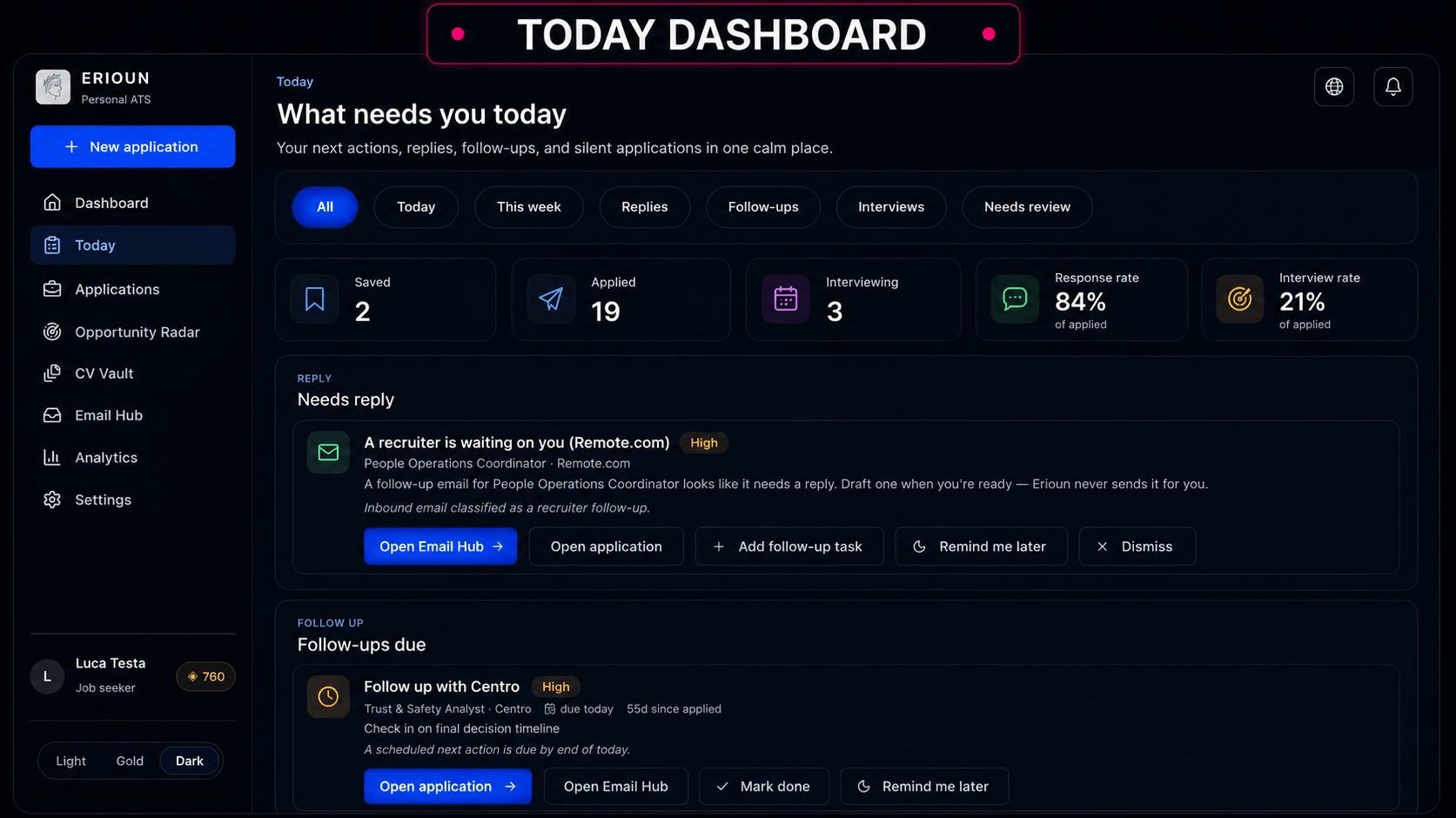
Dashboard Images
Key Features
Self-Updating Job Application Tracker: Keep your applications organized without constantly changing rows and statuses manually. Erioun connects application activity with employer replies to help keep your job-search pipeline current.
Email Hub: Give each application its own dedicated email address. Employer replies can then be connected to the appropriate application and classified, keeping important conversations attached to the right job.
CV Fit Score: Not every job requires the same CV. Compare your CV against a job description to identify strengths, gaps, and areas that may need improvement before you apply.
Opportunity Radar: Find relevant job opportunities without manually searching through endless listings. Opportunity Radar helps surface and rank opportunities based on your profile and preferences.
CV Version Management: Keep different CV versions organized and connect them to the applications where you used them. When a recruiter gets back to you, you know exactly which CV they received.
Application Workspace: Keep job descriptions, CVs, notes, documents, and next actions together for each opportunity. Everything you need to prepare an application stays connected to the role.
Application Autofill: The Erioun Companion browser extension can help fill supported job application forms using information you’ve already saved. You still review the application and submit it yourself.
Follow-Up Tracking: Keep track of when applications need another look. Instead of relying on memory, you can see your follow-ups and next actions alongside the relevant application.
Ghosted Applications: Applications don’t always end with a rejection. Erioun helps identify applications that have gone quiet so you can decide whether to follow up or move on.
Use Cases
Track every application automatically: Statuses update themselves the moment a reply lands, so you always know where you stand without touching a spreadsheet.
Apply with your personal inbox out of the firing line: A dedicated professional alias for every application keeps your real email private and your search organized.
Let better opportunities find you: The Opportunity Radar scans 10,000+ live openings daily and surfaces the roles that actually fit your profile.
Put your best self forward every time: The CV Fit Score shows which of your CVs gives you the strongest shot before you hit apply.
Product Roadmap
Mid-August: release of a plug-in to make auto-filling applications easier.
Before the end of August: launch of an easy-track Telegram bot.
Before the end of September: launch of the Android app.
Later: launch of the iOS app.
Alongside these releases, the core web app is continuously improved: bugs are fixed, the Opportunity Radar is expanded, and overall capabilities grow based on user feedback.
Deal Terms:
Length of access: Lifetime
Redemption deadline: 60 days from purchase
30 Days Money Back Guarantee (For Non-Prime Members/Regular Users).
Track applications automatically without constantly updating a spreadsheet
Connect employer replies to the right application with dedicated email aliases
Match your CV to jobs and discover relevant opportunities with AI-powered tools
Alternative: Use Trello for manual tracking
Erioun Lifetime Deal
Job searching becomes messy surprisingly quickly.
After dozens of applications, it is easy to forget which CV you used, whether a recruiter replied, when you planned to follow up, or which roles are still worth pursuing. A spreadsheet may help at first, but keeping it updated manually becomes another task on an already stressful to-do list.
And when an important recruiter email gets buried in your inbox, you may not notice it until much later. The problem isn’t applying. It’s keeping track of everything around the applications.
Erioun takes care of much of that administrative work. Each application can have its own email alias, allowing employer replies to be linked to the right role. Replies are classified, and the application stage can move accordingly, while you remain in control of every action.
You can also import existing applications, organize CV versions, prepare applications, and keep follow-ups visible from one workspace.
The goal is simple: you focus on the job search; Erioun handles the bookkeeping.
Erioun is a personal Applicant Tracking System (ATS) built for job seekers.
Every company you apply to runs your application through an ATS. You get a spreadsheet, browser tabs, and an inbox full of noise. Erioun levels the field: a personal applicant tracking system that gives job seekers the same weapons hiring teams already use. Companies have an ATS. Now you do too.
Every application gets its own private email alias, every reply files itself the moment it lands, and every status updates on its own, while nothing is ever sent without your approval.
Tutorial Video
Dashboard Images
Key Features
Self-Updating Job Application Tracker: Keep your applications organized without constantly changing rows and statuses manually. Erioun connects application activity with employer replies to help keep your job-search pipeline current.
Email Hub: Give each application its own dedicated email address. Employer replies can then be connected to the appropriate application and classified, keeping important conversations attached to the right job.
CV Fit Score: Not every job requires the same CV. Compare your CV against a job description to identify strengths, gaps, and areas that may need improvement before you apply.
Opportunity Radar: Find relevant job opportunities without manually searching through endless listings. Opportunity Radar helps surface and rank opportunities based on your profile and preferences.
CV Version Management: Keep different CV versions organized and connect them to the applications where you used them. When a recruiter gets back to you, you know exactly which CV they received.
Application Workspace: Keep job descriptions, CVs, notes, documents, and next actions together for each opportunity. Everything you need to prepare an application stays connected to the role.
Application Autofill: The Erioun Companion browser extension can help fill supported job application forms using information you’ve already saved. You still review the application and submit it yourself.
Follow-Up Tracking: Keep track of when applications need another look. Instead of relying on memory, you can see your follow-ups and next actions alongside the relevant application.
Ghosted Applications: Applications don’t always end with a rejection. Erioun helps identify applications that have gone quiet so you can decide whether to follow up or move on.
Use Cases
Track every application automatically: Statuses update themselves the moment a reply lands, so you always know where you stand without touching a spreadsheet.
Apply with your personal inbox out of the firing line: A dedicated professional alias for every application keeps your real email private and your search organized.
Let better opportunities find you: The Opportunity Radar scans 10,000+ live openings daily and surfaces the roles that actually fit your profile.
Put your best self forward every time: The CV Fit Score shows which of your CVs gives you the strongest shot before you hit apply.
Product Roadmap
Mid-August: release of a plug-in to make auto-filling applications easier.
Before the end of August: launch of an easy-track Telegram bot.
Before the end of September: launch of the Android app.
Later: launch of the iOS app.
Alongside these releases, the core web app is continuously improved: bugs are fixed, the Opportunity Radar is expanded, and overall capabilities grow based on user feedback.
Deal Terms:
Length of access: Lifetime
Redemption deadline: 60 days from purchase
30 Days Money Back Guarantee (For Non-Prime Members/Regular Users).
Up to 50 Opportunity radar matches, refreshed every 3 days
Full self-updating tracker
Tier 2
One-time payment. Lifetime access.
$169.00$299.00
600 Active applications
750 AI Coins/Month
2000/600 Alias emails/month (received/sent)
25 New CV uploads/month (50 stored)
Up to 120 Opportunity radar matches (Daily)
Full search capacity tracker
Tier 3
One-time payment. Lifetime access.
$499.00$990.00
3,000 Active applications
2500 AI Coins/Month
8000/2500 Alias emails/month (received/sent)
80 New CV uploads/month (200 stored)
Up to 200 Opportunity radar matches (twice-daily priority)
Power-user scale tracker
From The Founders
Loukas Tzekos
Founder
“Looking for a job is an exhausting process, and a fight nobody should have to face alone. I watched my best friend get worn down by it, and that’s why I built Erioun for him.
It’s a personal ATS, built to give job seekers the same tools companies already use against them in the hiring process.”
A: Never. Every application gets its own dedicated alias address, so your personal inbox stays completely out of your job search.
Q: 3. Will Erioun apply to jobs for me automatically?
A: No, and that is by design. Bulk auto-applying gets applications ignored. Erioun prepares everything for you, but you approve every send, so each application goes out at your best.
Q: 4. Where do the job listings come from?
A: The Opportunity Radar pulls from over 10,000 live openings across career sites and job boards, refreshed daily and ranked against the user’s profile.
Q: 5. Is my data safe?
A: Erioun is EU-built and GDPR-native, does not scrape LinkedIn, never sells data, and data can be exported or deleted at any time.
Q: 6. What is the CV Fit Score?
A: An instant comparison of a CV against a job description that flags strengths, gaps, and the best-matching CV version. It is a signal, not a guarantee.
Q: 7. What happens if I go over my plan’s limits?
A: Nothing is lost. Applications are archived, incoming mail is held safely, and outbound sending pauses until renewal.
Q: 8. Do recruiters notice I’m using an alias?
A: No, it looks and functions like a normal professional email address.
Reviews
5 reviews for Erioun: Your Personal ATS for a Smarter Job Search
Rated 4 out of 5
Sophia L. –
It’s like having a personal assistant for job searching. Erioun’s features are perfectly aligned with my needs.
Rated 4 out of 5
Mark S. –
The automated replies classification saved me so much time. I wish I had discovered Erioun sooner!
Rated 5 out of 5
David K. –
My application process is so much smoother now. Erioun’s intuitive system made a once tedious task, effortless!
Rated 5 out of 5
Jane D. –
Erioun completely transformed my job search experience. I feel more organized and confident knowing everything is tracked automatically.
Rated 5 out of 5
Emily R. –
Erioun has taken the stress out of job hunting. I can focus on finding roles without worrying about missing important replies.





5 reviews for Erioun: Your Personal ATS for a Smarter Job Search
Sophia L. –
It’s like having a personal assistant for job searching. Erioun’s features are perfectly aligned with my needs.
Mark S. –
The automated replies classification saved me so much time. I wish I had discovered Erioun sooner!
David K. –
My application process is so much smoother now. Erioun’s intuitive system made a once tedious task, effortless!
Jane D. –
Erioun completely transformed my job search experience. I feel more organized and confident knowing everything is tracked automatically.
Emily R. –
Erioun has taken the stress out of job hunting. I can focus on finding roles without worrying about missing important replies.