Your Cart

No products in the cart.

Our Top Picks

RARHost : High-performance servers with NVMe SSD storage and LiteSpeed Web Server
RARHost
$59.00 Starter
Add to Cart
1forAll : Your All-in-One Tool For Voice, Image & Video AI
1forAll
$29.00 Tier 1
Add to Cart
We.Inc: Build Chatbots, Websites & More with AI
We.Inc
$349.00 LTD Tier 1
Add to Cart
Brand2Social : Social Media Management tool for generating automated messages
Brand2Social
$29.00 Brand
Add to Cart

Shop Premium Tools Starting at $9 😍 Save on Lifetime Access

Explore Now
00 : 00 : 00 : 00
Day Hour Min Sec
Home » Store » Decloak: Find Hidden Website Security Risks Before They Become Problems

Decloak: Find Hidden Website Security Risks Before They Become Problems

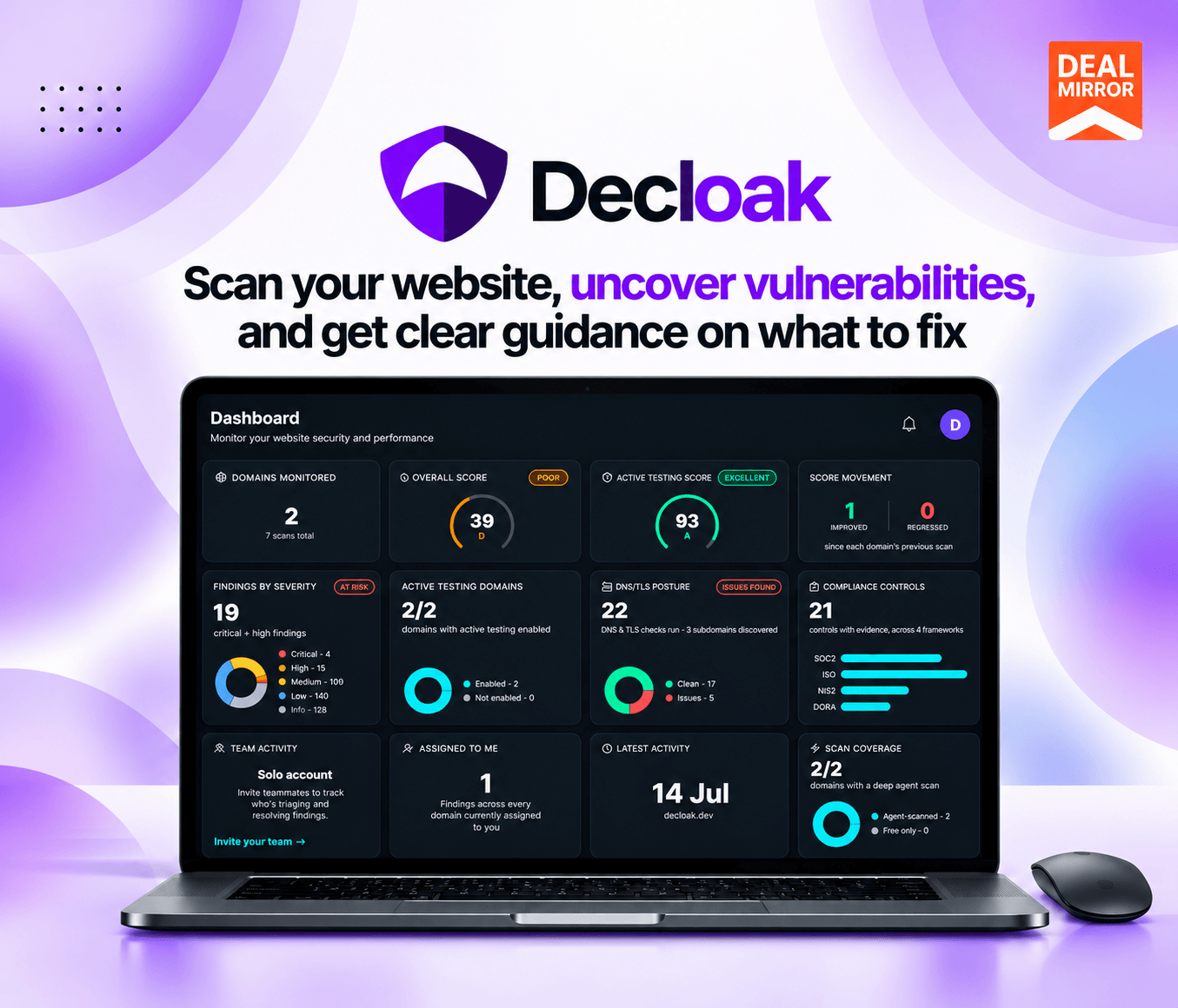
Decloak AI website security scanner dashboard

TL;DR

Decloak Lifetime Deal

A website can look perfectly normal on the surface while hiding security weaknesses underneath. Outdated JavaScript libraries, missing security headers, exposed subdomains, risky third-party scripts, and incorrect configurations can leave websites more vulnerable than expected.

Finding these issues manually takes time, and basic scanners may not provide enough context to understand what needs attention first.

Decloak helps you look deeper into your website’s security. It combines automated scanning, AI-assisted investigation, vulnerability checks, and actionable remediation guidance to help you understand potential risks and decide what to fix.

From a quick security snapshot of a single page to deeper investigations across an entire website, Decloak gives developers and teams a more organized way to identify issues, track improvements, and prepare security evidence. Higher-tier plans also offer active security testing, AI pentesting, and compliance reporting.

Decloak examines these areas through eight analysis layers, including HTTP/TLS security, page content, network activity, JavaScript vulnerabilities, tag managers, third-party domains, platform misconfigurations, and AI-generated analysis.

Instead of simply giving you a list of technical warnings, Decloak provides a security score, a letter grade, and an AI-generated summary. Its paid investigation features can go further by exploring related findings, examining additional pages, and suggesting specific remediation steps.

Demo Video

Decloak finds what’s running underneath a website, tests it the way an attacker would, and proves what it finds. Other scanners check the page. Decloak checks the injected scripts, forgotten subdomains, exposed APIs, and outdated libraries behind it.

Dashboard Images

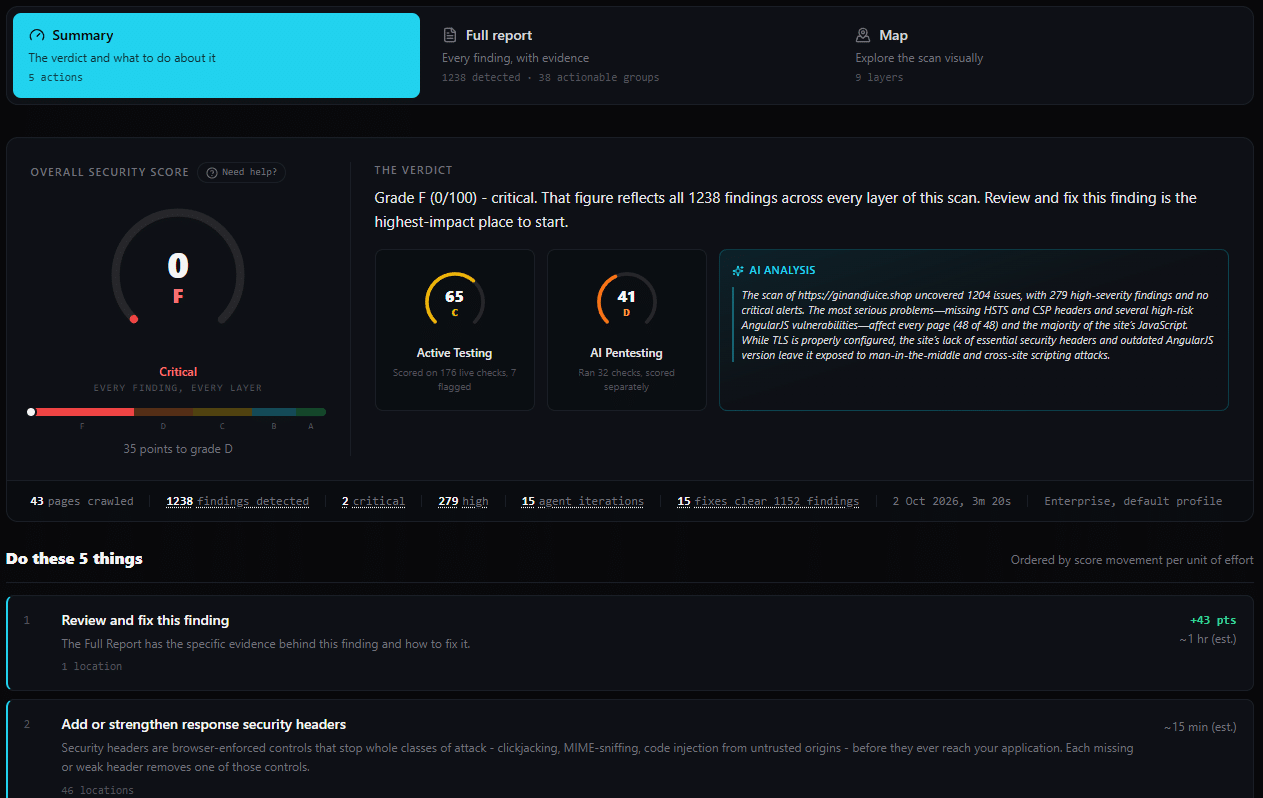
Decloak website vulnerability scan report

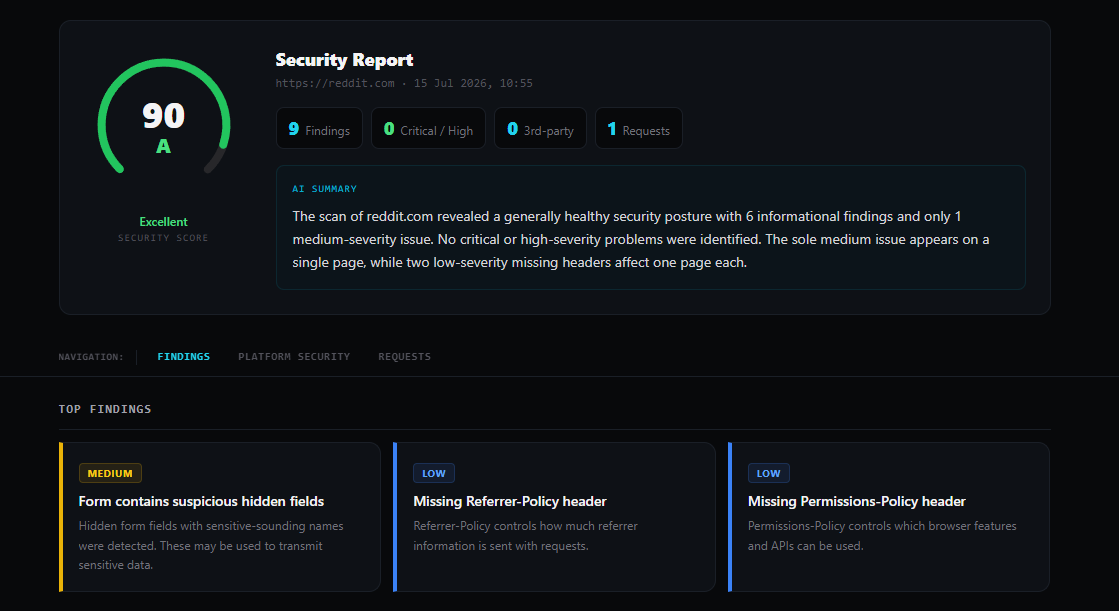
Security Report

Decloak JavaScript vulnerability detection

How Decloak Works

Step 1: Enter a website URL

Paste the URL you want to check into the free scanner. You can start without an account.

Step 2: Run the security scan

Decloak runs its supported analysis layers to examine HTTP/TLS settings, scripts, browser network activity, platform information, and other security signals.

Step 3: Review your report

Check the security score, letter grade, findings, and AI-generated summary to understand the areas that need attention.

Step 4: Investigate deeper

If you need more coverage, use a paid plan to investigate multiple pages, examine related resources, and obtain more detailed remediation guidance.

Step 5: Fix and verify issues

Use the findings to guide your remediation work. Run another scan and compare the results to see what has changed.

Step 6: Automate ongoing checks

On supported plans, schedule recurring scans, configure alerts, and export reports for your team or compliance workflow.

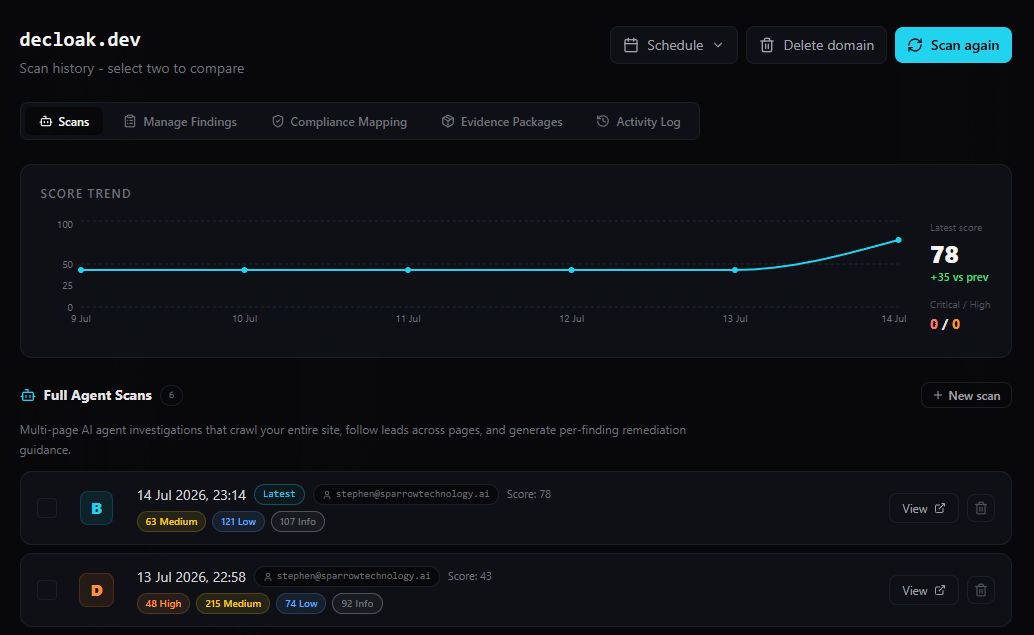
Scan History

Decloak web application security testing platform

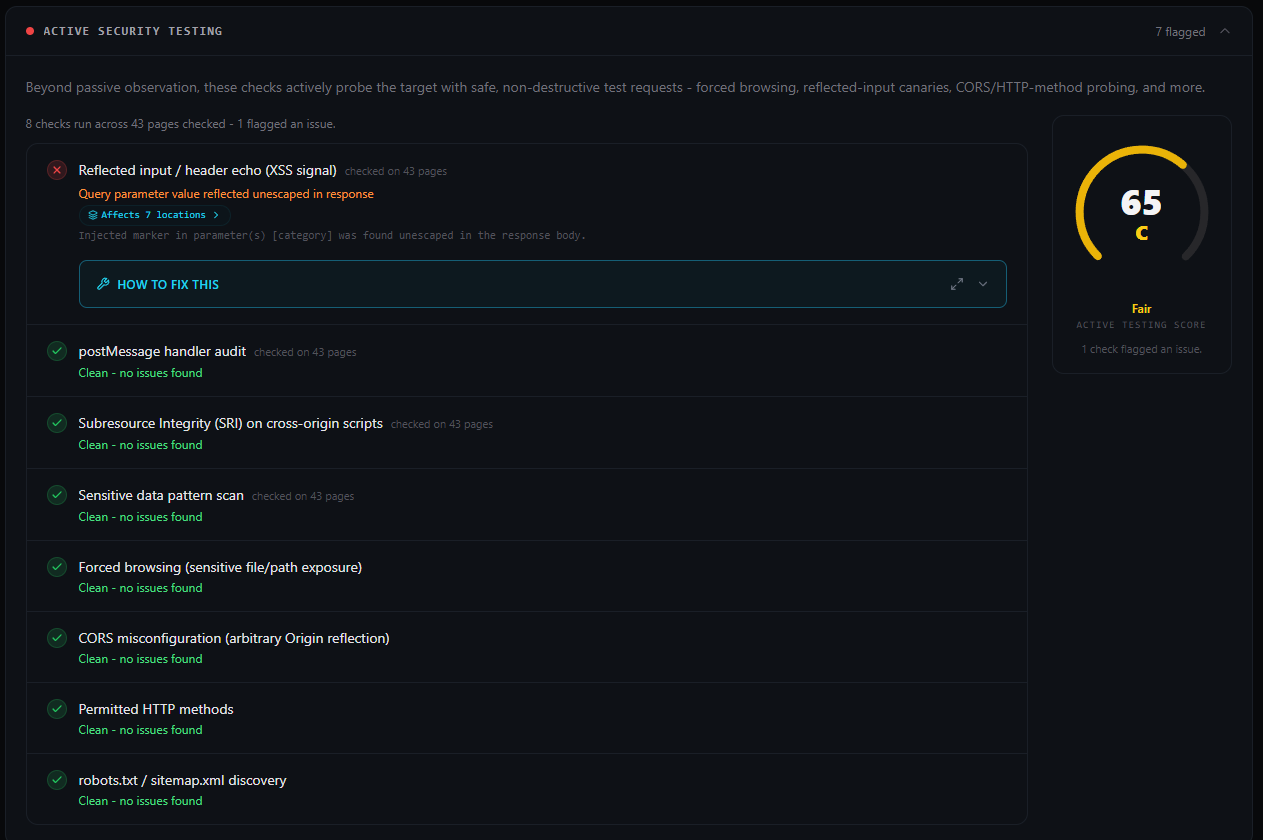
Active Security Testing

Decloak compliance reporting and security evidence

Key Features

  • Eight-Layer Website Security Scanning: Analyze HTTP/TLS, HTML, JavaScript, network traffic, third-party services, and platform configurations to identify potential security risks.
  • Instant Security Reports: Scan a URL in seconds to get security findings, an overall score, a letter grade, and an AI-generated summary.
  • JavaScript Vulnerability Detection: Identify vulnerable JavaScript libraries, affected versions, and relevant CVE details using vulnerability databases.
  • Security Headers and HTTP/TLS Analysis: Check security headers, cookies, CORS settings, certificates, and TLS configurations for potential weaknesses.
  • Third-Party Script Monitoring: Discover external domains and scripts loaded by your website to investigate unexpected connections and potential risks.
  • AI-Powered Website Investigation: Use AI to investigate multiple pages, explore related security findings, and uncover potential vulnerabilities.
  • AI-Generated Remediation Plans: Get prioritized, plain-language recommendations to help developers understand and fix security issues.
  • Security Score and Letter Grade: Measure your website’s security posture with a weighted score from 0–100 and a grade from A to F.
  • DNS, SSL/TLS, and Subdomain Discovery: Analyze DNS records, certificates, and subdomains to identify configuration issues and potential takeover risks.
  • CMS and Platform Security Checks: Identify supported platforms and check for known vulnerabilities, exposed databases, and risky configurations.
  • Scheduled Scans and Security Alerts: Automate recurring scans and receive email notifications, with Slack and webhook integrations available on higher-tier plans.
  • Scan History and Comparison Reports: Compare previous scans to track newly detected issues, resolved vulnerabilities, and changes in severity.
  • Compliance Reporting and Evidence: Generate framework mappings and security evidence to support compliance reviews, audits, and remediation tracking.
  • Active Security Testing and AI Pentesting: Perform authorized security tests to investigate potential vulnerabilities and collect supporting evidence of confirmed findings.
  • API Access and AI-Agent Integration: Connect security scans and results to development workflows using API access and MCP-compatible AI agents.

Use Cases

  • Website Owners and Administrators: Check your website for common security weaknesses, review its score, and identify areas that may need attention.
  • Web Developers: Investigate JavaScript vulnerabilities, security headers, exposed source maps, and configuration problems. Use remediation guidance to understand possible fixes.
  • SaaS Startups: Review the security posture of your web application as it evolves. Investigate third-party dependencies, browser activity, and common platform misconfigurations.
  • AI-Built Application Creators: Check supported applications built with platforms such as Lovable, Supabase, Base44, Bubble, and similar tools for common exposure risks, including publicly readable databases and exposed service-role keys.
  • Digital Agencies and Consultants: Review client websites, share reports, and use white-label PDF branding on supported plans to present findings under your own brand.
  • Security Teams: Run recurring scans, review findings across domains, track remediation, and connect alerts to supported team tools.
  • Compliance and Audit Teams: Organize scan reports, framework mappings, and evidence packages to support security reviews and audit preparation.
  • Penetration Testing Professionals: Use enterprise active testing and AI pentesting features to investigate supported findings and collect evidence of confirmed vulnerabilities on authorized targets.

Deal Terms

  • Length of access: Lifetime
  • Redemption deadline: 60 days from purchase
  • 30-Day Money-Back Guarantee (For Non-Prime Members/Regular Users).
  • 60-Day Money-Back Guarantee (For DealMirror Prime Members Only).

Intro Video

Roadmap & Use Cases:

Discount code auto-applied at checkout.

Decloak: Find Hidden Website Security Risks Before They Become Problems

One-time payment. Lifetime access.

What you get in this deal

Full AI agent investigation
Up to 50 pages per scan
Per-finding remediation guidance
Priority Remediation Plan (top fixes, AI-written, exportable PDF)

$49.00/$474.00 90% Saving

Select Plan Check Plan Details


30 Days Money-back Guarantee

Day
Hrs
Min
Sec

TL;DR

Decloak Lifetime Deal

A website can look perfectly normal on the surface while hiding security weaknesses underneath. Outdated JavaScript libraries, missing security headers, exposed subdomains, risky third-party scripts, and incorrect configurations can leave websites more vulnerable than expected.

Finding these issues manually takes time, and basic scanners may not provide enough context to understand what needs attention first.

Decloak helps you look deeper into your website’s security. It combines automated scanning, AI-assisted investigation, vulnerability checks, and actionable remediation guidance to help you understand potential risks and decide what to fix.

From a quick security snapshot of a single page to deeper investigations across an entire website, Decloak gives developers and teams a more organized way to identify issues, track improvements, and prepare security evidence. Higher-tier plans also offer active security testing, AI pentesting, and compliance reporting.

Decloak examines these areas through eight analysis layers, including HTTP/TLS security, page content, network activity, JavaScript vulnerabilities, tag managers, third-party domains, platform misconfigurations, and AI-generated analysis.

Instead of simply giving you a list of technical warnings, Decloak provides a security score, a letter grade, and an AI-generated summary. Its paid investigation features can go further by exploring related findings, examining additional pages, and suggesting specific remediation steps.

Demo Video

Decloak finds what’s running underneath a website, tests it the way an attacker would, and proves what it finds. Other scanners check the page. Decloak checks the injected scripts, forgotten subdomains, exposed APIs, and outdated libraries behind it.

Dashboard Images

Decloak website vulnerability scan report

Security Report

Decloak JavaScript vulnerability detection

How Decloak Works

Step 1: Enter a website URL

Paste the URL you want to check into the free scanner. You can start without an account.

Step 2: Run the security scan

Decloak runs its supported analysis layers to examine HTTP/TLS settings, scripts, browser network activity, platform information, and other security signals.

Step 3: Review your report

Check the security score, letter grade, findings, and AI-generated summary to understand the areas that need attention.

Step 4: Investigate deeper

If you need more coverage, use a paid plan to investigate multiple pages, examine related resources, and obtain more detailed remediation guidance.

Step 5: Fix and verify issues

Use the findings to guide your remediation work. Run another scan and compare the results to see what has changed.

Step 6: Automate ongoing checks

On supported plans, schedule recurring scans, configure alerts, and export reports for your team or compliance workflow.

Scan History

Decloak web application security testing platform

Active Security Testing

Decloak compliance reporting and security evidence

Key Features

  • Eight-Layer Website Security Scanning: Analyze HTTP/TLS, HTML, JavaScript, network traffic, third-party services, and platform configurations to identify potential security risks.
  • Instant Security Reports: Scan a URL in seconds to get security findings, an overall score, a letter grade, and an AI-generated summary.
  • JavaScript Vulnerability Detection: Identify vulnerable JavaScript libraries, affected versions, and relevant CVE details using vulnerability databases.
  • Security Headers and HTTP/TLS Analysis: Check security headers, cookies, CORS settings, certificates, and TLS configurations for potential weaknesses.
  • Third-Party Script Monitoring: Discover external domains and scripts loaded by your website to investigate unexpected connections and potential risks.
  • AI-Powered Website Investigation: Use AI to investigate multiple pages, explore related security findings, and uncover potential vulnerabilities.
  • AI-Generated Remediation Plans: Get prioritized, plain-language recommendations to help developers understand and fix security issues.
  • Security Score and Letter Grade: Measure your website’s security posture with a weighted score from 0–100 and a grade from A to F.
  • DNS, SSL/TLS, and Subdomain Discovery: Analyze DNS records, certificates, and subdomains to identify configuration issues and potential takeover risks.
  • CMS and Platform Security Checks: Identify supported platforms and check for known vulnerabilities, exposed databases, and risky configurations.
  • Scheduled Scans and Security Alerts: Automate recurring scans and receive email notifications, with Slack and webhook integrations available on higher-tier plans.
  • Scan History and Comparison Reports: Compare previous scans to track newly detected issues, resolved vulnerabilities, and changes in severity.
  • Compliance Reporting and Evidence: Generate framework mappings and security evidence to support compliance reviews, audits, and remediation tracking.
  • Active Security Testing and AI Pentesting: Perform authorized security tests to investigate potential vulnerabilities and collect supporting evidence of confirmed findings.
  • API Access and AI-Agent Integration: Connect security scans and results to development workflows using API access and MCP-compatible AI agents.

Use Cases

  • Website Owners and Administrators: Check your website for common security weaknesses, review its score, and identify areas that may need attention.
  • Web Developers: Investigate JavaScript vulnerabilities, security headers, exposed source maps, and configuration problems. Use remediation guidance to understand possible fixes.
  • SaaS Startups: Review the security posture of your web application as it evolves. Investigate third-party dependencies, browser activity, and common platform misconfigurations.
  • AI-Built Application Creators: Check supported applications built with platforms such as Lovable, Supabase, Base44, Bubble, and similar tools for common exposure risks, including publicly readable databases and exposed service-role keys.
  • Digital Agencies and Consultants: Review client websites, share reports, and use white-label PDF branding on supported plans to present findings under your own brand.
  • Security Teams: Run recurring scans, review findings across domains, track remediation, and connect alerts to supported team tools.
  • Compliance and Audit Teams: Organize scan reports, framework mappings, and evidence packages to support security reviews and audit preparation.
  • Penetration Testing Professionals: Use enterprise active testing and AI pentesting features to investigate supported findings and collect evidence of confirmed vulnerabilities on authorized targets.

Deal Terms

  • Length of access: Lifetime
  • Redemption deadline: 60 days from purchase
  • 30-Day Money-Back Guarantee (For Non-Prime Members/Regular Users).
  • 60-Day Money-Back Guarantee (For DealMirror Prime Members Only).

Pricing

Tier 1

One-time payment. Lifetime access.

$49.00$474.00


Full AI agent investigation
Up to 50 pages per scan
Per-finding remediation guidance
Priority Remediation Plan (top fixes, AI-written, exportable PDF)
AI assistant chat
DNS & SSL/TLS security analysis
Subdomain takeover detection
Open port & service discovery for IP scans
PDF evidence export
Scheduled recurring scans
Scan comparison reports
Email alerts for new criticals
ISO 27001 / SOC2 / NIS2 / DORA / LGPD / PCI DSS / NIST CSF / EU CRA control mapping
Remediation tracking
Team access and finding assignment
Slack and webhook notifications
API access
Audit evidence packages
Audit activity log
Active Security Testing (DAST)
Independent Active Testing Score
AI Pentesting (exploitation-confirmation testing)
Forced browsing, CORS, reflected-input probes
API endpoint discovery & testing (REST, GraphQL, SOAP)
Authenticated scan mode (session capture)
Enable active testing via API / MCP
Expert Mode & Scan Profiles (rate limits, crawl scope, per-tool pentest control)

Tier 2

One-time payment. Lifetime access.

$158.00$1292.00


Full AI agent investigation
Up to 200 pages per scan
Per-finding remediation guidance
Priority Remediation Plan (top fixes, AI-written, exportable PDF)
AI assistant chat
DNS & SSL/TLS security analysis
Subdomain takeover detection
Open port & service discovery for IP scans
PDF evidence export
Scheduled recurring scans
Scan comparison reports
Email alerts for new criticals
ISO 27001 / SOC2 / NIS2 / DORA / LGPD / PCI DSS / NIST CSF / EU CRA control mapping
Remediation tracking
Team access and finding assignment
Slack and webhook notifications
API access
Audit evidence packages
Audit activity log
Active Security Testing (DAST)
Independent Active Testing Score
AI Pentesting (exploitation-confirmation testing)
Forced browsing, CORS, reflected-input probes
API endpoint discovery & testing (REST, GraphQL, SOAP)
Authenticated scan mode (session capture)
Enable active testing via API / MCP
Expert Mode & Scan Profiles (rate limits, crawl scope, per-tool pentest control)

Tier 3

One-time payment. Lifetime access.

$198.00$1620.00


Full AI agent investigation
Up to 200 pages per scan
Per-finding remediation guidance
Priority Remediation Plan (top fixes, AI-written, exportable PDF)
AI assistant chat
DNS & SSL/TLS security analysis
Subdomain takeover detection
Open port & service discovery for IP scans
PDF evidence export
Scheduled recurring scans
Scan comparison reports
Email alerts for new criticals
ISO 27001 / SOC2 / NIS2 / DORA / LGPD / PCI DSS / NIST CSF / EU CRA control mapping
Remediation tracking
Team access and finding assignment
Slack and webhook notifications
API access
Audit evidence packages
Audit activity log
Active Security Testing (DAST)
Independent Active Testing Score
AI Pentesting (exploitation-confirmation testing)
Forced browsing, CORS, reflected-input probes
API endpoint discovery & testing (REST, GraphQL, SOAP)
Authenticated scan mode (session capture)
Enable active testing via API / MCP
Expert Mode & Scan Profiles (rate limits, crawl scope, per-tool pentest control)

FAQ's

Q: 1. How do I contact support?

A: You can contact Decloak support at [email protected] or sign in to your account and use the Help & Support form.

Q: 2. What is Decloak?

A: Decloak is a web security intelligence platform that scans websites for potential vulnerabilities, configuration issues, risky scripts, and other security concerns. It provides security reports and AI-assisted investigation features.

Q: 3. Can I use Decloak for free?

A: Yes, Decloak offers a free single-page scan that does not require an account. Paid plans add broader investigations, recurring scans, reporting, and other advanced capabilities.

Q: 4. What does Decloak check during a scan?

A: Its eight analysis layers cover HTTP/TLS, HTML, network traffic, JavaScript vulnerabilities, tag managers, third-party supply chains, platform misconfigurations, and server or CMS software vulnerability checks.

Q: 5. Does Decloak scan an entire website?

A: The free scan covers a single page. Paid plans offer AI-guided investigations across multiple pages, with scan limits depending on the plan.

Q: 6. Does Decloak provide remediation advice?

A: Yes, paid investigation features can generate finding-specific remediation guidance and a prioritized plan to help developers decide what to address first.

Q: 7. Can Decloak detect JavaScript vulnerabilities?

A: Yes, it checks identified JavaScript libraries against vulnerability databases and can report affected files, versions, and relevant CVE identifiers.

Q: 8. Does Decloak support compliance reporting?

A: Yes, supported paid plans include mappings to frameworks such as ISO 27001, SOC 2, NIS2, DORA, LGPD, PCI DSS, NIST CSF, and the EU Cyber Resilience Act. These reports support compliance work but do not guarantee compliance.

Q: 9. Does Decloak offer scheduled scans?

A: Yes, paid plans support recurring scans, with email alerts and additional integrations available depending on the tier.

Q: 10. What is the difference between security scanning and AI pentesting?

A: Standard scanning identifies potential weaknesses through passive analysis and related checks. AI pentesting uses supported tools to attempt to confirm whether certain flagged vulnerabilities are exploitable. Decloak offers AI pentesting on its Enterprise tier.

Q: 11. Can I share or export security reports?

A: Yes, free scans provide shareable report links. Paid plans add PDF evidence exports and, on higher tiers, comparison reports, evidence packages, and white-label branding.

Q: 12. Does Decloak guarantee that my website is secure?

A: No, A scan can identify supported issues and provide useful evidence, but no automated scanner can guarantee complete security. Findings should be reviewed, addressed, and supplemented with appropriate security practices.

Reviews

Reviews

There are no reviews yet.

Be the first to review “Decloak: Find Hidden Website Security Risks Before They Become Problems”

Questions & Answers

You need to log in to ask a question.

  • Loading questions...