Home » Store » WonderFox HD Video Converter Factory Pro: Your All-in-One Video & Audio Toolkit
WonderFox HD Video Converter Factory Pro: Your All-in-One Video & Audio Toolkit
TL;DR
Convert, compress, edit, download, and record videos; batch processing & GPU acceleration
Create animated GIFs from videos and images. Ringtone maker, subtitle extractor, and more
Super-intuitive and user-friendly interface, no tech skills required, best for beginner and novices
Alternative to VideoProc Converter
WonderFox HD Video Converter Factory Pro Lifetime Deal
Are you tired of juggling multiple tools for video conversion, downloading, editing, and more?
Say goodbye to the hassle and hello to WonderFox HD Video Converter Factory Pro lifetime deal, an HD video converter and your all-in-one media powerhouse. This is user-friendly software designed to simplify how you handle video and audio files.
Whether you’re converting files for your phone, editing clips for social media, or recording your screen, WonderFox has you covered with a smooth, intuitive experience.
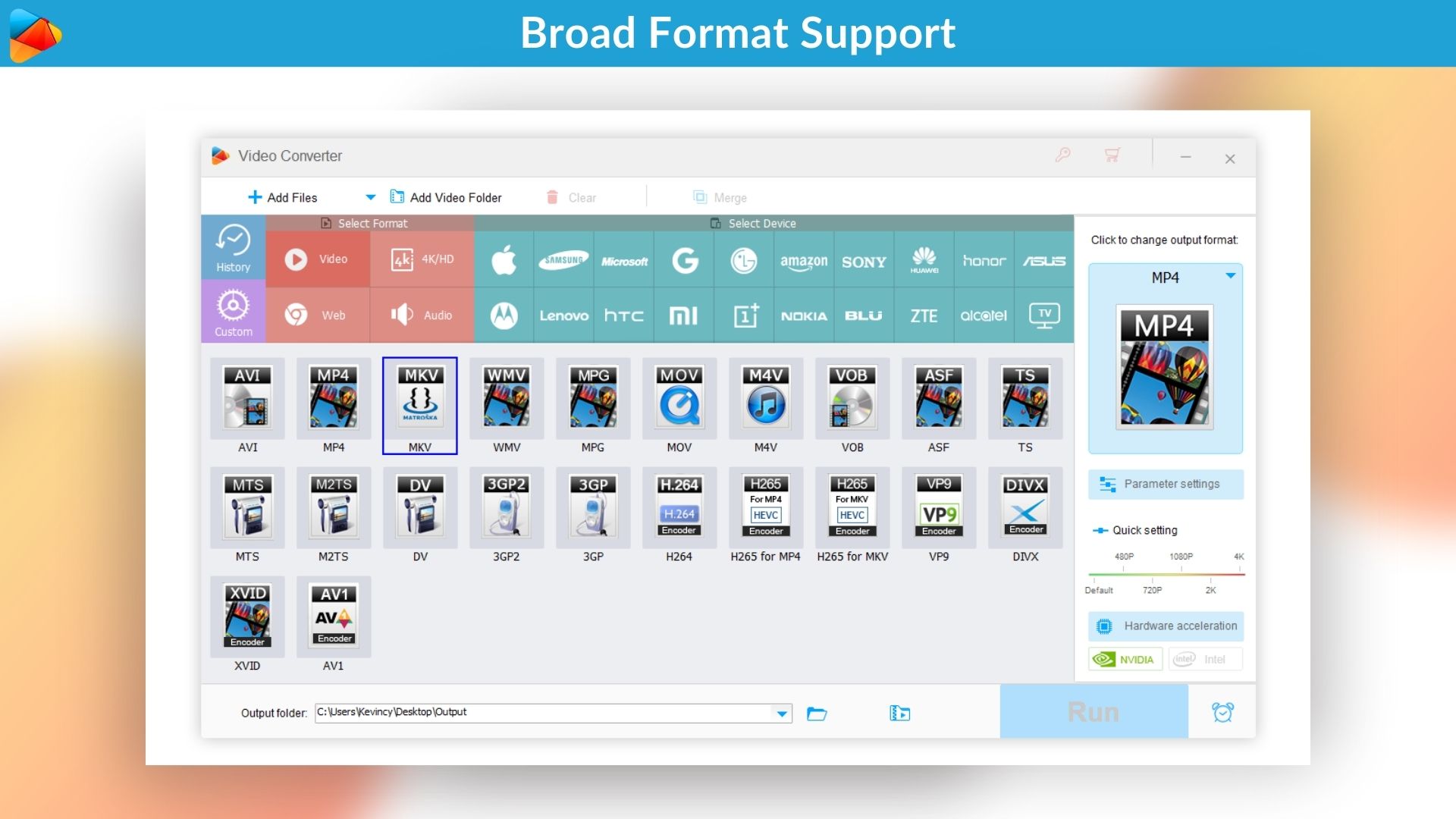
Supporting over 500 presets, it enables seamless conversion of HD and SD videos to a wide range of file types compatible with smartphones, tablets, game consoles, and more. Equipped with GPU acceleration technology, it significantly speeds up the conversion process without compromising quality.
With its intuitive interface and rich feature set, this tool caters to both novice users and seasoned content creators looking for an efficient multimedia management solution.
Demo Video
WonderFox HD Video Converter Factory Pro is a powerful all-in-one tool for converting, downloading, editing, and recording video and audio.
Dashboard Images
Effortlessly convert videos to and from over 500 popular formats and devices – no compatibility issues anymore.
It uses hardware acceleration (Intel Quick Sync & NVIDIA NVENC) to speed up video conversions dramatically.
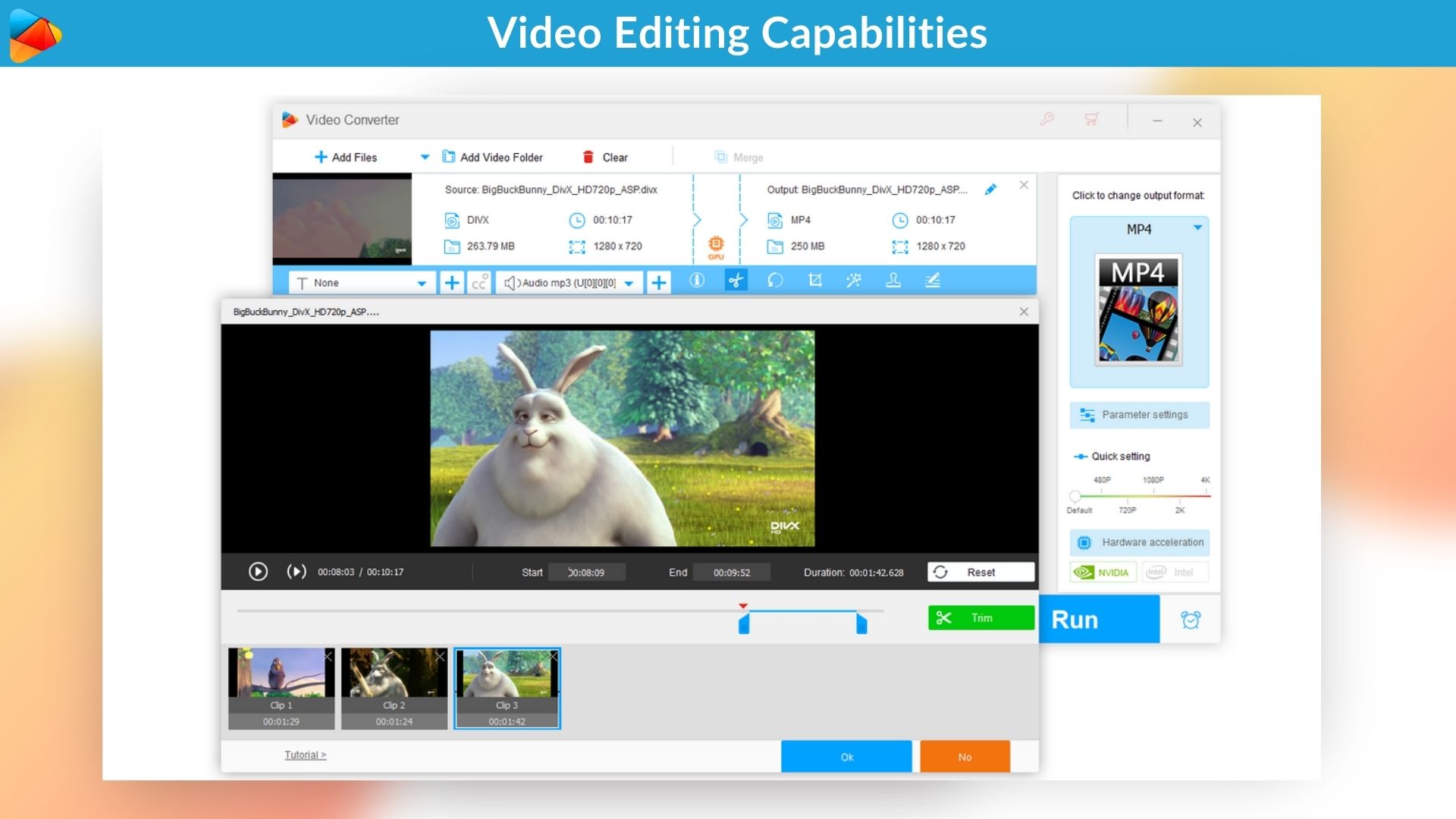
Trim, crop, rotate, merge clips, add watermarks, apply effects, or insert subtitles. Quickly customize video parameters.
Batch compress massive video files without losing noticeable visual quality.
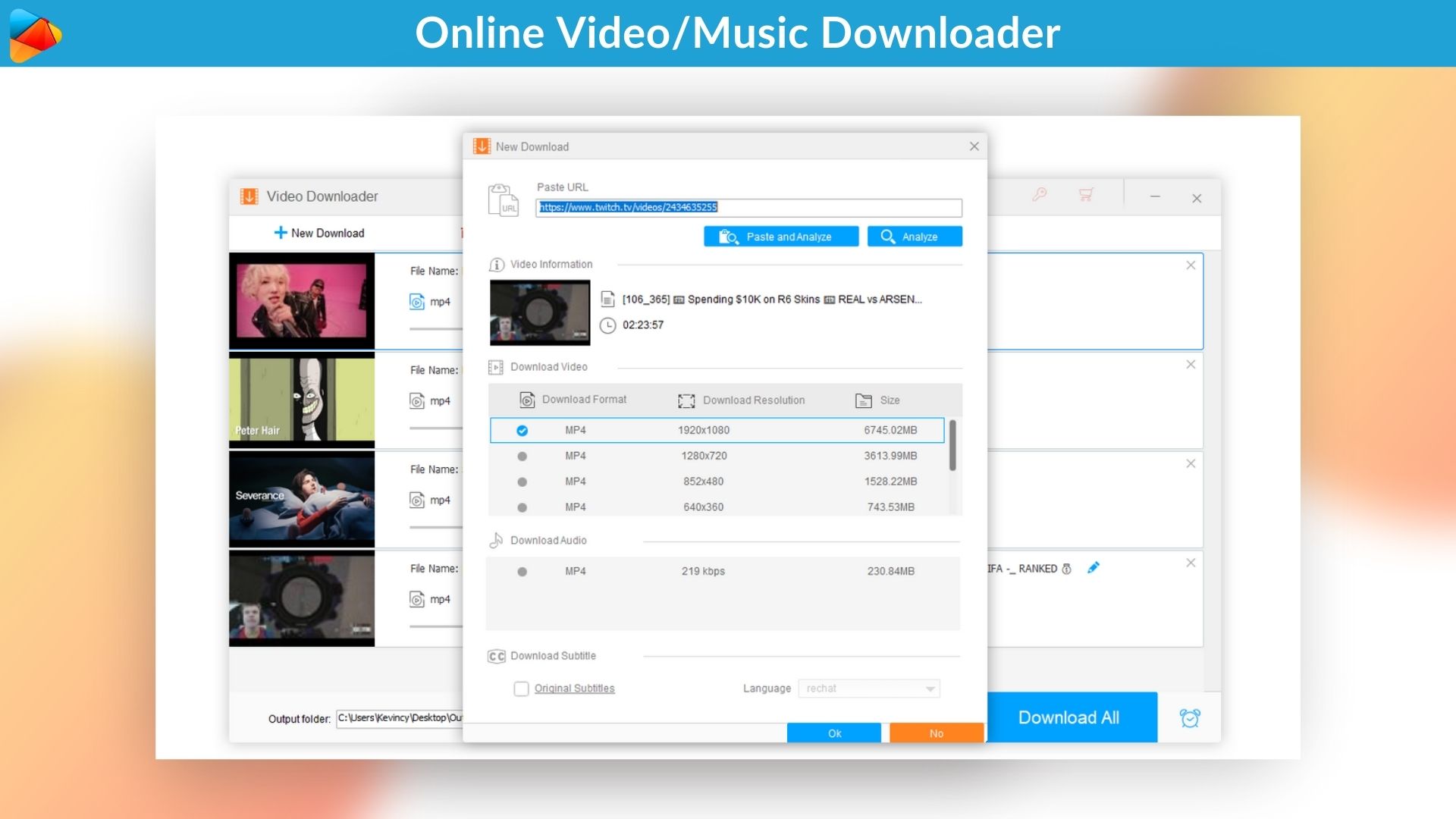
Download your favorite videos/songs, playlists, and even subtitles from over 1,000 popular websites for offline viewing.
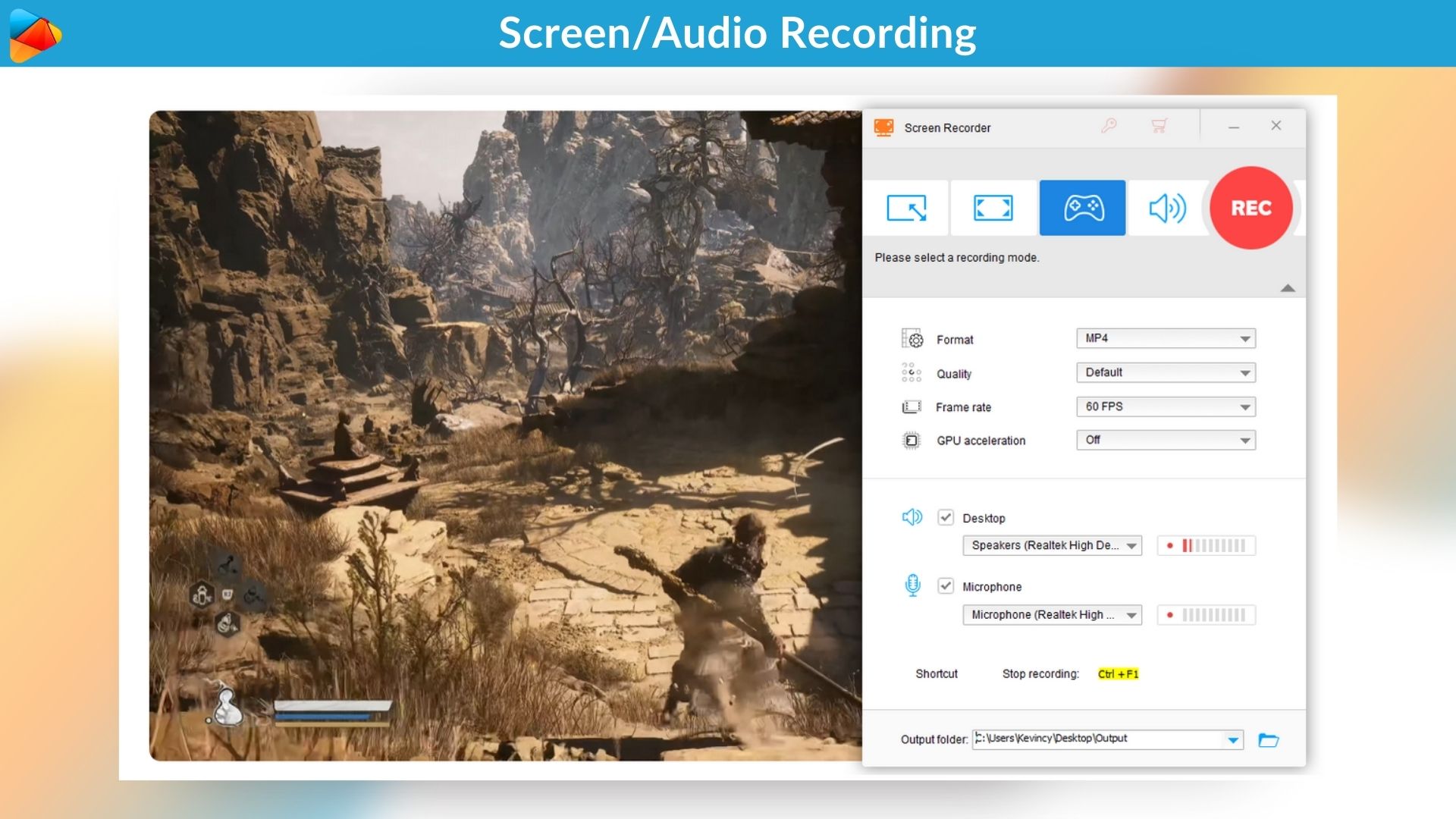
Capture anything on your screen with the built-in recorder (full-screen, custom area, game recording, and audio-only) It’s perfect for creating tutorials, recording gameplay, or saving online meetings, all without watermarks or time limits.
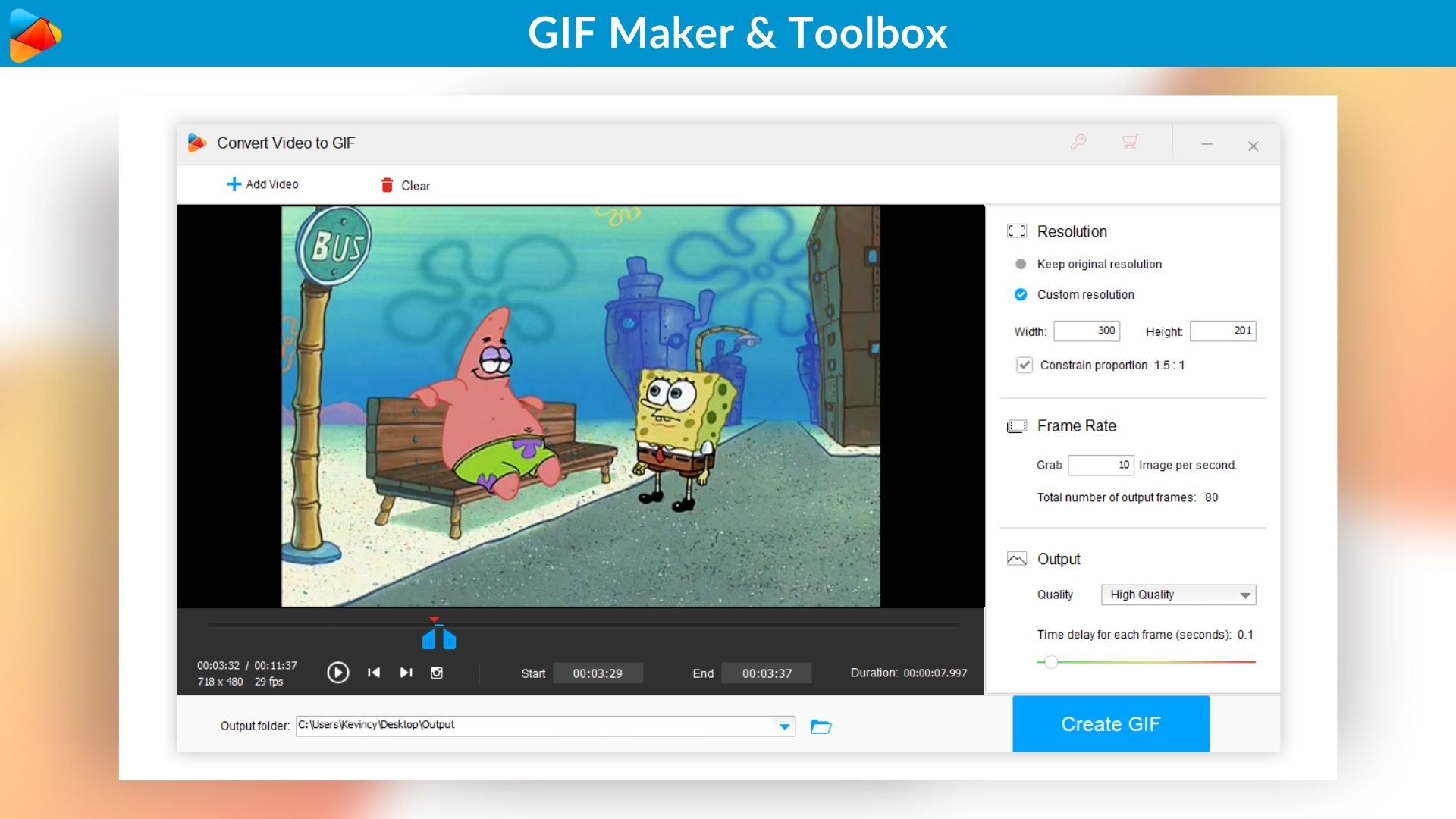
Create animated GIFs from videos or images. The Toolbox even offers options to extract subtitles, convert images to videos, and make ringtones.
Key Features
1. Video Conversion
Convert any video to MP4, MKV, MOV, AVI, WMV, MPG, TS, MTS iPhone, iPad, Samsung, Huawei, Sony, Apple TV, and other popular formats and devices.
2. Audio Conversion
Convert audio formats like MP3, FLAC, ALAC, WAV, AAC, OGG, M4A, etc.
3. Video Editing
Easily trim, crop, split, merge, rotate, flip, or add/remove the watermark, apply filter/effect, add subtitles, and add audio to a video clip.
4. HD Conversion
Convert low-resolution clips to high-resolution videos from SD to HD, 720p to 1080p, 1080p to 2K, 1080p to 4K, and more for better display effects.
5. Picture Enhancement
Improve video quality while converting videos and make blurry videos clear.
6. Lightning Fast Conversion
Access 50 times faster conversion speed than a standard video conversion.
7. Hardware Acceleration
Speed up the transcoding process while optimizing output quality on devices with a new generation of Intel CPU and Nvidia graphics.
8. Batch Conversion
Convert up to 10 video/audio files at once.
9. Smart Fit Output
Auto-optimize audio and video parameters for the best output quality.
10. Dolby Surround Sound
Convert video/audio to a file with Dolby 5.1/7.1 Surround Sound and get an immersive music experience.
11. Lossless Compression
Achieve lossless compression with a codec/format with higher compression efficiency.
Trim off redundant parts of your video/audio to reduce size without losing quality.
12. Audio & Video Download
Download original quality videos up to 12K from YouTube, Vimeo, Facebook, Twitter, Instagram, Dailymotion, Itemfix, Vevo, SoundCloud, Yahoo, and over 1000+ websites.
13. Multiple Resolution
Save your favorite videos in any resolution, including 360p, 480p, 720p, 1080p, 2K, 4K, 8K, and 12K.
14. Movies With Subtitles
Download HD movies with or without the original subtitles.
15. Screen Recording
Capture all on-screen activities like video tutorials, gameplay, online meetings, streaming video/music, and more.
Convert, compress, edit, download, and record videos; batch processing & GPU acceleration
Create animated GIFs from videos and images. Ringtone maker, subtitle extractor, and more
Super-intuitive and user-friendly interface, no tech skills required, best for beginner and novices
Alternative to VideoProc Converter
WonderFox HD Video Converter Factory Pro Lifetime Deal
Are you tired of juggling multiple tools for video conversion, downloading, editing, and more?
Say goodbye to the hassle and hello to WonderFox HD Video Converter Factory Pro lifetime deal, an HD video converter and your all-in-one media powerhouse. This is user-friendly software designed to simplify how you handle video and audio files.
Whether you’re converting files for your phone, editing clips for social media, or recording your screen, WonderFox has you covered with a smooth, intuitive experience.
Supporting over 500 presets, it enables seamless conversion of HD and SD videos to a wide range of file types compatible with smartphones, tablets, game consoles, and more. Equipped with GPU acceleration technology, it significantly speeds up the conversion process without compromising quality.
With its intuitive interface and rich feature set, this tool caters to both novice users and seasoned content creators looking for an efficient multimedia management solution.
Demo Video
WonderFox HD Video Converter Factory Pro is a powerful all-in-one tool for converting, downloading, editing, and recording video and audio.
Dashboard Images
Effortlessly convert videos to and from over 500 popular formats and devices – no compatibility issues anymore.
It uses hardware acceleration (Intel Quick Sync & NVIDIA NVENC) to speed up video conversions dramatically.
Trim, crop, rotate, merge clips, add watermarks, apply effects, or insert subtitles. Quickly customize video parameters.
Batch compress massive video files without losing noticeable visual quality.
Download your favorite videos/songs, playlists, and even subtitles from over 1,000 popular websites for offline viewing.
Capture anything on your screen with the built-in recorder (full-screen, custom area, game recording, and audio-only) It’s perfect for creating tutorials, recording gameplay, or saving online meetings, all without watermarks or time limits.
Create animated GIFs from videos or images. The Toolbox even offers options to extract subtitles, convert images to videos, and make ringtones.
Key Features
1. Video Conversion
Convert any video to MP4, MKV, MOV, AVI, WMV, MPG, TS, MTS iPhone, iPad, Samsung, Huawei, Sony, Apple TV, and other popular formats and devices.
2. Audio Conversion
Convert audio formats like MP3, FLAC, ALAC, WAV, AAC, OGG, M4A, etc.
3. Video Editing
Easily trim, crop, split, merge, rotate, flip, or add/remove the watermark, apply filter/effect, add subtitles, and add audio to a video clip.
4. HD Conversion
Convert low-resolution clips to high-resolution videos from SD to HD, 720p to 1080p, 1080p to 2K, 1080p to 4K, and more for better display effects.
5. Picture Enhancement
Improve video quality while converting videos and make blurry videos clear.
6. Lightning Fast Conversion
Access 50 times faster conversion speed than a standard video conversion.
7. Hardware Acceleration
Speed up the transcoding process while optimizing output quality on devices with a new generation of Intel CPU and Nvidia graphics.
8. Batch Conversion
Convert up to 10 video/audio files at once.
9. Smart Fit Output
Auto-optimize audio and video parameters for the best output quality.
10. Dolby Surround Sound
Convert video/audio to a file with Dolby 5.1/7.1 Surround Sound and get an immersive music experience.
11. Lossless Compression
Achieve lossless compression with a codec/format with higher compression efficiency.
Trim off redundant parts of your video/audio to reduce size without losing quality.
12. Audio & Video Download
Download original quality videos up to 12K from YouTube, Vimeo, Facebook, Twitter, Instagram, Dailymotion, Itemfix, Vevo, SoundCloud, Yahoo, and over 1000+ websites.
13. Multiple Resolution
Save your favorite videos in any resolution, including 360p, 480p, 720p, 1080p, 2K, 4K, 8K, and 12K.
14. Movies With Subtitles
Download HD movies with or without the original subtitles.
15. Screen Recording
Capture all on-screen activities like video tutorials, gameplay, online meetings, streaming video/music, and more.
Access audio recording from the mic and system sound.
16. High-Efficiency Video Compression
Compress large HD or 4K files up to 5X smaller while maintaining excellent quality.
17. Audio Extraction
Extract high-quality audio from video files or online media.
18. Pre-optimized Profiles For Standard Devices
Access pre-optimized profiles for standard devices, including iPhones, iPads, Samsung Galaxy phones, Sony PlayStation, Smart TVs, and tablets.
19. Audio & Video Previews
Access a preview player to fine-tune edits in real-time.
20. Video To GIF Animation
Make animated GIFs from a video in any possible format, including MP4, MKV, AVI, WMV, MOV, MPG, 3GP, FLV, WebM, and more.
Adjust the GIF resolution, frame rate, and quality to suit your desires.
21. Photos to GIF Animation
Combine still PNGs, JPGs, JPEGs, TIFFs, and BMPs and convert them to dynamic GIF animations.
22. No time limit
Save, record, and download video without any time constraints.
Roadmap
Expand format support, including new codecs and device presets.
Improve hardware acceleration support for the latest Intel and AMD GPUs.
Minor UI refinements based on recent user feedback to streamline workflow.
Add more practical editing features.
AI-enhanced upscaling (SD to HD/4K) and denoising
Use Cases
Beginners & Novices
Content Creators & YouTubers
Home Users & Movie Collectors
Teachers & Trainers
Social Media Managers
Corporate & IT Departments
Travelers & Commuters
Deal Terms:
Lifetime Access
Redeem your code within 60 days of purchase
30-Days Money-Back Guarantee (For Non-Prime Members and Regular users)
60-Day Money-Back Guarantee (For DealMirror Prime Members Only)
Get access to the full version of WonderFox HD Video Converter Factory Pro today!
Pricing
License Tier 1
One-time payment. Lifetime access.
$19.00$39.95
Lifetime license for 1 Windows PC
Audio & Video Conversion
Video Editing
Batch Conversion
Audio & Video Download
Movies With Subtitles
Screen Recording
Free tech support
Free updates and upgrades
License Tier 2
One-time payment. Lifetime access.
$29.00$79.92
Lifetime license for 3 Windows PCs
Audio & Video Conversion
Video Editing
Batch Conversion
Audio & Video Download
Movies With Subtitles
Screen Recording
Free tech support
Free updates and upgrades
From The Founders
Shawn
Vendor
Founded in 2009, WonderFox Soft has grown into a trusted name in multimedia and software solutions. Guided by our philosophy “Tech for Needs, Users at the Core”, we’ve developed a suite of acclaimed products for audio, video, images, documents, and DVDs. Over the years, we’ve served 10,000,000 users across 180+ countries and regions worldwide, earning a reputation for reliability and user-centric design.
We are committed to developing innovative technology solutions that empower individuals and businesses to tackle their challenges with minimal effort.
We appreciate and welcome feedback and suggestions to constantly improve our software, ensuring it meets your needs and exceeds your expectations. We envision a future where technology seamlessly aligns with user needs. Our goal is to develop more intelligent, efficient, and secure solutions tailored to what matters most to our users.
FAQ's
Q: Do I get lifetime access to this deal?
A: Yes, this deal gives you lifetime access to WonderFox HD Video Converter Factory Pro. It supports lifetime updates and upgrades.
Q: Is support available for this product?
A: Yes, contact [email protected] with your purchase information on DealMirror.
Q: Can this product be accessed on all devices?
A: No, WonderFox HD Video Converter Factory Pro is accessible ONLY on Microsoft® Windows® 11/10/8.1/8/7.
Reviews
Reviews
There are no reviews yet.
Be the first to review “WonderFox HD Video Converter Factory Pro: Your All-in-One Video & Audio Toolkit” Cancel reply








Reviews
There are no reviews yet.