Home » Store » Gblock: Protect Your Gmail Privacy with Block Email Trackers & Spy Pixels
Gblock: Protect Your Gmail Privacy with Block Email Trackers & Spy Pixels
TL;DR
Blocks hidden email trackers like spy pixels and tracking links in Gmail
Strips tracking parameters and anonymizes clicks via a secure proxy
Uses real-time detection to block new and evolving tracking methods
Ideal for Professionals and entrepreneurs or business communications
Gblock lifetime deal
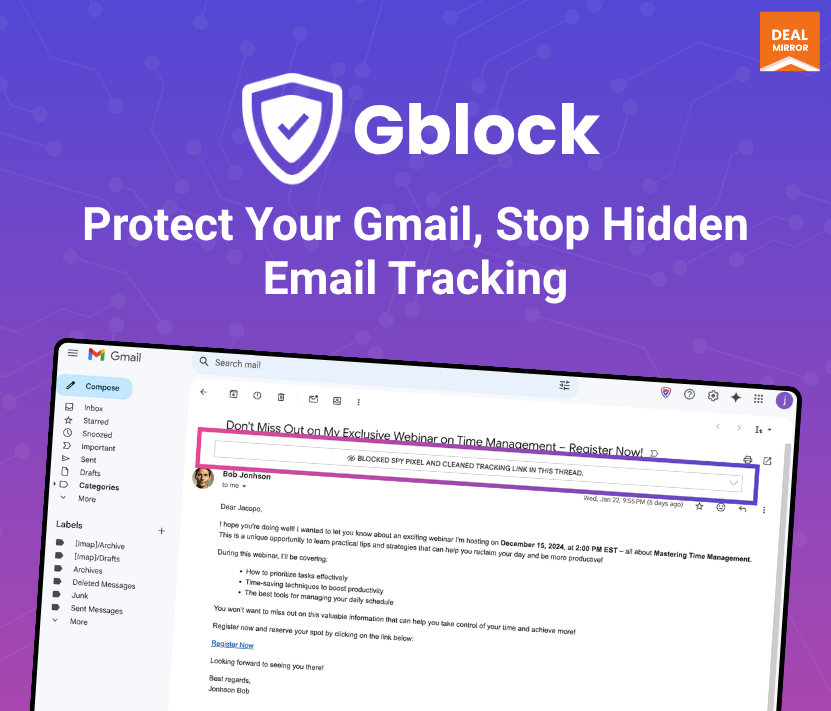
Is your Gmail privacy at risk every time you open an email? Many email senders use hidden trackers to monitor when, where, and how you read their messages without your consent.
Meet Gblock, a Block email tracker lifetime deal chrome extension that puts an end to this silent surveillance by blocking tracking pixels, stripping tracking links, and anonymizing your clicks through our secure proxy. With Gblock, you get real email privacy that involves no tricks, no leaks, just peace of mind.
Spy pixels and tracking links are two of the most common (and invisible) threats hiding in your inbox. These tiny 1×1 images and custom URLs silently report back data like your location, device, and reading habits. Gblock actively detects and blocks these threats by removing tracking parameters from URLs, masking your IP through its proxy, and completely disabling spy pixels before they load. It even caches common link responses to block repetitive trackers automatically.
Unlike traditional blockers, Gblock doesn’t rely on outdated static lists. Its smart, automated tracker detection uses real-time analysis to spot and neutralize new tracking techniques as they appear. With zero ads, no access to your emails, and no data collection of any kind, Gblock is built entirely around your privacy.
Demo Video
Gblock is a Chrome extension that protects your Gmail privacy by blocking email trackers, spy pixels, and tracking links in real time.
Dashboard Images
Key Features:
1. Full Protection Against Email Tracking
– Gblock protects you from spy pixels, tracking links and anonymizes you via our proxy. Its automated tracker detection keeps us one step ahead of new trackers. No other Browser extension offers this level of protection!
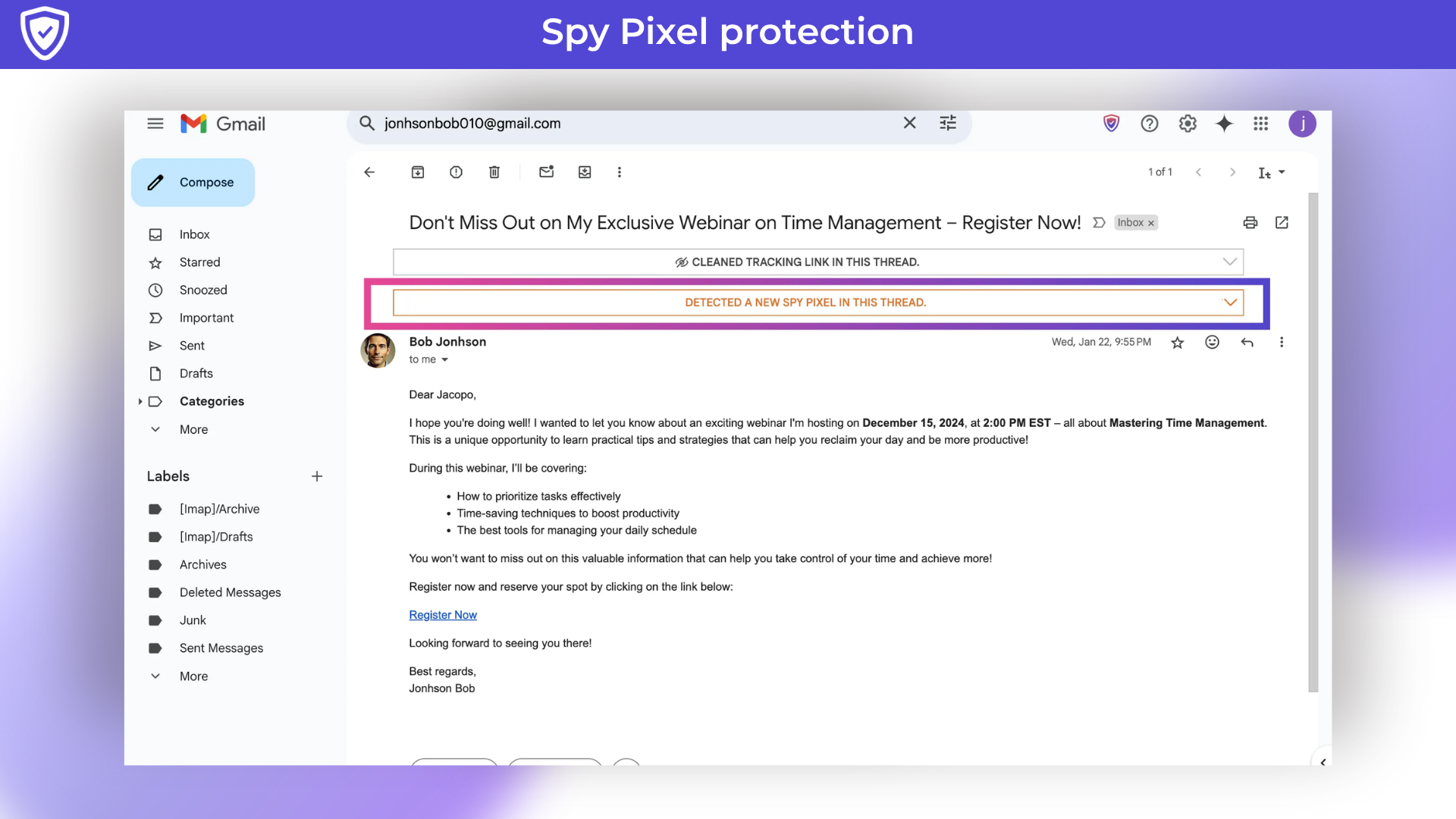
2. Spy Pixel protection
– Spy pixel tracking is a sneaky technique based on adding an invisible 1×1 image, known as a “tracking pixel” to an email. When you open the email, this pixel sends information back to the sender, revealing details like when you opened it, where you were, and what device you used. All of this is done without your knowledge or consent, making it a serious privacy concern.
Gblock detects and blocks tracking pixels, providing complete protection against spy pixel tracking.
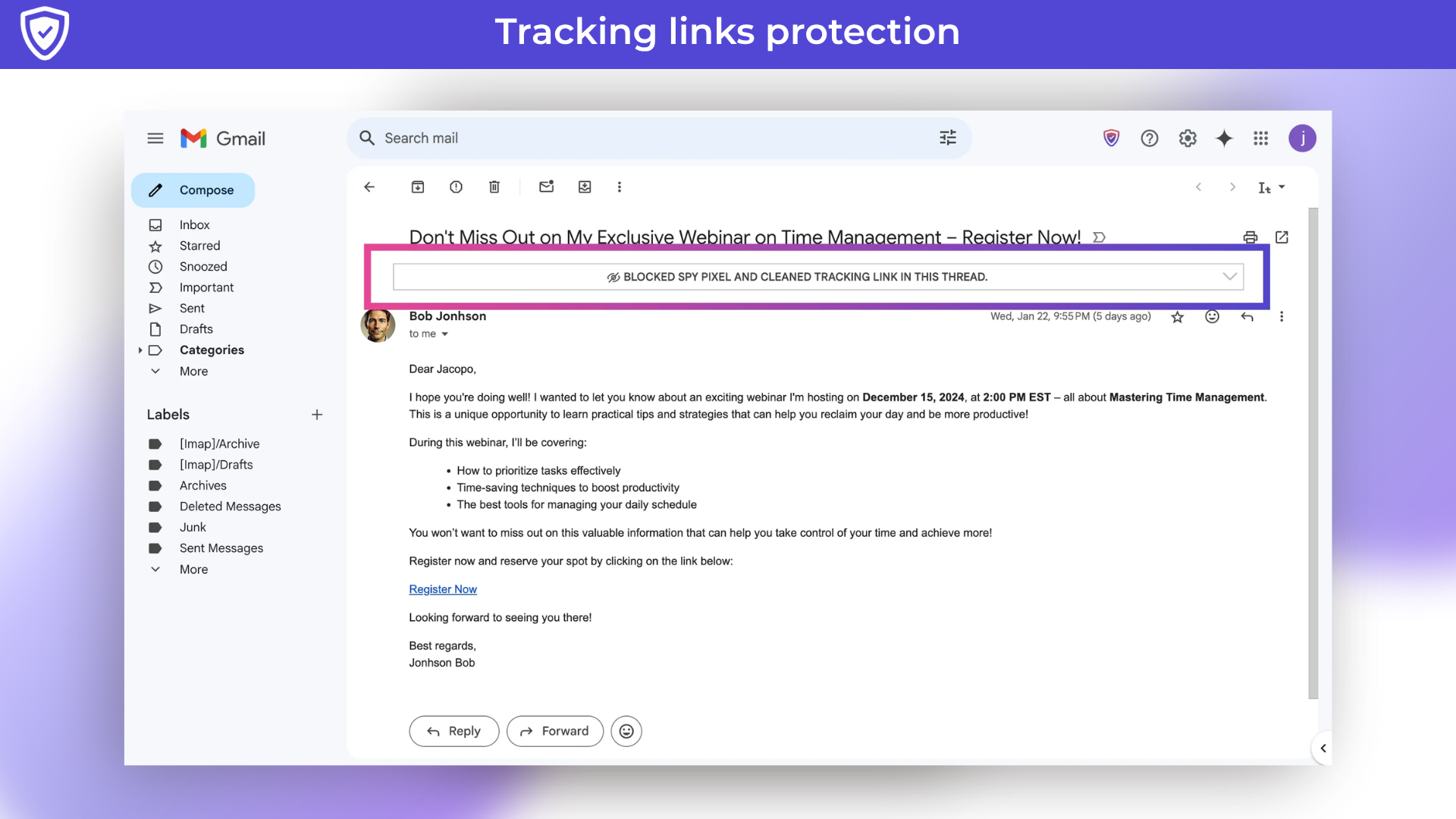
3. Tracking links protection
– Link tracking involves adding custom tracking parameters to URLs, such as “?utm_source=newsletter”, or embedding unique tracking codes. Some email marketing tools take this a step further by using URL shorteners to obscure the final destination, making it impossible to remove tracking parameters. Similar to spy pixels, tracking links can expose your location, device details, and other personal information.
Gblock protects you from tracking links in two ways: Stripping all known tracking parameters from URLs, and using our proxy server to follow email links, masking your IP address and fully anonymizing your activity. Its proxy is privacy-safe, It never stores personal data and can be disabled in your account settings if preferred. Additionally, its proxy caches redirect responses, so if a public tracking link is shared among multiple users, it already knows the final destination and can serve it directly without accessing it.
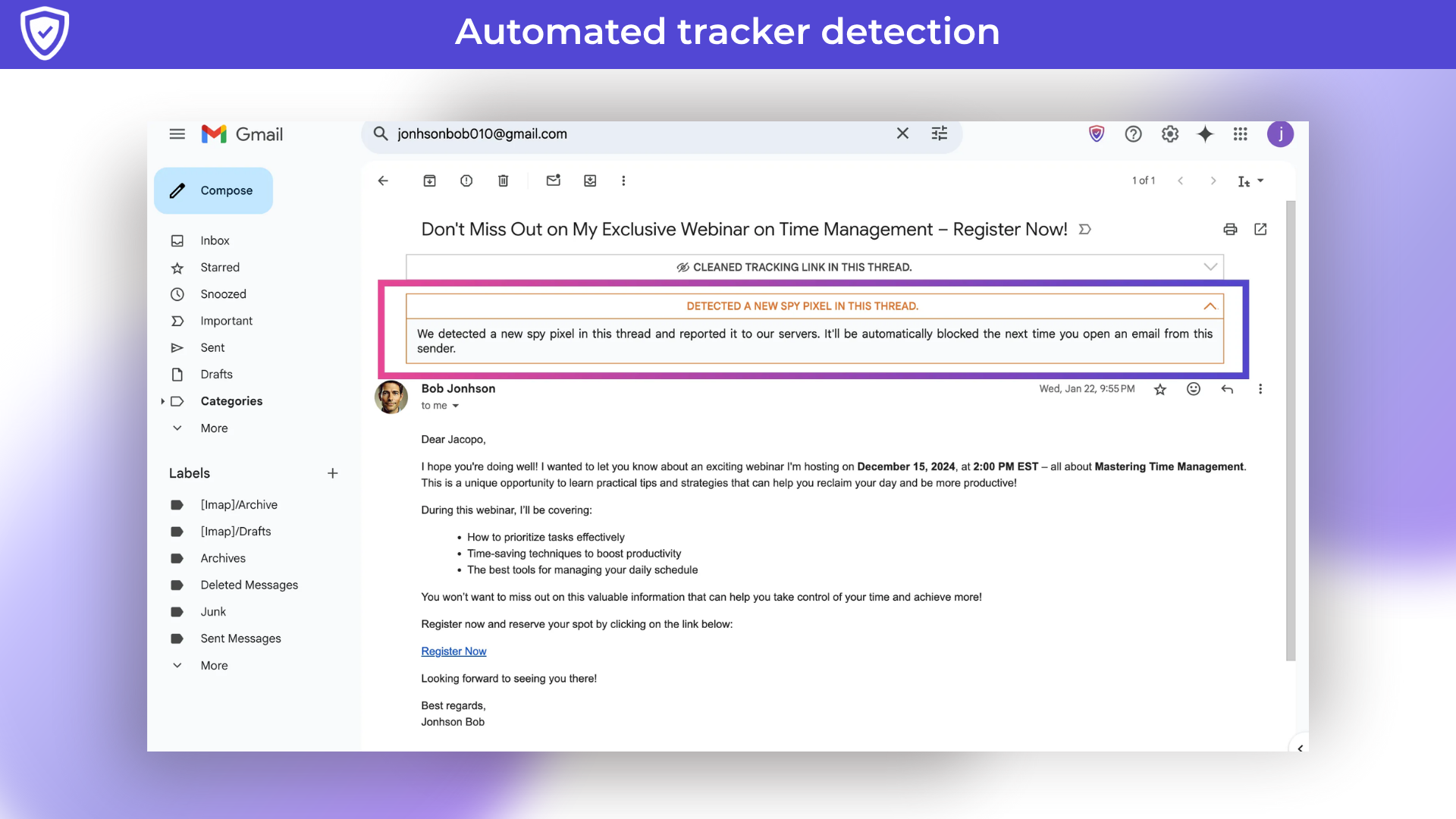
4. Automated tracker detection
– Other Browser extensions rely on static lists that require frequent manual updates. But as trackers constantly evolve, this outdated approach becomes less effective. Only Gblock offers a truly intelligent solution with automated tracker detection. Instead of fixed lists, our advanced system dynamically identifies and flags new trackers in real-time. The moment Gblock encounters a new tracker, it analyzes its behavior and reports it to our server—ensuring that future emails containing the same tracker are automatically blocked.
Use Cases:
Personal Privacy Protection
Block email trackers (know when, where, and if you open emails)
Hide your IP address and location from senders
Avoid invisible read receipts
Professional & Business Use
Journalists & lawyers: protect confidentiality with sources or clients
Recruiters & HR: review applications without sending engagement signals
Corporate employees: block marketing trackers in newsletters and outreach emails
Marketing & Competitive Intelligence
Safely analyze competitor newsletters
Test how email marketing tools embed and behave with trackers
Tech-savvy & Security-conscious Users
Strengthen Gmail privacy alongside VPNs and ad blockers
Investigate and study tracking techniques
Freelancers & Consultants
Control when clients see you’ve read their emails
Regulatory & Compliance-focused Users
Help companies reduce third-party tracking exposure, supporting GDPR and privacy best practices
Product Roadmap (2025):
Upcoming
Launch Firefox extension to bring Gblock’s protection to Firefox users.
Planned
Develop mobile apps, starting with iOS and followed by Android, to extend email tracking protection to mobile devices.
Explore support for other webmail services, such as Outlook.com and Yahoo Mail.
Ongoing Commitment
We are committed to continuously updating Gblock to stay ahead of new email tracking techniques, ensuring user privacy, improving detection, and listening to user feedback to guide future improvements.
Deal Terms:
Lifetime Access
Redeem your code within 60 days of purchase
30-Days Money-Back Guarantee (For Non-Prime Members and Regular users)
60-Day Money-Back Guarantee (For DealMirror Prime Members Only)
Intro Video
Roadmap & Use Cases:
Discount code auto-applied at checkout.
Gblock: Protect Your Gmail Privacy with Block Email Trackers & Spy Pixels
Blocks hidden email trackers like spy pixels and tracking links in Gmail
Strips tracking parameters and anonymizes clicks via a secure proxy
Uses real-time detection to block new and evolving tracking methods
Ideal for Professionals and entrepreneurs or business communications
Gblock lifetime deal
Is your Gmail privacy at risk every time you open an email? Many email senders use hidden trackers to monitor when, where, and how you read their messages without your consent.
Meet Gblock, a Block email tracker lifetime deal chrome extension that puts an end to this silent surveillance by blocking tracking pixels, stripping tracking links, and anonymizing your clicks through our secure proxy. With Gblock, you get real email privacy that involves no tricks, no leaks, just peace of mind.
Spy pixels and tracking links are two of the most common (and invisible) threats hiding in your inbox. These tiny 1×1 images and custom URLs silently report back data like your location, device, and reading habits. Gblock actively detects and blocks these threats by removing tracking parameters from URLs, masking your IP through its proxy, and completely disabling spy pixels before they load. It even caches common link responses to block repetitive trackers automatically.
Unlike traditional blockers, Gblock doesn’t rely on outdated static lists. Its smart, automated tracker detection uses real-time analysis to spot and neutralize new tracking techniques as they appear. With zero ads, no access to your emails, and no data collection of any kind, Gblock is built entirely around your privacy.
Demo Video
Gblock is a Chrome extension that protects your Gmail privacy by blocking email trackers, spy pixels, and tracking links in real time.
Dashboard Images
Key Features:
1. Full Protection Against Email Tracking
– Gblock protects you from spy pixels, tracking links and anonymizes you via our proxy. Its automated tracker detection keeps us one step ahead of new trackers. No other Browser extension offers this level of protection!
2. Spy Pixel protection
– Spy pixel tracking is a sneaky technique based on adding an invisible 1×1 image, known as a “tracking pixel” to an email. When you open the email, this pixel sends information back to the sender, revealing details like when you opened it, where you were, and what device you used. All of this is done without your knowledge or consent, making it a serious privacy concern.
Gblock detects and blocks tracking pixels, providing complete protection against spy pixel tracking.
3. Tracking links protection
– Link tracking involves adding custom tracking parameters to URLs, such as “?utm_source=newsletter”, or embedding unique tracking codes. Some email marketing tools take this a step further by using URL shorteners to obscure the final destination, making it impossible to remove tracking parameters. Similar to spy pixels, tracking links can expose your location, device details, and other personal information.
Gblock protects you from tracking links in two ways: Stripping all known tracking parameters from URLs, and using our proxy server to follow email links, masking your IP address and fully anonymizing your activity. Its proxy is privacy-safe, It never stores personal data and can be disabled in your account settings if preferred. Additionally, its proxy caches redirect responses, so if a public tracking link is shared among multiple users, it already knows the final destination and can serve it directly without accessing it.
4. Automated tracker detection
– Other Browser extensions rely on static lists that require frequent manual updates. But as trackers constantly evolve, this outdated approach becomes less effective. Only Gblock offers a truly intelligent solution with automated tracker detection. Instead of fixed lists, our advanced system dynamically identifies and flags new trackers in real-time. The moment Gblock encounters a new tracker, it analyzes its behavior and reports it to our server—ensuring that future emails containing the same tracker are automatically blocked.
Use Cases:
Personal Privacy Protection
Block email trackers (know when, where, and if you open emails)
Hide your IP address and location from senders
Avoid invisible read receipts
Professional & Business Use
Journalists & lawyers: protect confidentiality with sources or clients
Recruiters & HR: review applications without sending engagement signals
Corporate employees: block marketing trackers in newsletters and outreach emails
Marketing & Competitive Intelligence
Safely analyze competitor newsletters
Test how email marketing tools embed and behave with trackers
Tech-savvy & Security-conscious Users
Strengthen Gmail privacy alongside VPNs and ad blockers
Investigate and study tracking techniques
Freelancers & Consultants
Control when clients see you’ve read their emails
Regulatory & Compliance-focused Users
Help companies reduce third-party tracking exposure, supporting GDPR and privacy best practices
Product Roadmap (2025):
Upcoming
Launch Firefox extension to bring Gblock’s protection to Firefox users.
Planned
Develop mobile apps, starting with iOS and followed by Android, to extend email tracking protection to mobile devices.
Explore support for other webmail services, such as Outlook.com and Yahoo Mail.
Ongoing Commitment
We are committed to continuously updating Gblock to stay ahead of new email tracking techniques, ensuring user privacy, improving detection, and listening to user feedback to guide future improvements.
Deal Terms:
Lifetime Access
Redeem your code within 60 days of purchase
30-Days Money-Back Guarantee (For Non-Prime Members and Regular users)
60-Day Money-Back Guarantee (For DealMirror Prime Members Only)
Pricing
Lifetime
One-time payment. Lifetime access.
$79.00$1799.00
Spy pixel protection
Automated tracker detection
Link tracking protection
Privacy-safe proxy anonymization
Email customer support
Software updates
From The Founders
Jacopo
Creator
From the Founders
I’m Jacopo, the creator of Gblock, a Chrome extension designed to protect your Gmail inbox from email tracking. It blocks spy pixels and strips tracking links, giving you comprehensive protection against email surveillance 🔒.
Why did I create Gblock?
Because your inbox shouldn’t be spying on you. Many people don’t realize that most emails include hidden pixels or redirect links that quietly report when you opened them, where you were, and what device you used, all without your knowledge or approval. I built Gblock to put an end to that.
How does it help?
📨 Integrates directly with Gmail
🕵️ Stops spy pixels before they can load
🧠 Automatically identifies new tracking attempts
🔗 Removes and anonymizes tracking links
⚙️ Easy to use: just install the Chrome extension and you’re good to go
🔍 Bonus: if you’re curious, you can view what Gblock is blocking behind the scenes.
FAQ's
Q 1. How do I contact support?
-You can contact support at : [email protected]
Q 2. Why you should block email tracking?
– Here are a few reasons why you should block email tracking:
A. Reply to Messages with Confidence – Take Charge
– By blocking email trackers, you can reply confidently, assured that the sender can’t collect data about your email interactions: They don’t know when you opened their email, how many times you viewed it, or if you clicked on any links.
B. Halt Spammers in Their Tracks
– When you block embedded trackers you’re in control, ensuring that spammers can’t gather insights about your activity.
C. Guard Yourself Against Persistent Salespeople
– While many salespeople are great, some simply don’t know when to stop. If you’ve been inundated by emails from an overly eager salesperson, it’s likely they used a tracker to monitor your email behavior.
Q 3. Why I should use Gblock instead of another Browser extension?
– Gblock is a comprehensive solution for protecting your privacy in Gmail. It shields you from spy pixels and tracking links, offering robust protection against email tracking. Their proxy fully anonymizes you by hiding your IP address from mail trackers. Their automated tracker detection logic ensures that we are always one step ahead of new trackers. There’s no other Browser extension that offers the same level of protection! And of course, Gblock does not track any of your activity.
Q 4. Where are your proxies located?
– Their proxies are available in North America and Europe. You will be connected to the closest location based on the country you select during sign-up. You can change this at any time in your Account settings.
Q 5. Can I disable the proxy?
– Their proxy is privacy-safe, It never stores personal data. If you prefer, you can disable proxy anonymization from the account settings page. Please note that doing so will also disable tracking links protection.
Q 6. Can I bypass the proxy on an email link?
– You can bypass the proxy by holding Shift and clicking the link. This will open the link in a new window, skipping the proxy.
Q 7. What trackers are detected?
– Gblock detects the vast majority of email trackers and automatically blocks them. When a new tracker appears in an email you view, Gblock detects it in real-time and blocks it. Their current list includes 8841 trackers and is growing every day.
Here are just a few examples:
ActionKit
Adobe
Amazon
Campaign
Campaign
CloudHQ
ConvertKit
Customer.io
DZone
Drip
Dropbox
Eventbrite
Facebook
FreshMail
GMass
Google
Hubspot
Hunt
Mailchimp
Mailgun
Mandrill
Monitor
PayPal
Product
Quora
Salesforce
SendGrid
Signal
Sparkpost
Q 8. Can I add custom filters?
– You can create custom filters using the custom filters UI to block or allow custom trackers.
Q 9. Can senders see that I’m using Gblock to block their tracking?
– Gblock keeps your email activity private. Senders won’t know you’re using it, to them, it will just seem like you never opened their messages or interacted with any links.
Reviews
2 reviews for Gblock: Protect Your Gmail Privacy with Block Email Trackers & Spy Pixels
Rated 5 out of 5
Guru J. –
Gblock is fantastic—I installed and immediately saw the difference: no more spy pixels, and many tracking links automatically blocked. It’s lightweight, unobtrusive, and runs silently in the background.
Rated 5 out of 5
Dinesh Sharma –
“I audited the —everything is good, no hidden tracking. The proxy feature is optional too. The developer even added a toggle after feedback. Very impressive responsiveness.”






2 reviews for Gblock: Protect Your Gmail Privacy with Block Email Trackers & Spy Pixels
Guru J. –
Gblock is fantastic—I installed and immediately saw the difference: no more spy pixels, and many tracking links automatically blocked. It’s lightweight, unobtrusive, and runs silently in the background.
Dinesh Sharma –
“I audited the —everything is good, no hidden tracking. The proxy feature is optional too. The developer even added a toggle after feedback. Very impressive responsiveness.”