Home » Store » CalBot : AI-Powered Calendar Scheduling Assistant for Meetings
CalBot : AI-Powered Calendar Scheduling Assistant for Meetings
TL;DR
AI-powered assistant that schedules and reschedules meetings via email or text
Works across multiple calendars, email accounts, and time zones
Includes unlimited scheduling, SMS support, and all future updates
Alternative to: Calendly, Cal.com, Motion, Human assistants
CalBot lifetime deal
Are you still wasting time scheduling meetings manually?
Juggling multiple calendars, rescheduling over email threads, and double-checking time zones can eat up hours of your week. What if you had an assistant who understood your preferences, coordinated across your inboxes and calendars, and handled every scheduling task automatically just by CCing them on an email?
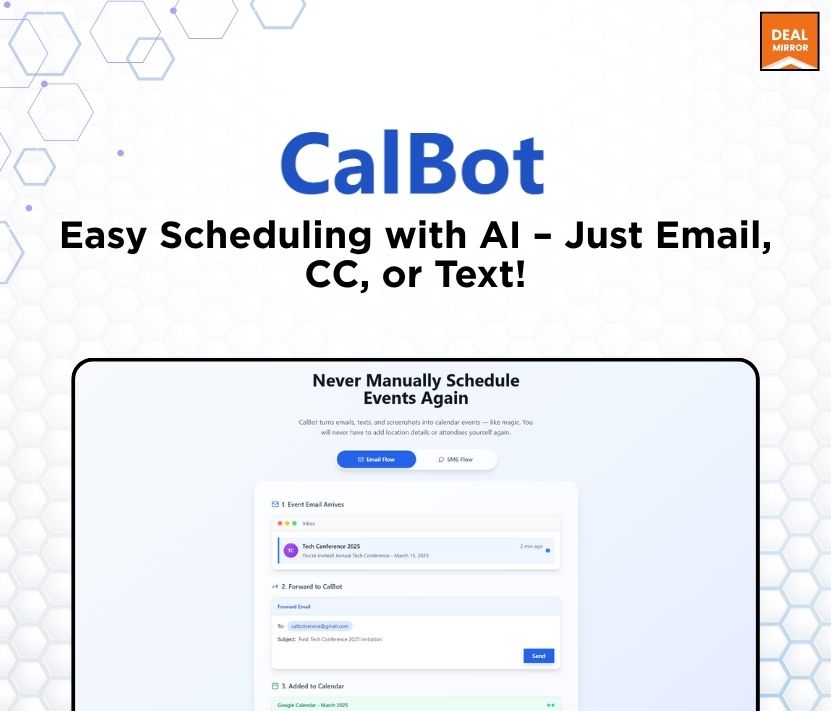
Meet CalBot lifetime deal, your ai scheduler sidekick that turns simple messages into booked meetings. Whether you’re saying “Let’s do next week in the afternoon” or texting a reschedule on the go, CalBot understands natural language and takes it from there.
It works easily across all your Google Calendars, supports multiple email accounts, and even handles time zone differences in which no forms or dashboards are required.
Built for busy people who hate scheduling friction, CalBot protects your time and clears your calendar chaos. Set your availability once (e.g., “weekdays after 10am”), and CalBot will respect your preferences, add smart buffers, and ensure you’re never double-booked.
You also get unlimited scheduling, SMS support, priority help, and all future features included. Just email, CC, or text; CalBot handles the rest.
Product Highlights
Email-based assistant— no new platform, just email or text
Understands natural language — works from how you naturally write
Supports multiple Google Calendar accounts
Handles reschedules and cancellations automatically
Creates calendar events with links and details
Private and secure — no inbox access, and your calendar details are never stored
Intro Video
CalBot is an AI-powered scheduling assistant that books, reschedules, and manages meetings for you—just by email, text, or CC.
Dashboard Images
Key Features:
1. Invisible Scheduling from Email
– CalBot fits into your workflow with zero friction. There’s nothing to install and no app to onboard into — you just CC CalBot when you want a meeting scheduled. It reads the thread, figures out what you’re asking, checks your calendar, and responds with available times.
Once a time is chosen, CalBot sends out the invite on your behalf. It’s like having a smart executive assistant who already knows your preferences and style — no training required.
2. Multi-Calendar Support
– For users managing more than one calendar, CalBot offers multi-account support. You can connect multiple Google Calendars (e.g. work and personal), and CalBot will intelligently check availability across all of them when suggesting times.
This makes it easy to avoid conflicts and preserve boundaries — without any manual coordination.
3. Built-In Calendar Event Creation
– Once a time is confirmed, CalBot creates the calendar event for you — complete with the meeting title, video link (Google Meet or Zoom), invitees, and any extra context pulled from the email thread. You don’t need to open your calendar app or do any copy-pasting — it’s done.
CalBot makes scheduling as easy as sending an email. Instead of switching tabs, scanning calendars, or going back and forth on times, just loop in CalBot and let it handle everything. It’s built for busy people who want less friction and more focus.
With CalBot, your calendar stays organized, your time is protected, and your energy goes to what matters — not logistics. CalBot takes scheduling off your plate for good.
Use Cases:
1. Auto-Schedule Meetings from Emails
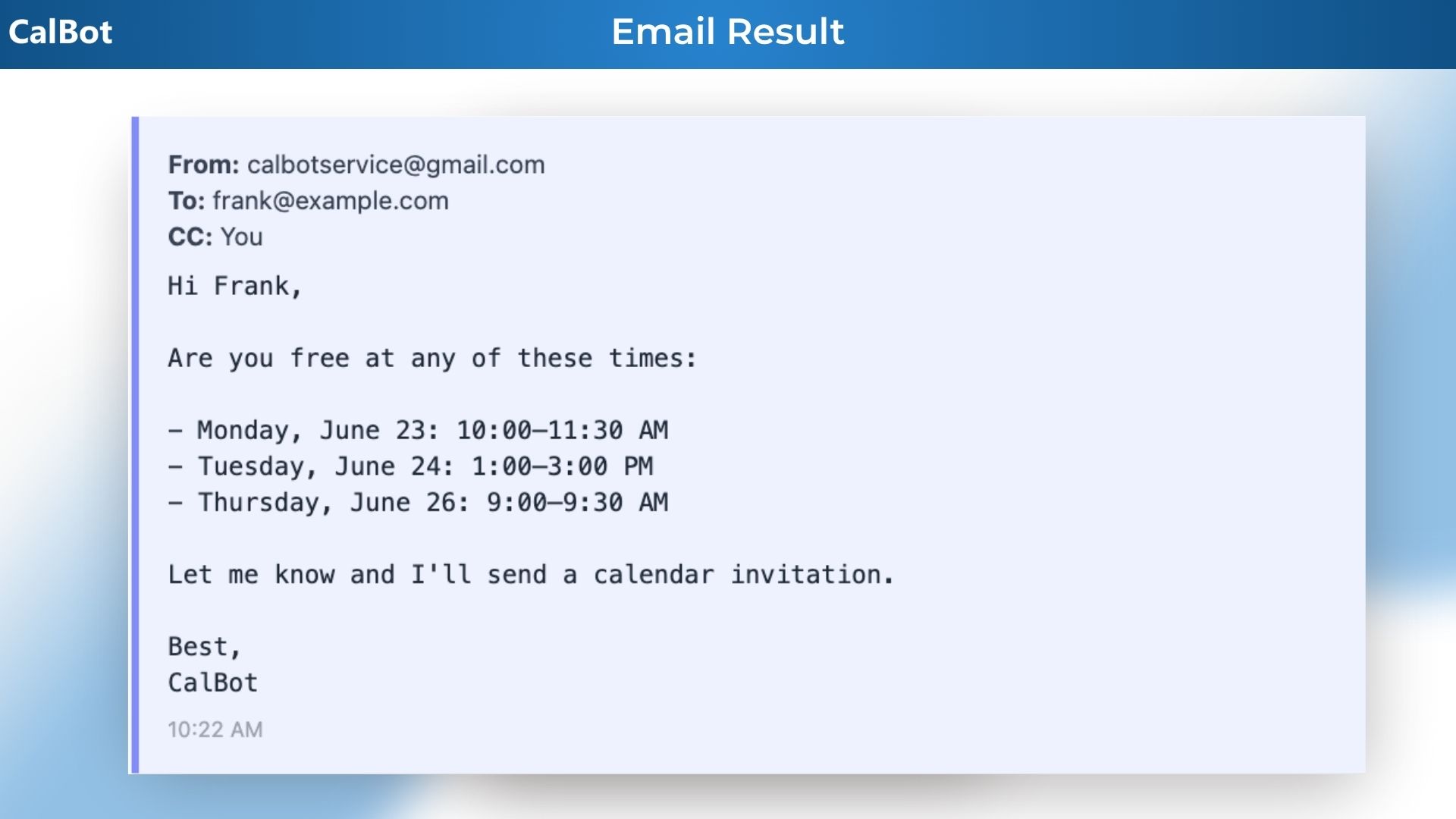
– CC or forward any email thread to CalBot. It’ll handle the scheduling by replying with proposed times, confirming with everyone, and sending the calendar invite.
2. Add Events from Screenshots or Texts
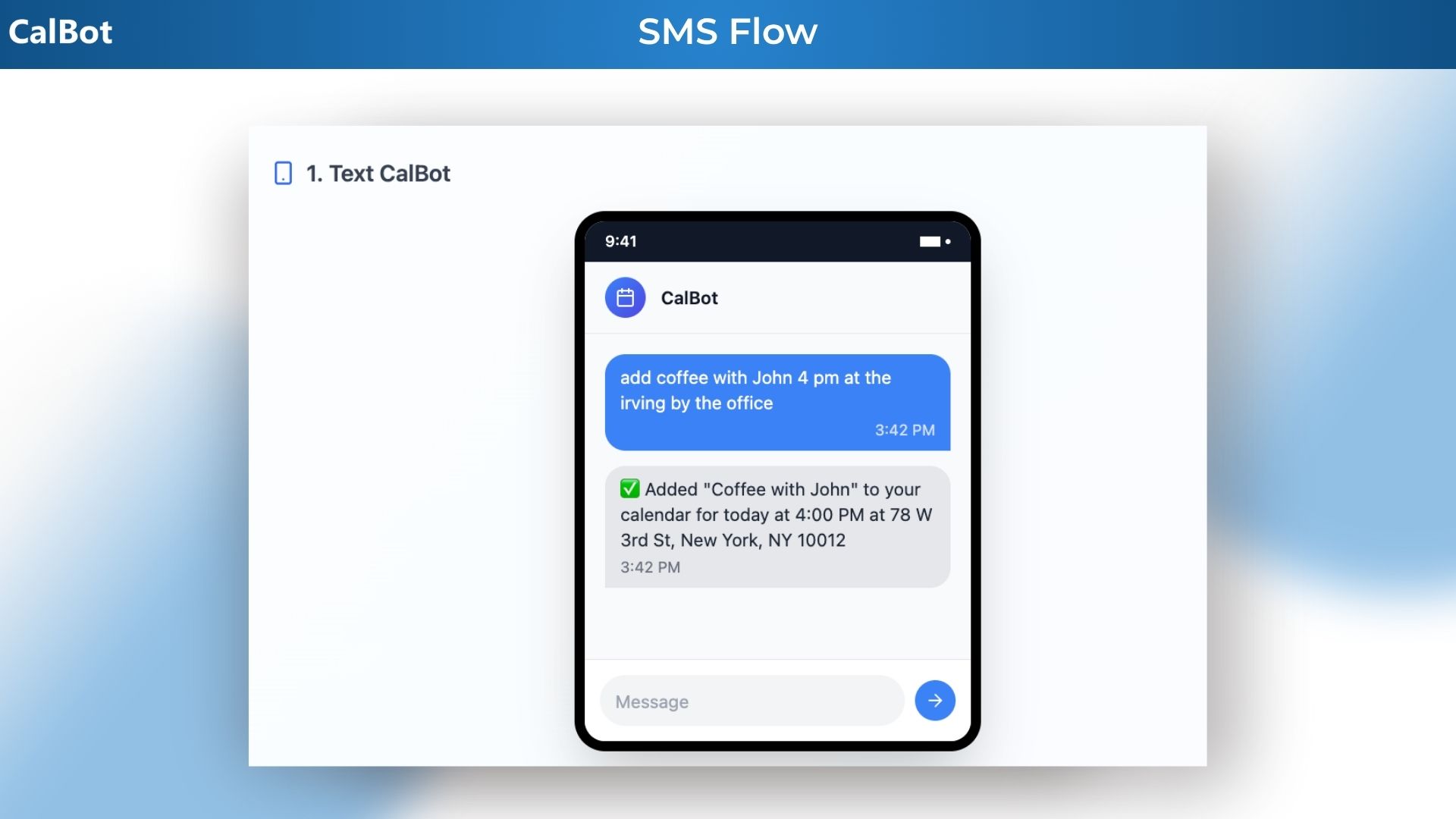
– Text CalBot a screenshot of an invite or a message like “lunch Friday at 1pm,” and it’ll parse the info and add it to your calendar.
3. Reschedule with One Command
– Reply to an event thread or text “reschedule to next week,” and CalBot will automatically find a new time that works and send updates.
4. Handle All Your Calendars/Emails
– Using multiple Google Calendars or emails? CalBot can coordinate across them to avoid double-booking and make sure everything lands on the right one.
5. Find Times Without Back-and-Forth
– Need to propose a time to someone? Just write, “What about next Thursday afternoon?” and CC CalBot—CalBot will send the invite once confirmed or help with rescheduling.
6. Smart Availability Replies
– Someone asks, “When are you free?” — Just CC CalBot and it’ll reply with your actual availability in natural language.
7. Real-Time SMS Scheduling
– Away from your inbox? Just text CalBot to schedule, cancel, or update meetings on the go—no app download required.
8. Daily Calendar Summaries
– Get a daily morning digest via email or text with what’s on your schedule, who you’re meeting, and what you need to prep.
9. Travel Coordination
– CalBot handles time zone differences and proposes local-time options.
10. Forward Your Schedules to CalBot
– Got an event itinerary or travel schedule in your inbox? Just forward it to CalBot—it’ll extract the dates, times, and details and add everything to your calendar for you.
11. Zoom and Google Meet Integration
– Never manually add a Zoom or Google Meet link to your invites again! CalBot will do so automatically when it schedules a video call.
12. Web Search
– Don’t know where to go for coffee? Ask Cal.
Product Roadmap (2025):
WhatsApp integration
Voice integration
Bespoke enterprise solutions
Deal Terms:
Lifetime Access
Redeem your code within 60 days of purchase
30-Days Money-Back Guarantee (For Non-Prime Members and Regular users)
60-Day Money-Back Guarantee (For DealMirror Prime Members Only)
Improve Prompt
Simplify
Rephrase
Grammar & Spelling
Friendly
Explain
Improve Writing
Make Longer
Make Shorter
Humanize
Summarize
dfdf
Selected Actions
Intro Video
Roadmap & Use Cases:
Improve Prompt
Simplify
Rephrase
Grammar & Spelling
Friendly
Explain
Improve Writing
Make Longer
Make Shorter
Humanize
Summarize
dfdf
Selected Actions
Discount code auto-applied at checkout.
CalBot : AI-Powered Calendar Scheduling Assistant for Meetings
AI-powered assistant that schedules and reschedules meetings via email or text
Works across multiple calendars, email accounts, and time zones
Includes unlimited scheduling, SMS support, and all future updates
Alternative to: Calendly, Cal.com, Motion, Human assistants
CalBot lifetime deal
Are you still wasting time scheduling meetings manually?
Juggling multiple calendars, rescheduling over email threads, and double-checking time zones can eat up hours of your week. What if you had an assistant who understood your preferences, coordinated across your inboxes and calendars, and handled every scheduling task automatically just by CCing them on an email?
Meet CalBot lifetime deal, your ai scheduler sidekick that turns simple messages into booked meetings. Whether you’re saying “Let’s do next week in the afternoon” or texting a reschedule on the go, CalBot understands natural language and takes it from there.
It works easily across all your Google Calendars, supports multiple email accounts, and even handles time zone differences in which no forms or dashboards are required.
Built for busy people who hate scheduling friction, CalBot protects your time and clears your calendar chaos. Set your availability once (e.g., “weekdays after 10am”), and CalBot will respect your preferences, add smart buffers, and ensure you’re never double-booked.
You also get unlimited scheduling, SMS support, priority help, and all future features included. Just email, CC, or text; CalBot handles the rest.
Product Highlights
Email-based assistant— no new platform, just email or text
Understands natural language — works from how you naturally write
Supports multiple Google Calendar accounts
Handles reschedules and cancellations automatically
Creates calendar events with links and details
Private and secure — no inbox access, and your calendar details are never stored
Intro Video
CalBot is an AI-powered scheduling assistant that books, reschedules, and manages meetings for you—just by email, text, or CC.
Dashboard Images
Key Features:
1. Invisible Scheduling from Email
– CalBot fits into your workflow with zero friction. There’s nothing to install and no app to onboard into — you just CC CalBot when you want a meeting scheduled. It reads the thread, figures out what you’re asking, checks your calendar, and responds with available times.
Once a time is chosen, CalBot sends out the invite on your behalf. It’s like having a smart executive assistant who already knows your preferences and style — no training required.
2. Multi-Calendar Support
– For users managing more than one calendar, CalBot offers multi-account support. You can connect multiple Google Calendars (e.g. work and personal), and CalBot will intelligently check availability across all of them when suggesting times.
This makes it easy to avoid conflicts and preserve boundaries — without any manual coordination.
3. Built-In Calendar Event Creation
– Once a time is confirmed, CalBot creates the calendar event for you — complete with the meeting title, video link (Google Meet or Zoom), invitees, and any extra context pulled from the email thread. You don’t need to open your calendar app or do any copy-pasting — it’s done.
CalBot makes scheduling as easy as sending an email. Instead of switching tabs, scanning calendars, or going back and forth on times, just loop in CalBot and let it handle everything. It’s built for busy people who want less friction and more focus.
With CalBot, your calendar stays organized, your time is protected, and your energy goes to what matters — not logistics. CalBot takes scheduling off your plate for good.
Use Cases:
1. Auto-Schedule Meetings from Emails
– CC or forward any email thread to CalBot. It’ll handle the scheduling by replying with proposed times, confirming with everyone, and sending the calendar invite.
2. Add Events from Screenshots or Texts
– Text CalBot a screenshot of an invite or a message like “lunch Friday at 1pm,” and it’ll parse the info and add it to your calendar.
3. Reschedule with One Command
– Reply to an event thread or text “reschedule to next week,” and CalBot will automatically find a new time that works and send updates.
4. Handle All Your Calendars/Emails
– Using multiple Google Calendars or emails? CalBot can coordinate across them to avoid double-booking and make sure everything lands on the right one.
5. Find Times Without Back-and-Forth
– Need to propose a time to someone? Just write, “What about next Thursday afternoon?” and CC CalBot—CalBot will send the invite once confirmed or help with rescheduling.
6. Smart Availability Replies
– Someone asks, “When are you free?” — Just CC CalBot and it’ll reply with your actual availability in natural language.
7. Real-Time SMS Scheduling
– Away from your inbox? Just text CalBot to schedule, cancel, or update meetings on the go—no app download required.
8. Daily Calendar Summaries
– Get a daily morning digest via email or text with what’s on your schedule, who you’re meeting, and what you need to prep.
9. Travel Coordination
– CalBot handles time zone differences and proposes local-time options.
10. Forward Your Schedules to CalBot
– Got an event itinerary or travel schedule in your inbox? Just forward it to CalBot—it’ll extract the dates, times, and details and add everything to your calendar for you.
11. Zoom and Google Meet Integration
– Never manually add a Zoom or Google Meet link to your invites again! CalBot will do so automatically when it schedules a video call.
12. Web Search
– Don’t know where to go for coffee? Ask Cal.
Product Roadmap (2025):
WhatsApp integration
Voice integration
Bespoke enterprise solutions
Deal Terms:
Lifetime Access
Redeem your code within 60 days of purchase
30-Days Money-Back Guarantee (For Non-Prime Members and Regular users)
60-Day Money-Back Guarantee (For DealMirror Prime Members Only)
Improve Prompt
Simplify
Rephrase
Grammar & Spelling
Friendly
Explain
Improve Writing
Make Longer
Make Shorter
Humanize
Summarize
dfdf
Selected Actions
Pricing
LTD
One-time payment. Lifetime access.
$69.00$99.00
Full access forever
Unlimited scheduling
Unlimited email + SMS usage
Unlimited email/calendar linking
Best-in-class customer support
Access to all future updates and features
From The Founders
Sarah Hirschfield
Founder
Hi, I’m Sarah
Founder of CalBot.
This product was born out of frustration. I was drowning in scheduling emails and hated having to switch between multiple calendar tabs to figure out when I was free. I didn’t need another calendar app.
I needed an assistant. So I built one.
Since then, it’s become something more. People are using it to reclaim their time, protect their boundaries, and show up better to the things that matter.
Thanks for being part of this. We’re just getting started.
1. How do I contact support?
–You can contact support- [email protected]
2. What is CalBot? – CalBot is an AI-powered executive assistant that helps you manage your calendar and schedule meetings efficiently. It integrates with Google Calendar to automatically handle scheduling requests, create and send calendar events, and anything else a competent executive assistant would do regarding scheduling. CalBot can be reached via email, SMS, or CalBot’s online chat interface.
3. What are the use cases for CalBot?
Forward event schedules and invitations to CalBot to have them automatically added to your calendar.
CC CalBot ([email protected]) on any thread where scheduling needs to happen. CalBot checks your availability, proposes time options, sends calendar invites once a time is confirmed, and keeps everyone in the loop.
Email or text CalBot to send reminders for upcoming events or to check your availability.
Text CalBot screenshots of text conversations that include plans or invitations — it will add them to your calendar.
Have CalBot perform simple web search tasks, like finding restaurants or current shows in NYC.
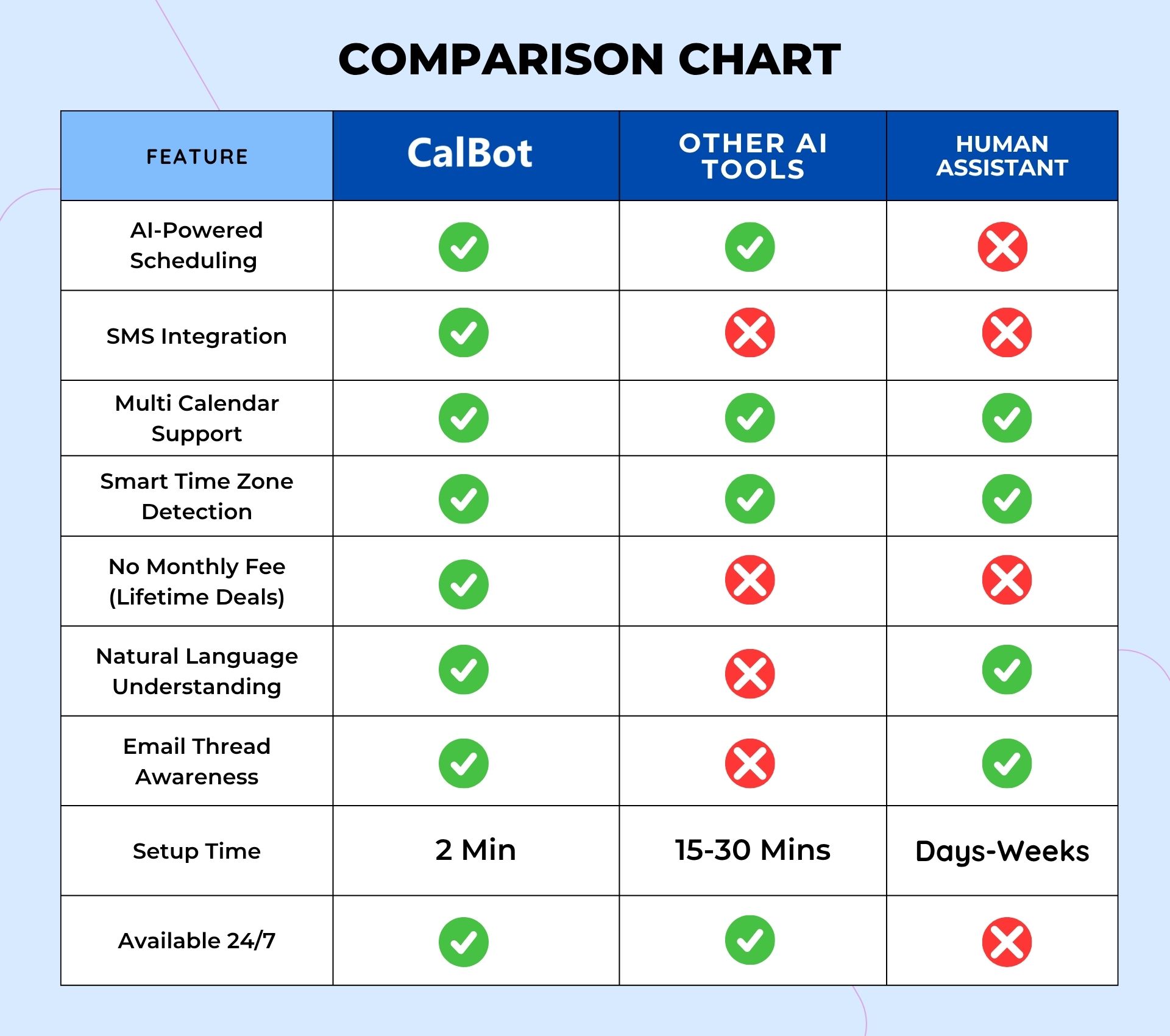
4. What makes CalBot different from other scheduling tools? – Unlike scheduling links or booking pages, CalBot acts like a real assistant. It works in natural language and blends seamlessly into your email flow. No need to switch tools or send someone a link — just CC CalBot and it handles the rest like a human would.
5. What makes CalBot different from other email-based scheduling tools? – CalBot’s competitors cost between $300 to $500 a month (vs. CalBot’s $10/month). They’re also slower to respond, make more mistakes, and lack SMS capabilities.
6. Can I use CalBot for multiple calendars/accounts? – Yes. After you create an account, you can add multiple Google Accounts and choose which calendars CalBot can access. This helps you manage work and personal calendars without cross-sharing them.
7. Can I use CalBot from multiple email addresses? – Yes. You can link multiple email addresses to your account — even non-Gmail ones — and CalBot will recognize you when CC’d from any of them.
8. Does CalBot support SMS scheduling? – Yes. You can text CalBot to book or manage meetings on the go, or have it do simple research. It’s especially useful for sending screenshots of plans or invites.
9. Can I customize my scheduling preferences? – Yes. You can set preferences like meeting hours, days, durations, and buffer times — all in natural language (e.g., “Only book 30-min meetings on weekdays between 1–5pm”).
10. What types of events can CalBot schedule? – 1:1 meetings, group calls, Zooms, interviews, internal syncs, sales calls, reminders, dates—anything.
11. I don’t put all my availability on my calendar. How will CalBot know when not to schedule? – Think of CalBot like a human assistant — it only knows what you tell it. If you’re unavailable Tuesday morning, don’t ask it to propose times on Tuesday. Instead say, “Propose times for Tuesday afternoon” or “any day but Tuesday.” You can also add general rules to your preferences (e.g., “No meetings Tuesday mornings”).
B. SETUP & INTEGRATION
1. How do I get started with CalBot? – Sign up and connect your Google Calendar. Then, just CC CalBot on scheduling emails and it’ll step in.
2. What calendars can CalBot support? – Currently, only Google Calendar. Outlook and iCloud support are on the roadmap.
3. Can CalBot access multiple calendars? – Yes. CalBot checks across all calendars in your Google account to prevent double-booking. You can also link multiple Google accounts.
4. How do I link my calendar to CalBot? – When you sign up, you’ll be prompted to connect your Google account via OAuth (a secure method used by most modern apps). CalBot does not store your events.
5. Do I need to install anything to use CalBot? – No, No apps, downloads, or extensions required. It works via email and SMS.
6. Does CalBot work with Outlook Calendar? – No.
7. Can I set different availability for different days? – Yes, You can say things like “Only mornings on Mondays and Wednesdays” or “No meetings after 3pm on Fridays.” CalBot will follow those instructions.
C. LANGUAGE & INTERACTION
1. Can I talk to CalBot in plain English? – Yes. You can write casually, like “Let’s do something next week in the afternoon” or “I’m free after 10am.”
2. What kinds of phrases does CalBot understand? – Examples: “Any time after lunch next Tuesday,” “Let’s try for early next week,” “Avoid Wednesdays and Fridays,” or “Book 45-minute calls with at least 15 minutes between meetings.” Talk to it like you would to a real assistant.
3. Will CalBot understand if I say something vague, like ‘after lunch’? – Yes, CalBot interprets common phrases like “after lunch,” “mid-morning,” or “late afternoon” based on standard conventions (e.g., “after lunch” = 1–2pm) and your preferences.
4. Can I use CalBot in other languages? – Yes, It works in over 100 languages.
D. PRIVACY & SECURITY
1. Is CalBot secure? – Yes, Your calendar data is only used temporarily for availability checks and event creation. It’s not stored. Your basic account info is stored in an encrypted database.
2. Can CalBot see my calendar events? – Only to check availability. It doesn’t store or deeply inspect event content unless necessary for scheduling.
3. Who has access to the information I share with CalBot? – Only the CalBot system. No humans read your data unless needed for debugging.
Improve Prompt
Simplify
Rephrase
Grammar & Spelling
Friendly
Explain
Improve Writing
Make Longer
Make Shorter
Humanize
Summarize
dfdf
Selected Actions
Reviews
2 reviews for CalBot : AI-Powered Calendar Scheduling Assistant for Meetings
Rated 5 out of 5
Neha Chauhan –
I live by my calendar, and with CalBot, I don’t need to worry about incomplete or forgotten entries.
Rated 5 out of 5
Thomas Smyth –
CalBot is the white whale of AI calendaring bots, and Ahab is finally content with his schedule.







2 reviews for CalBot : AI-Powered Calendar Scheduling Assistant for Meetings
Neha Chauhan –
I live by my calendar, and with CalBot, I don’t need to worry about incomplete or forgotten entries.
Thomas Smyth –
CalBot is the white whale of AI calendaring bots, and Ahab is finally content with his schedule.