Home » Store » Ashdeck: Turn Your Tabs Into Focus Timer
Ashdeck: Turn Your Tabs Into Focus Timer
TL;DR
Stay focused on work that matters with a website blocker and a Pomodoro timer
Boost your productivity 10X with an advanced Chrome extension
Best for Developers, Freelancers, Researchers, Entrepreneurs, Founders, and more
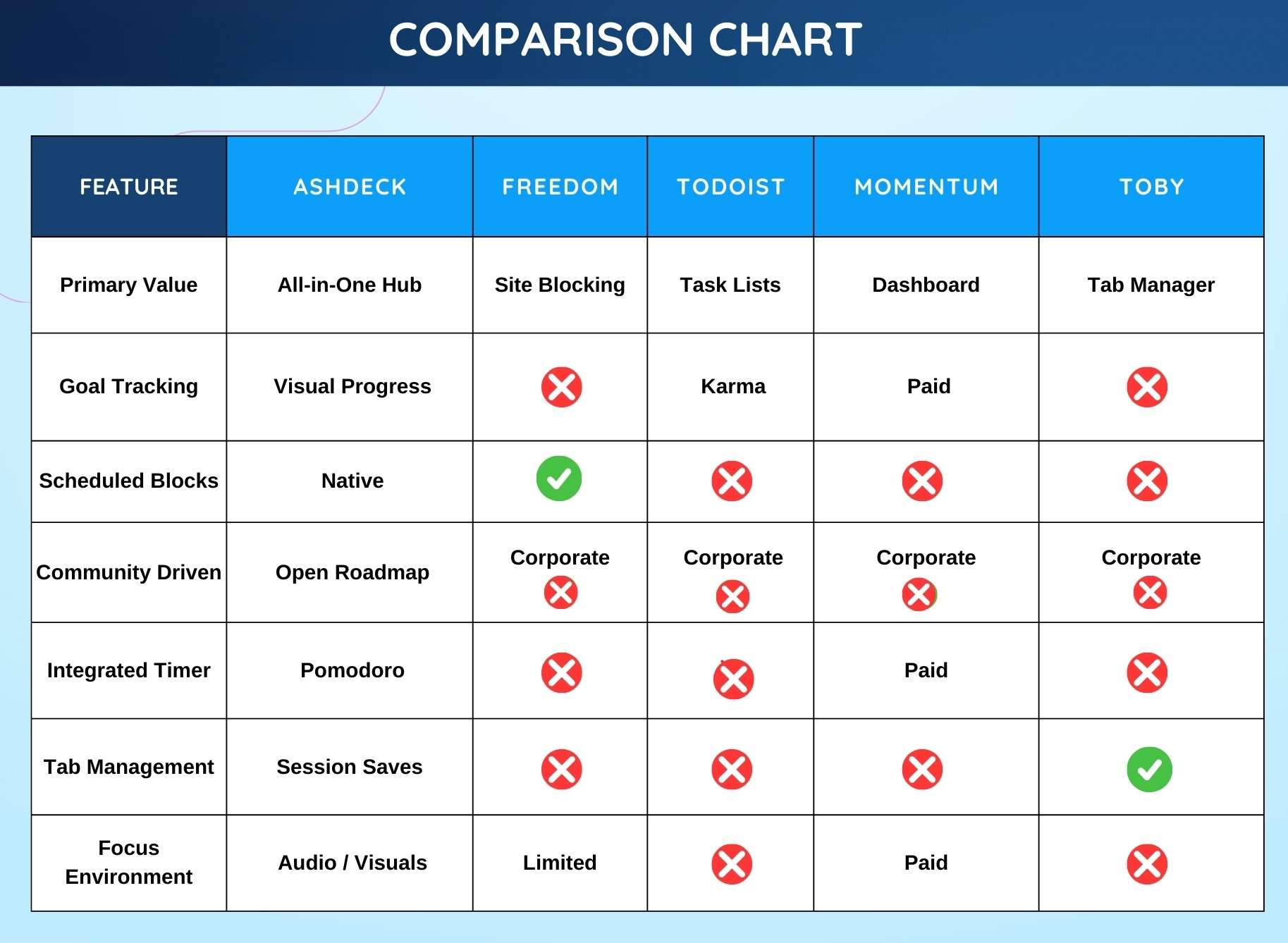
Alternative to Freedom.to, Todoist, Momentum Dash, Toby.com, etc
Ashdeck Lifetime Deal
When you open your browser for work, do you often find yourself overwhelmed by numerous tabs, notifications, and endless scrolling? Does managing multiple tasks, context-switching, and constant interruptions hamper your focus, making focused work feel impossible? You’re not alone.
MeetAshdeck, a productivity workspace built for people who struggle to stay focused in a browser full of distractions. Unlike traditional productivity tools that work in separate apps, Ashdeck integrates directly into your Chrome New Tab, right where you actually work.
Every time you open a new tab, you’re greeted with a calm, purpose-built environment designed to help you block distractions, structure your time, and move tasks forward without friction.
Ashdeck combines a powerful site blocker, a Pomodoro-based focus timer, task management, and science-backed soundscapes into one minimalist, privacy-focused experience.
Whether you’re a tech professional, a remote worker or freelancer working from home, a student studying for exams, a founder managing multiple priorities, or someone with ADHD, Ashdeck helps you regain control of your attention.
By transforming your browser into a personalized productivity hub, Ashdeck eliminates digital noise, reinforces healthy work rhythms, and keeps your goals visible, so focus becomes a habit, not a constant struggle.
Demo – Onboarding and Feature Guide
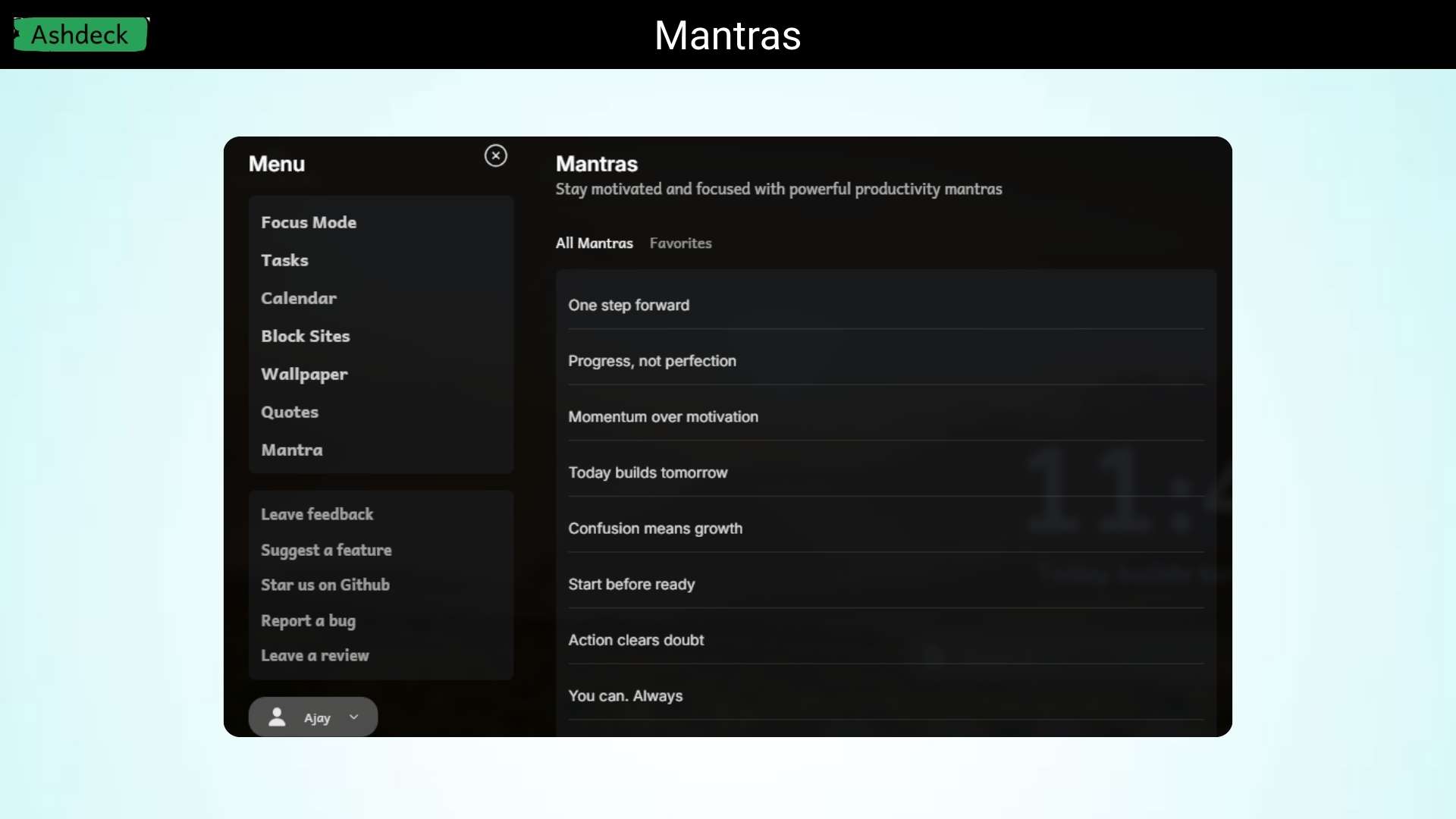
Ashdeck is a productivity tool that turns your Chrome new tab into a focused workspace. It helps you block distracting websites, manage tasks, and use a focus timer so you can stay productive while working online.
Dashboard Images
Key Features
Distraction blocker: Easily block websites like social media or news so you can stay focused on your work without getting pulled into endless browsing.
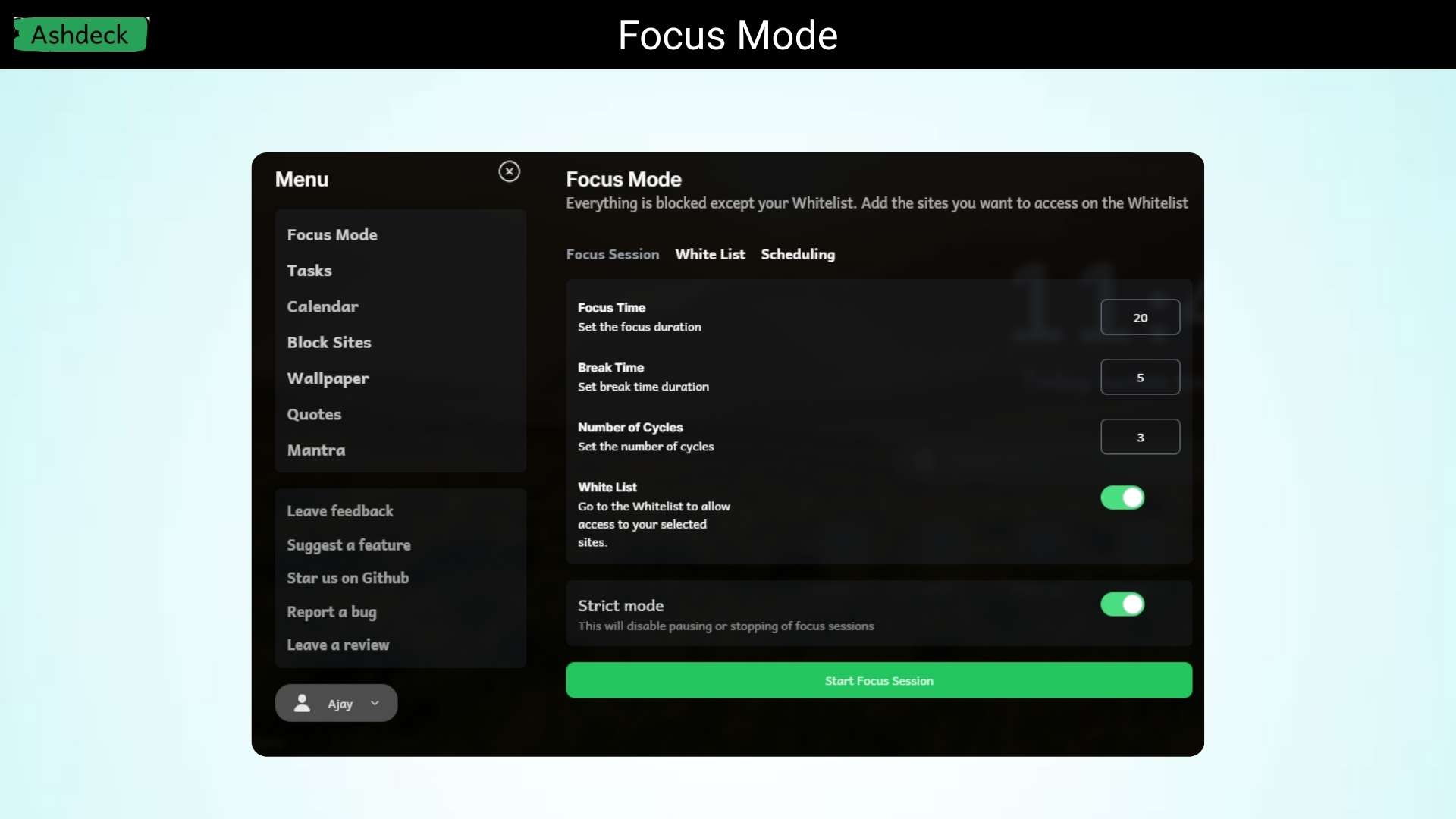
Built-in focus timer: Use the Pomodoro-style timer to work in focused sessions and take healthy breaks so you don’t burn out.
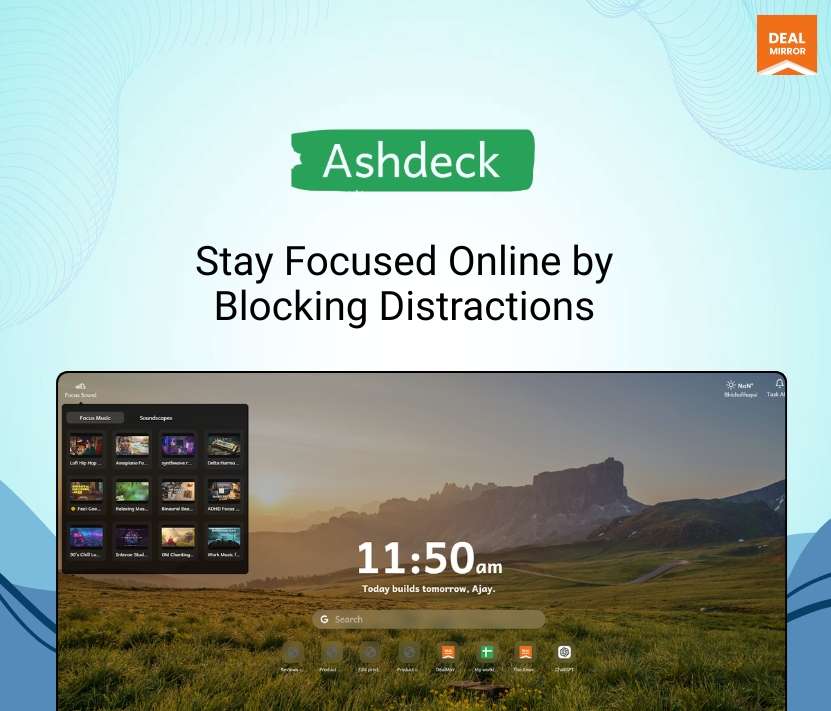
New tab productivity dashboard: Every time you open a new tab, you see a clean workspace with your tasks and timer instead of a distracting blank page.
Simple task tracking: Write down what you need to do and keep your priorities visible so you always know what to work on next.
Focus soundscapes: Play calming background sounds that help reduce noise and make it easier to concentrate for longer periods.
Minimal and distraction-free design: The interface is clean and simple so you can focus on your work without dealing with complicated tools.
Works right inside your browser: No need to switch between apps; everything lives in your Chrome tab, where you already spend most of your time working.
Use Cases:
Developers: Block distractions, use the Pomodoro timer, and track progress while coding.
Remote workers & freelancers: Structure work sessions and stay focused while working from home.
Students & researchers: Avoid social media and stay on task while studying or writing.
Writers & creatives: Remove digital noise and work in short, focused bursts to keep momentum.
ADHD & focus challenges: Use timeboxing and distraction control to build a predictable, focused routine.
Product Roadmap (2026):
Phase 1: Ecosystem Expansion & Accessibility
Expanding Ashdeck to every screen and browser to ensure a unified experience across devices.
Multi-Browser Support: Launching official extensions for Edge, Safari, and Firefox.
Mobile Apps: Native applications for Android and iOS to bring focus on the go.
Desktop Application: Dedicated desktop version for macOS and Windows for a deeper, distraction-free environment.
Phase 2: Workflow & API Integrations
Connecting Ashdeck with your existing tech stack to eliminate context switching.
Project Management Sync: Deep integrations with Notion, ClickUp, Asana, and Todoist to pull tasks directly into your focus sessions.
Audio & Environment: Spotify integration to control focus playlists and ambient soundscapes directly within the dashboard.
Calendar Bi-Directional Sync: Enhanced scheduling to block time for deep work based on your external calendar.
Phase 3: Team Collaboration & Admin Control
Scaling Ashdeck from a personal tool to a team productivity powerhouse.
Admin Panel for Teams: A centralized dashboard for organizations to manage multi-user access, seat provisioning, and billing.
Team Collaboration Features: Shared task lists, collaborative focus rooms, and team-wide productivity visibility.
Enterprise Security: Implementation of SSO (Single Sign-On) and advanced data privacy controls for corporate teams.
Phase 4: Smart Productivity & AI
Leveraging data and AI to help users work smarter, not just harder.
AI-Powered Notes: Intelligent writing assistance to help users draft notes faster, summarize sessions, and organize thoughts with AI.
Habit Tracking & Analytics: Introducing meaningful metrics to visualize progress, identify focus trends, and build long-term consistency.
Enhanced Task Management: Advanced sub-tasks, recurring items, and priority heatmaps to streamline daily planning.
Deal Terms:
Length of access: Lifetime
Redemption deadline: 60 days from purchase
30 Days Money Back Guarantee (For Non-Prime Members/Regular Users).
Stay focused on work that matters with a website blocker and a Pomodoro timer
Boost your productivity 10X with an advanced Chrome extension
Best for Developers, Freelancers, Researchers, Entrepreneurs, Founders, and more
Alternative to Freedom.to, Todoist, Momentum Dash, Toby.com, etc
Ashdeck Lifetime Deal
When you open your browser for work, do you often find yourself overwhelmed by numerous tabs, notifications, and endless scrolling? Does managing multiple tasks, context-switching, and constant interruptions hamper your focus, making focused work feel impossible? You’re not alone.
MeetAshdeck, a productivity workspace built for people who struggle to stay focused in a browser full of distractions. Unlike traditional productivity tools that work in separate apps, Ashdeck integrates directly into your Chrome New Tab, right where you actually work.
Every time you open a new tab, you’re greeted with a calm, purpose-built environment designed to help you block distractions, structure your time, and move tasks forward without friction.
Ashdeck combines a powerful site blocker, a Pomodoro-based focus timer, task management, and science-backed soundscapes into one minimalist, privacy-focused experience.
Whether you’re a tech professional, a remote worker or freelancer working from home, a student studying for exams, a founder managing multiple priorities, or someone with ADHD, Ashdeck helps you regain control of your attention.
By transforming your browser into a personalized productivity hub, Ashdeck eliminates digital noise, reinforces healthy work rhythms, and keeps your goals visible, so focus becomes a habit, not a constant struggle.
Demo – Onboarding and Feature Guide
Ashdeck is a productivity tool that turns your Chrome new tab into a focused workspace. It helps you block distracting websites, manage tasks, and use a focus timer so you can stay productive while working online.
Dashboard Images
Key Features
Distraction blocker: Easily block websites like social media or news so you can stay focused on your work without getting pulled into endless browsing.
Built-in focus timer: Use the Pomodoro-style timer to work in focused sessions and take healthy breaks so you don’t burn out.
New tab productivity dashboard: Every time you open a new tab, you see a clean workspace with your tasks and timer instead of a distracting blank page.
Simple task tracking: Write down what you need to do and keep your priorities visible so you always know what to work on next.
Focus soundscapes: Play calming background sounds that help reduce noise and make it easier to concentrate for longer periods.
Minimal and distraction-free design: The interface is clean and simple so you can focus on your work without dealing with complicated tools.
Works right inside your browser: No need to switch between apps; everything lives in your Chrome tab, where you already spend most of your time working.
Use Cases:
Developers: Block distractions, use the Pomodoro timer, and track progress while coding.
Remote workers & freelancers: Structure work sessions and stay focused while working from home.
Students & researchers: Avoid social media and stay on task while studying or writing.
Writers & creatives: Remove digital noise and work in short, focused bursts to keep momentum.
ADHD & focus challenges: Use timeboxing and distraction control to build a predictable, focused routine.
Product Roadmap (2026):
Phase 1: Ecosystem Expansion & Accessibility
Expanding Ashdeck to every screen and browser to ensure a unified experience across devices.
Multi-Browser Support: Launching official extensions for Edge, Safari, and Firefox.
Mobile Apps: Native applications for Android and iOS to bring focus on the go.
Desktop Application: Dedicated desktop version for macOS and Windows for a deeper, distraction-free environment.
Phase 2: Workflow & API Integrations
Connecting Ashdeck with your existing tech stack to eliminate context switching.
Project Management Sync: Deep integrations with Notion, ClickUp, Asana, and Todoist to pull tasks directly into your focus sessions.
Audio & Environment: Spotify integration to control focus playlists and ambient soundscapes directly within the dashboard.
Calendar Bi-Directional Sync: Enhanced scheduling to block time for deep work based on your external calendar.
Phase 3: Team Collaboration & Admin Control
Scaling Ashdeck from a personal tool to a team productivity powerhouse.
Admin Panel for Teams: A centralized dashboard for organizations to manage multi-user access, seat provisioning, and billing.
Team Collaboration Features: Shared task lists, collaborative focus rooms, and team-wide productivity visibility.
Enterprise Security: Implementation of SSO (Single Sign-On) and advanced data privacy controls for corporate teams.
Phase 4: Smart Productivity & AI
Leveraging data and AI to help users work smarter, not just harder.
AI-Powered Notes: Intelligent writing assistance to help users draft notes faster, summarize sessions, and organize thoughts with AI.
Habit Tracking & Analytics: Introducing meaningful metrics to visualize progress, identify focus trends, and build long-term consistency.
Enhanced Task Management: Advanced sub-tasks, recurring items, and priority heatmaps to streamline daily planning.
Deal Terms:
Length of access: Lifetime
Redemption deadline: 60 days from purchase
30 Days Money Back Guarantee (For Non-Prime Members/Regular Users).
We built Ashdeck because we were hitting the same productivity bottlenecks you probably face every day. We realized that productivity doesn’t need another complex app; it needs fewer distractions. We wanted a solution that didn’t require “switching” to work but rather lived exactly where our work actually happens: the browser.
By transforming your New Tab into a calm, purpose-built environment, Ashdeck eliminates digital noise and keeps your goals visible, so focus becomes a habit, not a struggle. We are committed to keeping Ashdeck open-source and privacy-first, ensuring it remains a tool that respects your attention without invasive tracking
Thank you for being part of our journey to make focus the default state.
A: Ashdeck is a browser extension that replaces your “New Tab” page with a unified productivity workspace. It combines a Pomodoro timer, a website blocker, and task management to ensure that every time you open a new tab, you are met with your goals rather than distractions.
Q: 3. Is Ashdeck lightweight? Will it slow down my browser?
A: Yes, it is extremely lightweight. We built it using a modern tech stack (React + TypeScript + Vite) to ensure that replacing your New Tab page doesn’t lag, even if you have dozens of tabs open.
Q: 4. How does Ashdeck handle my privacy differently from competitors?
A: Most productivity apps sync your data to their servers. Ashdeck’s Privacy-First Design keeps your data (blocked sites, task lists, and history) locally on your device. We don’t monitor your browsing, and we don’t sell your focus patterns to advertisers. Your data stays securely on your device, and your “blocked” list remains invisible to everyone, including team administrators.
Q: 5. How does the website blocker work?
A: The blocker allows you to create “Blacklists” of distracting sites (like social media or news). When a focus session is active, attempting to visit these sites will redirect you back to your Ashdeck dashboard to keep you on task.
Q: 6. What is the Pomodoro timer, and how can it help me?
A: The Pomodoro timer is a time-management method that breaks work into intervals (usually 25 minutes) separated by short breaks. Ashdeck automates this by syncing the timer with the site blocker—distractions are blocked only while the timer is running.
Q: 7. Who is Ashdeck best suited for?
It is specifically designed for:
Students looking to accelerate study sessions.
Developers & Designers needing “Deep Work” states.
Freelancers managing their own schedules.
Users with ADHD who benefit from visual structure and immediate distraction redirection.
Q: 8. How do I install and use Ashdeck as a Chrome extension?
A: You can install it directly from the Chrome Web Store. Once added, it automatically replaces your default New Tab page. You can then customize your dashboard, set your tasks, and start your first focus session immediately.
Reviews
4 reviews for Ashdeck: Turn Your Tabs Into Focus Timer
Rated 5 out of 5
Marcus Thorne –
I’ve tried a lot of productivity tools, but I like the simplicity here. No unnecessary bells and whistles—just a solid site blocker and a focus timer that works. It’s helped me reclaim at least an hour of productive time every day that I used to waste on mindless scrolling.
Rated 5 out of 5
Anita K. –
Finding focus can be a real struggle for me, but the structure Ashdeck provides is exactly what I needed. The Pomodoro integration is seamless, and having the timer front-and-center every time I open a tab keeps me grounded.
Rated 5 out of 5
David L. –
I’m a freelance writer, and staying in ‘the flow’ is everything. Ashdeck helps me protect my creative space by blocking the sites I usually visit when I’m bored.
It’s simple to set up, and the UI is very clean. It has definitely helped me turn my to-do list into a ‘done’ list much faster.
Rated 5 out of 5
R Mehta. –
As a student, the ‘quick check’ of social media always turns into an hour of lost study time. I love how Ashdeck turns every new tab into a focus timer instead of a distraction. It’s much harder to procrastinate when your browser is literally telling you to get back to work.






4 reviews for Ashdeck: Turn Your Tabs Into Focus Timer
Marcus Thorne –
I’ve tried a lot of productivity tools, but I like the simplicity here. No unnecessary bells and whistles—just a solid site blocker and a focus timer that works. It’s helped me reclaim at least an hour of productive time every day that I used to waste on mindless scrolling.
Anita K. –
Finding focus can be a real struggle for me, but the structure Ashdeck provides is exactly what I needed. The Pomodoro integration is seamless, and having the timer front-and-center every time I open a tab keeps me grounded.
David L. –
I’m a freelance writer, and staying in ‘the flow’ is everything. Ashdeck helps me protect my creative space by blocking the sites I usually visit when I’m bored.
It’s simple to set up, and the UI is very clean. It has definitely helped me turn my to-do list into a ‘done’ list much faster.
R Mehta. –
As a student, the ‘quick check’ of social media always turns into an hour of lost study time. I love how Ashdeck turns every new tab into a focus timer instead of a distraction. It’s much harder to procrastinate when your browser is literally telling you to get back to work.